The world of modern computing potentially offers many helpful methods and tools to scientists and engineers, but the fast pace of change in computer hardware, software, and algorithms often makes practical use of the newest computing technology difficult. The Scientific and Engineering Computation series focuses on rapid advances in computing technologies and attempts to facilitate transferring these technologies to applications in science and engineering. It will include books on theories, methods, and original applications in such areas as parallelism, large-scale simulations, time-critical computing, computer-aided design and engineering, use of computers in manufacturing, visualization of scientific data, and human-machine interface technology.
The series will help scientists and engineers to understand the current world of advanced computation and to anticipate future developments that will impact their computing environments and open up new capabilities and modes of computation.
This volume presents a software package for developing parallel programs executable on networked Unix computers. The tool called Parallel Virtual Machine (PVM) allows a heterogeneous collection of workstations and supercomputers to function as a single high-performance parallel machine. PVM is portable and runs on a wide variety of modern platforms. It has been well accepted by the global computing community and used successfully for solving large-scale problems in science, industry, and business.
Janusz S. Kowalik
Preface
In this book we describe the Parallel Virtual Machine (PVM) system and how to develop programs using PVM. PVM is a software system that permits a heterogeneous collection of Unix computers networked together to be viewed by a user's program as a single parallel computer. PVM is the mainstay of the Heterogeneous Network Computing research project, a collaborative venture between Oak Ridge National Laboratory, the University of Tennessee, Emory University, and Carnegie Mellon University.
The PVM system has evolved in the past several years into a viable technology for distributed and parallel processing in a variety of disciplines. PVM supports a straightforward but functionally complete message-passing model.
PVM is designed to link computing resources and provide users with a parallel platform for running their computer applications, irrespective of the number of different computers they use and where the computers are located. When PVM is correctly installed, it is capable of harnessing the combined resources of typically heterogeneous networked computing platforms to deliver high levels of performance and functionality.
In this book, we describe the architecture of the PVM system and discuss its computing model; the programming interface it supports; auxiliary facilities for process groups; the use of PVM on highly parallel systems such as the Intel Paragon, Cray T3D, and Thinking Machines CM-5; and some of the internal implementation techniques employed. Performance issues, dealing primarily with communication overheads, are analyzed, and recent findings as well as enhancements are presented. To demonstrate the viability of PVM for large-scale scientific supercomputing, we also provide some example programs.
This book is not a textbook; rather, it is meant to provide a fast entrance to the world of heterogeneous network computing. We intend this book to be used by two groups of readers: students and researchers working with networks of computers. As such, we hope this book can serve both as a reference and as a supplement to a teaching text on aspects of network computing.
This guide will familiarize readers with the basics of PVM and the concepts used in programming on a network. The information provided here will help with the following PVM tasks:

Stand-alone workstations delivering several tens of millions of operations per second are commonplace, and continuing increases in power are predicted. When these computer systems are interconnected by an appropriate high-speed network, their combined computational power can be applied to solve a variety of computationally intensive applications. Indeed, network computing may even provide supercomputer-level computational power. Further, under the right circumstances, the network-based approach can be effective in coupling several similar multiprocessors, resulting in a configuration that might be economically and technically difficult to achieve with supercomputer hardware.
To be effective, distributed computing requires high communication speeds.
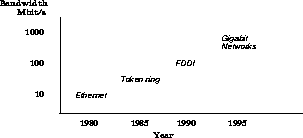
In the past fifteen years or so, network speeds have increased by several orders
of magnitude (see Figure
 ).
).
Among the most notable advances in computer networking technology are the following:
ATM - Asynchronous Transfer Mode. ATM is the technique for transport, multiplexing, and switching that provides a high degree of flexibility required by B-ISDN. ATM is a connection-oriented protocol employing fixed-size packets with a 5-byte header and 48 bytes of information.
These advances in high-speed networking promise high throughput with low latency and make it possible to utilize distributed computing for years to come. Consequently, increasing numbers of universities, government and industrial laboratories, and financial firms are turning to distributed computing to solve their computational problems. The objective of PVM is to enable these institutions to use distributed computing efficiently.
Four functions
handle all packet traffic into and out of libpvm.
mroute()
is called by higher-level functions
such as pvm_send() and pvm_recv()
to copy messages into and out of the task.
It establishes any necessary routes before calling mxfer().
mxfer()
polls for messages,
optionally blocking until one is received
or until a specified timeout.
It calls mxinput() to copy
fragments into the task and reassemble messages.
In the generic version of PVM,
mxfer()
uses select() to poll all routes (sockets) in order to find
those ready for input or output.
pvmmctl()
is called by mxinput()
when a control message (Section
)
is received.
Direct routing allows one task to send messages to another through a TCP link, avoiding the overhead of forwarding through the pvmds. It is implemented entirely in libpvm, using the notify and control message facilities. By default, a task routes messages to its pvmd, which forwards them on. If direct routing is enabled (PvmRouteDirect) when a message (addressed to a task) is passed to mroute(), it attempts to create a direct route if one doesn't already exist. The route may be granted or refused by the destination task, or fail (if the task doesn't exist). The message is then passed to mxfer().
Libpvm maintains a protocol control block (struct ttpcb)
for each active or denied connection,
in list ttlist.
The state diagram for a ttpcb is shown in
Figure
.
To request a connection,
mroute()
makes a ttpcb and socket,
then
sends a
TC_CONREQ
control message to the destination via the default route.
At the same time,
it sends a TM_NOTIFY message to the pvmd,
to be notified if the destination task exits,
with closure (message tag)
TC_TASKEXIT.
Then it
puts the ttpcb in
state TTCONWAIT,
and calls
mxfer() in blocking mode repeatedly
until the state changes.
When the destination task enters mxfer() (for example, to receive a message), it receives the TC_CONREQ message. The request is granted if its routing policy (pvmrouteopt != PvmDontRoute) and implementation allow a direct connection, it has resources available, and the protocol version (TDPROTOCOL) in the request matches its own. It makes a ttpcb with state TTGRNWAIT, creates and listens on a socket, and then replies with a TC_CONACK message. If the destination denies the connection, it nacks, also with a TC_CONACK message. The originator receives the TC_CONACK message, and either opens the connection (state = TTOPEN) or marks the route denied (state = TTDENY). Then, mroute() passes the original message to mxfer(), which sends it. Denied connections are cached in order to prevent repeated negotiation.
If the destination doesn't exist, the TC_CONACK message never arrives because the TC_CONREQ message is silently dropped. However, the TC_TASKEXIT message generated by the notify system arrives in its place, and the ttpcb state is set to TTDENY.
This connect scheme also works if both ends try to establish a connection at the same time. They both enter TTCONWAIT, and when they receive each other's TC_CONREQ messages, they go directly to the TTOPEN state.
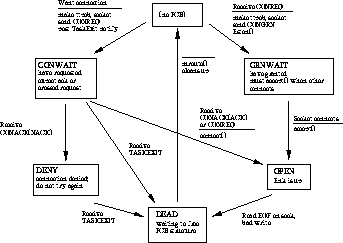
Figure: Task-task connection state diagram
The libpvm function pvm_mcast() sends a message to multiple destinations simultaneously. The current implementation only routes multicast messages through the pvmds. It uses a 1:N fanout to ensure that failure of a host doesn't cause the loss of any messages (other than ones to that host). The packet routing layer of the pvmd cooperates with the libpvm to multicast a message.
To form a multicast address TID (GID)
,
the G bit is set
(refer to Figure
).
The L field is assigned by a counter that is incremented for
each multicast,
so
a new multicast address is used for each message,
then recycled.
To initiate a multicast, the task sends a TM_MCA message to its pvmd, containing a list of recipient TIDs. The pvmd creates a multicast descriptor (struct mca) and GID. It sorts the addresses, removes bogus ones, and duplicates and caches them in the mca. To each destination pvmd (ones with destination tasks), it sends a DM_MCA message with the GID and destinations on that host. The GID is sent back to the task in the TM_MCA reply message.
The task sends the multicast message to the pvmd, addressed to the GID. As each packet arrives, the routing layer copies it to each local task and foreign pvmd. When a multicast packet arrives at a destination pvmd, it is copied to each destination task. Packet order is preserved, so the multicast address and data packets arrive in order at each destination. As it forwards multicast packets, each pvmd eavesdrops on the header flags. When it sees a packet with EOM flag set, it flushes the mca.
Experience seems to indicate that inherited environment (Unix environ) is useful to an application. For example, environment variables can be used to distinguish a group of related tasks or to set debugging variables.
PVM makes increasing use of environment, and may eventually support it even on machines where the concept is not native. For now, it allows a task to export any part of environ to tasks spawned by it. Setting variable PVM_EXPORT to the names of other variables causes them to be exported through spawn. For example, setting
PVM_EXPORT=DISPLAY:SHELLexports the variables DISPLAY and SHELL to children tasks (and PVM_EXPORT too).
The following environment variables are used by PVM. The user may set these:
-----------------------------------------------------------------------
PVM_ROOT        Root installation directory
PVM_EXPORT      Names of environment variables to inherit through spawn
PVM_DPATH       Default slave pvmd install path
PVM_DEBUGGER    Path of debugger script used by spawn
-----------------------------------------------------------------------
The following variables are set by PVM and should not be modified:
-------------------------------------------------------------------
PVM_ARCH        PVM architecture name
PVMSOCK         Address of the pvmd local socket; see Section 7.4.2
PVMEPID         Expected PID of a spawned task
PVMTMASK        Libpvm Trace mask
-------------------------------------------------------------------
Each task spawned through PVM has /dev/null opened for stdin. From its parent, it inherits a stdout sink, which is a (TID, code) pair. Output on stdout or stderr is read by the pvmd through a pipe, packed into PVM messages and sent to the TID, with message tag equal to the code. If the output TID is set to zero (the default for a task with no parent), the messages go to the master pvmd, where they are written on its error log.
Children spawned by a task inherit its stdout sink. Before the spawn, the parent can use pvm_setopt() to alter the output TID or code. This doesn't affect where the output of the parent task itself goes. A task may set output TID to one of three settings: the value inherited from its parent, its own TID, or zero. It can set output code only if output TID is set to its own TID. This means that output can't be assigned to an arbitrary task.
Four types of messages are sent to an stdout sink. The message body formats for each type are as follows:
------------------------------------------------------------
Spawn:     (code) {                  Task has been spawned
                      int tid,       Task id
                      int -1,        Signals spawn
                      int ptid       TID of parent
                  }
Begin:     (code) {                  First output from task
                      int tid,       Task id
                      int -2,        Signals task creation
                      int ptid       TID of parent
                  }
Output:    (code) {                  Output from a task
                      int tid,       Task id
                      int count,     Length of output fragment
                      data[count]    Output fragment
                  }
End:       (code) {                  Last output from a task
                      int tid,       Task id
                      int 0          Signals EOF
                  }
------------------------------------------------------------
The first two items in the message body are always the task id and output count, which allow the receiver to distinguish between different tasks and the four message types. For each task, one message each of types Spawn, Begin, and End is sent, along with zero or more messages of class Output, (count > 0). Classes Begin, Output and End will be received in order, as they originate from the same source (the pvmd of the target task). Class Spawn originates at the (possibly different) pvmd of the parent task, so it can be received in any order relative to the others. The output sink is expected to understand the different types of messages and use them to know when to stop listening for output from a task (EOF) or group of tasks (global EOF).
The messages are designed so as to prevent race conditions
when a task spawns another task,
then immediately exits.
The
output sink might
get the End
message from the parent task
and decide the group is finished,
only to receive more output later from the child task.
According to these rules, the Spawn
message for the second task
must
arrive before
the End message from the first task.
The Begin message itself is necessary because the Spawn
message for a task may arrive after the End message
for the same task.
The state transitions of a task as observed by the receiver of
the output messages
are shown in
Figure
.
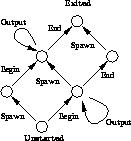
Figure: Output states of a task
The libpvm function pvm_catchout() uses this output collection feature to put the output from children of a task into a file (for example, its own stdout). It sets output TID to its own task id, and the output code to control message TC_OUTPUT. Output from children and grandchildren tasks is collected by the pvmds and sent to the task, where it is received by pvmmctl() and printed by pvmclaimo().
The libpvm library
has a tracing system
that can record the parameters and results of all calls to interface
functions.
Trace data is sent as messages to a trace sink task
just as output is sent to an stdout sink (Section
).
If the trace output TID is set to zero (the default),
tracing is disabled.
Besides the trace sink, tasks also inherit a trace mask, used to enable tracing function-by-function. The mask is passed as a (printable) string in environment variable PVMTMASK. A task can manipulate its own trace mask or the one to be inherited from it. A task's trace mask can also be set asynchronously with a TC_SETTMASK control message.
Constants related to trace messages are defined in public header file pvmtev.h. Trace data from a task is collected in a manner similar to the output redirection discussed above. Like the type Spawn, Begin, and End messages which bracket output from a task, TEV_SPNTASK, TEV_NEWTASK and TEV_ENDTASK trace messages are generated by the pvmds to bracket trace messages.
The tracing system was introduced in version 3.3 and is still expected to change somewhat.
PVM provides a simple but extensible debugging facility. Tasks started by hand could just as easily be run under a debugger, but this procedure is cumbersome for those spawned by an application, since it requires the user to comment out the calls to pvm_spawn() and start tasks manually. If PvmTaskDebug is added to the flags passed to pvm_spawn(), the task is started through a debugger script (a normal shell script), $PVM_ROOT/lib/debugger.
The pvmd passes the name and parameters of the task to the debugger script, which is free to start any sort of debugger. The script provided is very simple. In an xterm window, it runs the correct debugger according to the architecture type of the host. The script can be customized or replaced by the user. The pvmd can be made to execute a different debugger via the bx= host file option or the PVM_DEBUGGER environment variable.
The PVM console is used to manage the virtual machine-to reconfigure it or start and stop processes. In addition, it's an example program that makes use of most of the libpvm functions.
pvm_getfds() and select() are used to check for input from the keyboard and messages from the pvmd simultaneously. Keyboard input is passed to the command interpreter, while messages contain notification (for example, HostAdd) or output from a task.
The console can collect output or trace messages from spawned tasks,
using the redirection mechanisms described
in Section
and Section
,
and
write them to the screen or a file.
It uses the begin and end messages
from child tasks to maintain groups of tasks (or jobs),
related by common ancestors.
Using the PvmHostAdd notify event,
it informs the user when the virtual machine is reconfigured.
Resource limits imposed by the operating system and available hardware are in turn passed to PVM applications. Whenever possible, PVM avoids setting explicit limits; instead, it returns an error when resources are exhausted. Competition between users on the same host or network affects some limits dynamically.
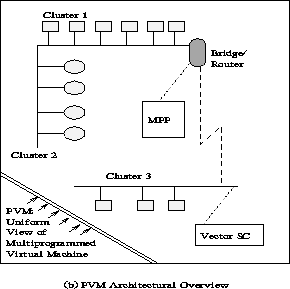
The PVM software provides a unified framework within which parallel programs can be developed in an efficient and straightforward manner using existing hardware. PVM enables a collection of heterogeneous computer systems to be viewed as a single parallel virtual machine. PVM transparently handles all message routing, data conversion, and task scheduling across a network of incompatible computer architectures.
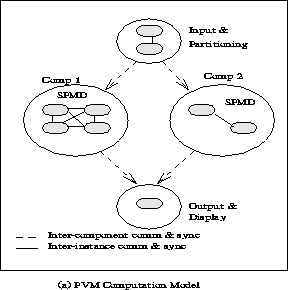
The PVM computing model is simple yet very general, and accommodates a wide variety of application program structures. The programming interface is deliberately straightforward, thus permitting simple program structures to be implemented in an intuitive manner. The user writes his application as a collection of cooperating tasks. Tasks access PVM resources through a library of standard interface routines. These routines allow the initiation and termination of tasks across the network as well as communication and synchronization between tasks. The PVM message-passing primitives are oriented towards heterogeneous operation, involving strongly typed constructs for buffering and transmission. Communication constructs include those for sending and receiving data structures as well as high-level primitives such as broadcast, barrier synchronization, and global sum.
PVM tasks may possess arbitrary control and dependency structures. In other words, at any point in the execution of a concurrent application, any task in existence may start or stop other tasks or add or delete computers from the virtual machine. Any process may communicate and/or synchronize with any other. Any specific control and dependency structure may be implemented under the PVM system by appropriate use of PVM constructs and host language control-flow statements.
Owing to its ubiquitous nature (specifically, the virtual machine concept) and also because of its simple but complete programming interface, the PVM system has gained widespread acceptance in the high-performance scientific computing community.
How many tasks each pvmd can manage is limited by two factors: the number of processes allowed a user by the operating system, and the number of file descriptors available to the pvmd. The limit on processes is generally not an issue, since it doesn't make sense to have a huge number of tasks running on a uniprocessor machine.
Each task consumes one file descriptor in the pvmd, for the pvmd-task TCP stream. Each spawned task (not ones connected anonymously) consumes an extra descriptor, since its output is read through a pipe by the pvmd (closing stdout and stderr in the task would reclaim this slot). A few more file descriptors are always in use by the pvmd for the local and network sockets and error log file. For example, with a limit of 64 open files, a user should be able to have up to 30 tasks running per host.
The pvmd may become a bottleneck if all these tasks try to talk to one another through it.
The pvmd uses dynamically allocated memory to store message packets en route between tasks. Until the receiving task accepts the packets, they accumulate in the pvmd in an FIFO procedure. No flow control is imposed by the pvmd: it will happily store all the packets given to it, until it can't get any more memory. If an application is designed so that tasks can keep sending even when the receiving end is off doing something else and not receiving, the system will eventually run out of memory .
As with the pvmd, a task may have a limit on the number of others it can connect to directly. Each direct route to a task has a separate TCP connection (which is bidirectional), and so consumes a file descriptor. Thus, with a limit of 64 open files, a task can establish direct routes to about 60 other tasks. Note that this limit is in effect only when using task-task direct routing. Messages routed via the pvmds use only the default pvmd-task connection.
The maximum size of a PVM message is limited by the amount of memory available to the task. Because messages are generally packed using data existing elsewhere in memory, and they must be reside in memory between being packed and sent, the largest possible message a task can send should be somewhat less than half the available memory. Note that as a message is sent, memory for packet buffers is allocated by the pvmd, aggravating the situation. In-place message encoding alleviates this problem somewhat, because the data is not copied into message buffers in the sender. However, on the receiving end, the entire message is downloaded into the task before the receive call accepts it, possibly leaving no room to unpack it.
In a similar vein, if many tasks send to a single destination all at once, the destination task or pvmd may be overloaded as it tries to store the messages. Keeping messages from being freed when new ones are received by using pvm_setrbuf() also uses up memory.
These problems can sometimes be avoided by rearranging the application code, for example, to use smaller messages, eliminate bottlenecks, and process messages in the order in which they are generated.
Developed initially as a parallel programming environment for Unix workstations, PVM has gained wide acceptance and become a de facto standard for message-passing programming. Users want the same programming environment on multiprocessor computers so they can move their applications onto these systems. A common interface would also allow users to write vendor-independent programs for parallel computers and to do part or most of the development work on workstations, freeing up the multiprocessor supercomputers for production runs.
With PVM, multiprocessor systems can be included in the same configuration with workstations. For example, a PVM task running on a graphics workstation can display the results of computations carried out on a massively parallel processing supercomputer. Shared-memory computers with a small number of processors can be linked to deliver supercomputer performance.
The virtual machine hides the configuration details from the programmer. The physical processors can be a network of workstations, or they can be the nodes of a multicomputer. The programmer doesn't have to know how the tasks are created or where they are running; it is the responsibility of PVM to schedule user's tasks onto individual processors. The user can, however, tune the program for a specific configuration to achieve maximum performance, at the expense of its portability.
Multiprocessor systems can be divided into two main categories: message passing and shared memory. In the first category, PVM is now supported on Intel's iPSC/860 and Paragon , as well as Thinking Machine's CM-5 . Porting PVM to these platforms is straightforward, because the message-passing functions in PVM map quite naturally onto the native system calls. The difficult part is the loading and management of tasks. In the second category, message passing can be done by placing the message buffers in shared memory. Access to these buffers must be synchronized with mutual exclusion locks. PVM 3.3 shared memory ports include SGI multiprocessor machines running IRIX 5.x and Sun Microsystems, Inc., multiprocessor machines running Solaris 2.3 (This port also runs on the Cray Research, Inc., CS6400 ). In addition, CRAY and DEC have created PVM ports for their T3D and DEC 2100 shared memory multiprocessors, respectively.

Figure:
PVM daemon and tasks on MPP host
A typical MPP system has one or more service nodes for user logins and a large number of compute nodes for number crunching. The PVM daemon runs on one of the service nodes and serves as the gateway to the outside world. A task can be started on any one of the service nodes as a Unix process and enrolls in PVM by establishing a TCP socket connection to the daemon. The only way to start PVM tasks on the compute nodes is via pvm_spawn(). When the daemon receives a request to spawn new tasks, it will allocate a set of nodes if necessary, and load the executable onto the specified number of nodes.
The way PVM allocates nodes is system dependent. On the CM-5, the entire partition is allocated to the user. On the iPSC/860, PVM will get a subcube big enough to accommodate all the tasks to be spawned. Tasks created with two separate calls to pvm_spawn() will reside in different subcubes, although they can exchange messages directly by using the physical node address. The NX operating system limits the number of active subcubes system-wide to 10. Pvm_spawn will fail when this limit is reached or when there are not enough nodes available. In the case of the Paragon, PVM uses the default partition unless a different one is specified when pvmd is invoked. Pvmd and the spawned tasks form one giant parallel application. The user can set the appropriate NX environment variables such as NX_DFLT_SIZE before starting PVM, or he can specify the equivalent command-line arguments to pvmd (i.e., pvmd -sz 32).

Figure:
Packing: breaking data into fixed-size fragments
PVM message-passing functions are implemented in terms of
the native send and receive system calls.
The ``address" of a task is encoded in the task id, as illustrated
in Figure
.

Figure: How TID is used to distinguish tasks on MPP
This enables the messages to be sent directly to the target task, without any help from the daemon. The node number is normally the logical node number, but the physical address is used on the iPSC/860 to allow for direct intercube communication. The instance number is used to distinguish tasks running on the same node.

Figure:
Buffering: buffering one fragment by receiving
task until pvm_recv() is called
PVM normally uses asynchronous send primitives to send
messages.
The operating system can run out of
message handles very quickly if a lot of small messages or several
large messages are sent at once.
PVM will be forced to switch to synchronous send when there are no more
message handles left or when the system buffer gets filled up.
To improve performance, a task
should call pvm_send() as soon as the data becomes available,
so (one hopes) when the other task calls pvm_recv(), the message will
already be in its buffer. PVM buffers one incoming packet between
calls to pvm_send()/pvm_recv(). A large message,
however, is broken up into
many fixed-size fragments during packing, and each piece is sent
separately.
Buffering one of these fragments
is not sufficient unless pvm_send() and pvm_recv() are synchronized.
Figures
and
illustrate this process.
The front end of an MPP system is treated as a regular workstation. Programs to be run there should be linked with the regular PVM library, which relies on Unix sockets to transmit messages. Normally one should avoid running processes on the front end, because communication between those processes and the node processes must go through the PVM daemon and a TCP socket link. Most of the computation and communication should take place on the compute nodes in order to take advantage of the processing power of these nodes and the fast interconnects between them.
Since the PVM library for the front end is different from the one for the nodes, the executable for the front end must be different from the one compiled for the nodes. An SPMD program, for example, has only one source file, but the object code must be linked with the front end and node PVM libraries separately to produce two executables if it is to be started from the front end. An alternative would be a ``hostless" SPMD program , which could be spawned from the PVM console.
Table
shows the native system calls used by the corresponding
PVM functions on various platforms.

Table: Implementation of PVM system calls
The CM-5 is somewhat different from the Intel systems because it requires a special host process for each group of tasks spawned. This process enrolls in PVM and relays messages between pvmd and the node programs. This, needless to say, adds even more overhead to daemon-task communications.
Another restrictive feature of the CM-5 is that all nodes in the same partition are scheduled as a single unit. The partitions are normally configured by the system manager and each partition must contain at least 16 processors. User programs are run on the entire partition by default. Although it is possible to idle some of the processors in a partition, as PVM does when fewer nodes are called for, there is no easy way to harness the power of the idle processors. Thus, if PVM spawns two groups of tasks, they will time-share the partition, and any intergroup traffic must go through pvmd.
Additionally, CMMD has no support for multicasting. Thus, pvm_mcast() is implemented with a loop of CMMD_async_send().
The shared-memory architecture provides a very efficient medium for processes to exchange data. In our implementation, each task owns a shared buffer created with the shmget() system call. The task id is used as the ``key" to the shared segment. If the key is being used by another user, PVM will assign a different id to the task. A task communicates with other tasks by mapping their message buffers into its own memory space.
To enroll in PVM, the task first writes its Unix process id into
pvmd's incoming box. It then looks for the assigned task id in
pvmd's pid TID table.
The message buffer is divided into pages, each of which holds one fragment
(Figure
).
PVM's page size can be a multiple of the system page size.
Each page has a header, which contains the lock and
the reference count.
The first few pages are used as the incoming box, while the rest of the pages
hold outgoing fragments (Figure
). To send a message,
the task first packs the
message body into its buffer, then delivers the message header (which
contains the sender's TID and the location of the data) to the incoming
box of the intended recipient. When pvm_recv() is called, PVM checks
the incoming box, locates and unpacks the messages (if any), and
decreases the reference count so the space can be reused. If a task
is not able to deliver the header directly because the receiving box
is full, it will block until the other task is ready.

Figure:
Structure of a PVM page

Figure:
Structures of shared message buffers
Inevitably some overhead will be incurred when a message is packed into and unpacked from the buffer, as is the case with all other PVM implementations. If the buffer is full, then the data must first be copied into a temporary buffer in the process's private space and later transferred to the shared buffer.
Memory contention is usually not a problem. Each process has its own buffer, and each page of the buffer has its own lock. Only the page being written to is locked, and no process should be trying to read from this page because the header has not been sent out. Different processes can read from the same page without interfering with each other, so multicasting will be efficient (they do have to decrease the counter afterwards, resulting in some contention). The only time contention occurs is when two or more processes trying to deliver the message header to the same process at the same time. But since the header is very short (16 bytes), such contention should not cause any significant delay.
To minimize the possibility of page faults, PVM attempts to use only a small number of pages in the message buffer and recycle them as soon as they have been read by all intended recipients.
Once a task's buffer has been mapped, it will not be unmapped unless the system limits the number of mapped segments. This strategy saves time for any subsequent message exchanges with the same process.
In the original implementation, all user messages are buffered by PVM. The user must pack the data into a PVM buffer before sending it, and unpack the data after it has been received into an internal buffer. This approach works well on systems with relatively high communication latency, such as the Ethernet. On MPP systems the packing and unpacking introduce substantial overhead. To solve this problem we added two new PVM functions, namely pvm_psend() and pvm_precv(). These functions combine packing/unpacking and sending/receiving into one single step. They could be mapped directly into the native message passing primitives available on the system, doing away with internal buffers altogether. On the Paragon these new functions give almost the same performance as the native ones.
Although the user can use both pvm_psend() and pvm_send() in the same program, on MPP the pvm_psend() must be matched with pvm_precv(), and pvm_send() with pvm_recv().
Several research groups have developed software packages that like PVM assist programmers in using distributed computing. Among the most well known efforts are P4 [1], Express [], MPI [], and Linda []. Various other systems with similar capabilities are also in existence; a reasonably comprehensive listing may be found in [13].
It is often useful and always reassuring to be able to see the present configuration of the virtual machine and the status of the hosts. It would be even more useful if the user could also see what his program is doing-what tasks are running, where messages are being sent, etc. The PVM GUI called XPVM was developed to display this information, and more.
XPVM combines the capabilities of the PVM console, a performance monitor, and a call-level debugger into a single, easy-to-use X-Windows interface. XPVM is available from netlib in the directory pvm3/xpvm. It is distributed as precompiled, ready-to-run executables for SUN4, RS6K, ALPHA, SUN4SOL2, HPPA, and SGI5. The XPVM source is also available for compiling on other machines.
XPVM is written entirely in C using the TCL/TK [8] toolkit and runs just like another PVM task. If a user wishes to build XPVM from the source, he must first obtain and install the TCL/TK software on his system. TCL and TK were developed by John Ousterhout at Berkeley and can be obtained by anonymous ftp to sprite.berkeley.edu The TCL and XPVM source distributions each contain a README file that describes the most up-to-date installation procedure for each package respectively.
Figure
shows a snapshot of XPVM in use.
Figure: XPVM interface - snapshot during use
- figure not available -
Like the PVM console, XPVM will start PVM if PVM is not already running, or will attach to the local pvmd if it is. The console can take an optional hostfile argument whereas XPVM always reads $HOME/.xpvm_hosts as its hostfile. If this file does not exist, then XPVM just starts PVM on the local host (or attaches to the existing PVM). In typical use, the hostfile .xpvm_hosts contains a list of hosts prepended with an &. These hostnames then get added to the Hosts menu for addition and deletion from the virtual machine by clicking on them.
The top row of buttons perform console-like functions. The Hosts button displays a menu of hosts. Clicking on a host toggles whether it is added or deleted from the virtual machine. At the bottom of the menu is an option for adding a host not listed. The Tasks button brings up a menu whose most-used selection is spawn. Selecting spawn brings up a window where one can set the executable name, spawn flags, start position, number of copies to start, etc. By default, XPVM turns on tracing in all tasks (and their children) started inside XPVM. Clicking on Start in the spawn window starts the task, which will then appear in the space-time view. The Reset button has a menu for resetting PVM (i.e., kill all PVM tasks) or resetting different parts of XPVM. The Quit button exits XPVM while leaving PVM running. If XPVM is being used to collect trace information, the information will not be collected if XPVM is stopped. The Halt button is used when one is through with PVM. Clicking on this button kills all running PVM tasks, shuts down PVM cleanly, and exits the XPVM interface. The Help button brings up a menu of topics the user can get help about.
During startup, XPVM joins a group called xpvm. The intention is that tasks started outside the XPVM interface can get the TID of XPVM by doing tid = pvm_gettid( xpvm, 0 ). This TID would be needed if the user wanted to manually turn on tracing inside such a task and pass the events back to XPVM for display. The expected TraceCode for these events is 666.
While an application is running, XPVM collects and displays the information in real time. Although XPVM updates the views as fast as it can, there are cases when XPVM cannot keep up with the events and it falls behind the actual run time.
In the middle of the XPVM interface are tracefile controls. It is here that the user can specify a tracefile-a default tracefile in /tmp is initially displayed. There are buttons to specify whether the specified tracefile is to be played back or overwritten by a new run. XPVM saves trace events in a file using the ``self defining data format'' (SDDF) described in Dan Reed's Pablo [11] trace playing package. The analysis of PVM traces can be carried out on any of a number of systems such as Pablo.
XPVM can play back its own SDDF files. The tape-player-like buttons allow the user to rewind the tracefile, stop the display at any point, and step through the execution. A time display specifies the number of seconds from when the trace display began.
The Views button allows the user to open or close any of several views presently supplied with XPVM. These views are described below.
The Network view displays the present virtual machine configuration and the activity of the hosts. Each host is represented by an icon that includes the PVM_ARCH and host name inside the icon. In the initial release of XPVM, the icons are arranged arbitrarily on both sides of a bus network. In future releases the view will be extended to visualize network activity as well. At that time the user will be able to specify the network topology to display.
These icons are illuminated in different colors to indicate their status in executing PVM tasks. Green implies that at least one task on that host is busy executing useful work. Yellow indicates that no tasks are executing user computation, but at least one task is busy executing PVM system routines. When there are no tasks on a given host, its icon is left uncolored or white. The specific colors used in each case are user customizable.
The user can tell at a glance how well the virtual machine is being utilized by his PVM application. If all the hosts are green most of the time, then machine utilization is good. The Network view does not display activity from other users' PVM jobs or other processes that may be running on the hosts.
In future releases the view will allow the user to click on a multiprocessor icon and get information about the number of processors, number of PVM tasks, etc., that are running on the host.
The Space-Time view displays the activities of individual PVM tasks that are running on the virtual machine. Listed on the left-hand side of the view are the executable names of the tasks, preceded by the host they are running on. The task list is sorted by host so that it is easy to see whether tasks are being clumped on one host. This list also shows the task-to-host mappings (which are not available in the Network view).
The Space-Time view combines three different displays. The first is like a Gantt chart . Beside each listed task is a horizontal bar stretching out in the ``time'' direction. The color of this bar at any time indicates the state of the task. Green indicates that user computations are being executed. Yellow marks the times when the task is executing PVM routines. White indicates when a task is waiting for messages. The bar begins at the time when the task starts executing and ends when the task exits normally. The specific colors used in each case are user customizable.
The second display overlays the first display with the communication activity among tasks. When a message is sent between two tasks, a red line is drawn starting at the sending task's bar at the time the message is sent and ending at the receiving task's bar when the message is received. Note that this is not necessarily the time the message arrived, but rather the time the task returns from pvm_recv(). Visually, the patterns and slopes of the red lines combined with white ``waiting'' regions reveal a lot about the communication efficiency of an application.
The third display appears only when a user clicks on interesting features of the Space-Time view with the left mouse button. A small ``pop-up'' window appears giving detailed information regarding specific task states or messages. If a task bar is clicked on, the state begin and end times are displayed, along with the last PVM system call information. If a message line is clicked on, the window displays the send and receive time as well as the number of bytes in the message and the message tag.
When the mouse is moved inside the Space-Time view, a blue vertical line tracks the cursor and the time corresponding to this vertical line is displayed as Query time at the bottom of the display. This vertical line also appears in the other ``something vs. time'' views so the user can correlate a feature in one view with information given in another view.
The user can zoom into any area of the Space-Time view by dragging the vertical line with the middle mouse button. The view will unzoom back one level when the right mouse button is clicked. It is often the case that very fine communication or waiting states are only visible when the view is magnified with the zoom feature. As with the Query time, the other views also zoom along with the Space-Time view.
XPVM is designed to be extensible. New views can be created and added to the Views menu. At present, there are three other views: task utilization vs. time view, call trace view, and task output view. Unlike the Network and Space-Time views, these views are closed by default. XPVM attempts to draw the views in real time; hence, the fewer open views, the faster XPVM can draw.
The Utilization view shows the number of tasks computing, in overhead, or waiting for each instant. It is a summary of the Space-Time view for each instant. Since the number of tasks in a PVM application can change dynamically, the scale on the Utilization view will change dynamically when tasks are added, but not when they exit. When the number of tasks changes, the displayed portion of the Utilization view is completely redrawn to the new scale.
The Call Trace view provides a textual record of the last PVM call made in each task. The list of tasks is the same as in the Space-Time view. As an application runs, the text changes to reflect the most recent activity in each task. This view is useful as a call level debugger to identify where a PVM program's execution hangs.
Unlike the PVM console, XPVM has no natural place for task output to be printed. Nor is there a flag in XPVM to tell tasks to redirect their standard output back to XPVM. This flag is turned on automatically in all tasks spawned by XPVM after the Task Output view is opened. This view gives the user the option to also redirect the output into a file. If the user types a file name in the ``Task Output'' box, then the output is printed in the window and into the file.
As with the trace events, a task started outside XPVM can be programmed to send standard output to XPVM for display by using the options in pvm_setopt(). XPVM expects the OutputCode to be set to 667.
PVM has been ported to three distinct classes of architecture:
Porting PVM to non-Unix operating systems can be very difficult. Nonetheless, groups outside the PVM team have developed PVM ports for DEC's VMS and IBM's OS/2 operating systems. Such ports can require extensive rewriting of the source and are not described here.
PVM is supported on most Unix platforms. If an architecture is not listed in the file $PVM_ROOT/docs/arches, the following description should help you to create a new PVM port. Anything from a small amount of tweaking to major surgery may be required, depending on how accomodating your version of Unix is.
The PVM source directories are organized in the following manner: Files in src form the core for PVM (pvmd and libpvm); files in console are for the PVM console, which is just a special task; source for the FORTRAN interface and group functions are in the libfpvm and pvmgs directories, respectively.
In each of the source directories, the file Makefile.aimk is the generic makefile for all uniprocessor platforms. System-specific definitions are kept in the conf directory under $(PVM_ARCH).def. The script lib/aimk, invoked by the top-level makefile, determines the value of PVM_ARCH, then chooses the appropriate makefile for a particular architecture. It first looks in the PVM_ARCH subdirectory for a makefile; if none is found, the generic one is used. The custom information stored in the conf directory is prepended to the head of the chosen makefile, and the build begins. The generic makefiles for MPP and shared-memory systems are Makefile.mimd and Makefile.shmem, respectively. System-specific rules are kept in the makefile under the PVM_ARCH subdirectory.
The steps to create a new architecture (for example ARCH) are:
Compiler macros imported from conf/ARCH.def are listed at the top of the file named src/Makefile.aimk. They enable options that are common to several machines and so generally useful. New ones are added occasionally. The macro IMA_ARCH can be used to enable code that only applies to a single architecture. The ones most commonly used are:
ARCH.m4 is a file of commands for the m4 macro processor, that edits the libfpvm C source code to conform to FORTRAN calling conventions, which vary from machine to machine. The two main things you must determine about your FORTRAN are: 1. How FORTRAN subroutine names are converted to linker symbols. Some systems append an underscore to the name; others convert to all capital letters. 2. How strings are passed in FORTRAN - One common method is to pass the address in a char*, and pass corresponding lengths after all remaining parameters. The easiest way to discover the correct choices may be to try every common case (approximately three) for each. First, get the function names right, then make sure you can pass string data to FORTRAN tasks.
Porting to MPP systems is more difficult because most of them do not offer a standard Unix environment on the nodes. We discuss some of these limitations below.
Processes running on the nodes of an Intel iPSC/860 have no Unix process id's and they cannot receive Unix signals. There is a similar problem for the Thinking Machine's CM-5 .
If a node process forks, the behavior of the new process is machine dependent. In any event it would not be allowed to become a new PVM task. In general, processes on the nodes are not allowed to enroll unless they were spawned by PVM.
By default, pvm_spawn() starts tasks on the (compute) nodes. To spawn multiple copies of the same executable, the programmer should call pvm_spawn() once and specify the number of copies.
On some machines (e.g., iPSC/860), only one process is allowed on each node, so the total number of PVM tasks on these machines cannot exceed the number of nodes available.
Several functions serve as the multiprocessor ``interface" for PVM. They are called by pvmd to spawn new tasks and to communicate with them. The implementation of these functions is system dependent; the source code is kept in the src/PVM_ARCH/pvmdmimd.c (message passing) or src/PVM_ARCH/pvmdshmem.c (shared memory). We give a brief description of each of these functions below. Note that pvmdmimd.c can be found in the subdirectory PVM_ARCH because MPP platforms are very different from one another, even those from the same vendor.
void mpp_init(int argc, char **argv);
    Initialization. Called once when PVM is started. Arguments argc and argv
    are passed from pvmd main().
int mpp_load(int flags, char *name, char *argv, int count, int *tids, int ptid);
    Create partition if necessary. Load executable onto nodes; create new
    entries in task table, encode node number and process type into task IDs.
    flags:  exec options;
    name:   executable to be loaded;
    argv:   command line argument for executable;
    count:  number of tasks to be created;
    tids:   array to store new task IDs;
    ptid:   parent task ID.
void mpp_output(struct task *tp, struct pkt *pp);
    Send all pending packets to nodes via native send. Node number and process
    type are extracted from task ID.
    tp: destination task;
    pp: packet.
int mpp_mcast(struct pkt pp, int *tids, int ntask);
    Global send.
    pp:     packet;
    tids:   list of destination task IDs;
    ntask:  how many.
int mpp_probe();
    Probe for pending packets from nodes (non-blocking). Returns 1 if packets
    are found, otherwise 0.
void mpp_input();
    Receive pending packets (from nodes) via native receive.
void mpp_free(int tid)
    Remove node/process-type from active list.
    tid: task ID.
In addition to these functions, the message exchange routine in libpvm, mroute(), must also be implemented in the most efficient native message-passing primitives. The following macros are defined in src/pvmmimd.h:
ASYNCRECV(buf,len)
    Non-blocking receive. Returns immediately with a message handle.
    buf: (char *), buffer to place the data;
    len: (int), size of buffer in bytes.
ASYNCSEND(tag,buf,len,dest,ptype)
    Non-blocking send. Returns immediately with a message handle.
    tag: (int), message tag;
    buf: (char *), location of data;
    len: (int), size of data in bytes;
    dest: (long), address of destination node;
    ptype: instance number of destination task.
ASYNCWAIT(mid)
    Blocks until operation associated with mid has completed.
    mid: message handle (its type is system-dependent).
ASYNCDONE(mid)
    Returns 1 if operation associated with mid has completed, and 0 otherwise.
    mid: message handle (its type is system-dependent).
MSGSIZE(mid)
    Returns size of message most recently arrived.
    mid: message handle (its type is system-dependent).
MSGSENDER(mid)
    Returns node number of the sender of most recently received message.
    mid: message handle (its type is system-dependent).
PVMCRECV(tag,buf,len)
    Blocks until message has been received into buffer.
    tag: (int), expected message tag;
    buf: (char *), buffer to place the data;
    len: (int), size of buffer in bytes;
PVMCSEND(tag,buf,len,dest,ptype)
    Blocks until send operation is complete and buffer can be reused.
    Non-blocking send. Returns immediately with a message handle.
    tag: (int), message tag;
    buf: (char *), location of data;
    len: (int), size of data in bytes;
    dest: (long), address of destination node;
    ptype: instance number of destination task.
These functions are used by mroute() on MPP systems. The source code for mroute for multiprocessors is in src/lpvmmimd.c or src/lpvmshmem.c depending on the class.
For shared-memory implementations, the following macros are defined in
the file
src/pvmshmem.h:
PAGEINITLOCK(lp)
    Initialize the lock pointed to by lp.
PAGELOCK(lp)
    Locks the lock pointed to by lp.
PAGEUNLOCK(lp)
    Unlocks the lock pointed to by lp.
In addition, the file pvmshmem.c contains routines used by both pvmd
and libpvm.
This chapter attempts to answer some of the most common questions encountered by users when installing PVM and running PVM programs. It also covers debugging the system itself, which is sometimes necessary when doing new ports or trying to determine whether an application or PVM is at fault. The material here is mainly taken from other sections of the book, and rearranged to make answers easier to find. As always, RTFM pages first. Printed material always lags behind reality, while the online documentation is kept up-to-date with each release. The newsgroup comp.parallel.pvm is available to post questions and discussions.
If you find a problem with PVM, please tell us about it. A bug report form is included with the distribution in $PVM_ROOT/doc/bugreport. Please use this form or include equivalent information.
Some of the information in this chapter applies only to the generic
Unix implementation of PVM,
or describes features more volatile than the standard documented ones.
It is presented here to aid with debugging,
and tagged with a  to warn you of its nature.
Examples of shell scripts are for either C-shell (csh, tcsh) or Bourne shell (sh, ksh). If you use some other shell, you may need to modify them somewhat, or use csh while troubleshooting.
You can get a copy of PVM for your own use or share an already-installed copy with other users. The installation process for either case more or less the same.
Make certain you have environment variable PVM_ROOT set (and exported, if applicable) to directory where PVM is installed before you do anything else. This directory is where the system executables and libraries reside. Your application executables go in a private directory, by default $HOME/pvm3/bin/$PVM_ARCH. If PVM is already installed at your site you can share it by setting PVM_ROOT to that path, for example /usr/local/pvm3. If you have your own copy, you could install it in $HOME/pvm3.
If you normally use csh, add a line like this to your .cshrc file: setenv PVM_ROOT $HOME/pvm3
If you normally use sh, add these lines to your .profile: PVM_ROOT=$HOME/pvm3 PVM_DPATH=$HOME/pvm3/lib/pvmd export PVM_ROOT PVM_DPATH
Make sure these are set in your current session too.
Older versions of PVM assumed an installation path of $HOME/pvm3. Versions 3.3 and later require that the PVM_ROOT variable always be set. Note: For compatibility with older versions of PVM and some command shells that don't execute a startup file, newer versions guess $HOME/pvm3 if it's not set, but you shouldn't depend on that.
On-line manual pages compatible with most Unix machines are shipped with the source distribution. These reside in $PVM_ROOT/man and can be copied to some other place (for example /usr/local/man or used in-place. If the man program on your machine uses the MANPATH environment variable, try adding something like the following near the end of your .cshrc or .login file:
    if (! $?MANPATH) setenv MANPATH /usr/man:/usr/local/man
    setenv MANPATH ${MANPATH}:$PVM_ROOT/man
Then you should be able to read both normal system man pages and PVM man pages by simply typing man subject.
The following commands download, unpack, build and install a release:

The compiler may print a few warning messages; we suggest you ignore these unless the build doesn't complete or until you have some other reason to think there is a problem. If you can't build the unmodified distribution ``out of the box'' on a supported architecture, let us know.
P4 [1] is a library of macros and subroutines developed at Argonne National Laboratory for programming a variety of parallel machines. The p4 system supports both the shared-memory model (based on monitors) and the distributed-memory model (using message-passing). For the shared-memory model of parallel computation, p4 provides a set of useful monitors as well as a set of primitives from which monitors can be constructed. For the distributed-memory model, p4 provides typed send and receive operations and creation of processes according to a text file describing group and process structure.
Process management in the p4 system is based on a configuration file that specifies the host pool, the object file to be executed on each machine, the number of processes to be started on each host (intended primarily for multiprocessor systems), and other auxiliary information. An example of a configuration file is
    # start one slave on each of sun2 and sun3
    local 0
    sun2  1  /home/mylogin/p4pgms/sr_test
    sun3  1  /home/mylogin/p4pgms/sr_test
Two issues are noteworthy in regard to the process management mechanism in p4. First, there is the notion a ``master'' process and ``slave'' processes, and multilevel hierarchies may be formed to implement what is termed a cluster model of computation. Second, the primary mode of process creation is static, via the configuration file; dynamic process creation is possible only by a statically created process that must invoke a special o4 function that spawns a new process on the local machine. Despite these restrictions, a variety of application paradigms may be implemented in the p4 system in a fairly straightforward manner.
Message passing in the p4 system is achieved through the use of traditional send and recv primitives, parameterized almost exactly as other message-passing systems. Several variants are provided for semantics, such as heterogeneous exchange and blocking or nonblocking transfer. A significant proportion of the burden of buffer allocation and management, however, is left to the user. Apart from basic message passing, p4 also offers a variety of global operations, including broadcast, global maxima and minima, and barrier synchronization.
The protocols used in building PVM are evolving, with the result that newer releases are not compatible with older ones. Compatibility is determined by the pvmd-task and task-task protocol revision numbers. These are compared when two PVM entities connect; they will refuse to interoperate if the numbers don't match. The protocol numbers are defined in src/ddpro.h and src/tdpro.h (DDPROTOCOL, TDPROTOCOL).
As a general rule, PVM releases with the same second digit in their version numbers (for example 3.2.0 and 3.2.6) will interoperate. Changes that result in incompatibility are held until a major version change (for example, from 3.2 to 3.3).
To get PVM running, you must start either a pvmd or the PVM console by hand. The executables are named pvmd3 and pvm, respectively, and reside in directory $PVM_ROOT/lib/ $PVM_ARCH. We suggest using the pvmd or pvm script in $PVM_ROOT/lib instead, as this simplifies setting your shell path. These scripts determine the host architecture and run the correct executable, passing on their command line arguments.
Problems when starting PVM can be caused by system or network trouble, running out of resources (such as disk space), incorrect installation or a bug in the PVM code.
The pvmd writes errors on both its standard error stream (only until it is fully started) and a log file, named /tmp/pvml.uid. uid is your numeric user id (generally the number in the third colon-separated field of your passwd entry). If PVM was built with the SHAREDTMP option (used when a cluster of machines shares a /tmp directory), the log file will instead be named /tmp/pvml.uid.hostname.
If you have trouble getting PVM started, always check the log file for hints about what went wrong. If more than one host is involved, check the log file on each host. For example, when adding a new host to a virtual machine, check the log files on the master host and the new host.
Try the following command to get your uid:
    (grep `whoami` /etc/passwd || ypmatch `whoami` passwd) \
      | awk -F: '{print $3;exit}'
The pvmd publishes the address of the socket to which local tasks connect
in a file named
/tmp/pvmd.uid.
uid is your numeric user id
(generally in the third field of your passwd entry).
If PVM was built with the SHAREDTMP option
(used when a cluster of machines shares a /tmp directory),
the file will be named /tmp/pvmd.uid.hostname.
See §
for more information on how
this file is used.
The pvmd creates the socket address file while starting up, and removes it while shutting down. If while starting up, it finds the file already exists, it prints an error message and exits. If the pvmd can't create the file because the permissions of /tmp are set incorrectly or the filesystem is full, it won't be able to start up.
If the pvmd is killed with un uncatchable signal or other catastrophic event such as a (Unix) machine crash, you must remove the socket address file before another pvmd will start on that host.
Note that if the pvmd is compiled with option OVERLOADHOST, it will start up even if the address file already exists (creating it if it doesn't). It doesn't consider the existence of the address file an error. This allows disjoint virtual machines owned by the same user to use overlapping sets of hosts. Tasks not spawned by PVM can only connect to the first pvmd running on an overloaded host, however, unless they can somehow guess the correct socket address of one of the other pvmds.
PVM is normally started by invoking the console program,
which starts a pvmd if one is not already running and connects to it.
The syntax for starting a PVM console is:
pvm [-ddebugmask] [-nhostname] [hostfile]
If the console can't start the pvmd for some reason, you may see one of the following error messages. Check the pvmd log file for error messages. The most common ones are described below.
Can't start pvmd - This message means that the console either can't find the pvmd executable or the pvmd is having trouble starting up. If the pvmd complains that it can't bind a socket, perhaps the host name set for the machine does not resolve to an IP address of one of its interfaces, or that interface is down. The console/pvmd option -nname can be used to change the default.
Can't contact local daemon - If a previously running pvmd crashed, leaving behind its socket address file, the console may print this message. The pvmd will log error message pvmd already running?. Find and delete the address file.
Version mismatch - The console (libpvm) and pvmd protocol revision numbers don't match. The protocol has a revision number so that incompatible versions won't attempt to interoperate. Note that having different protocol revisions doesn't necessarily cause this message to be printed; instead the connecting side may simply hang.
It is necessary to start the master pvmd by hand if you will use the so=pw or so=ms options in the host file or when adding hosts. These options require direct interaction with the pvmd when adding a host. If the pvmd is started by the console, or otherwise backgrounded, it will not be able to read passwords from a TTY.
The syntax to start the master pvmd by hand is:
$PVM_ROOT/lib/pvmd [-ddebugmask] [-nhostname] [hostfile]
If you start a PVM console or application, use another window. When the pvmd finishes starting up, it prints out a line like either: 80a95ee4:0a9a or /tmp/aaa026175. If it can't start up, you may not see an error message, depending on whether the problem occurs before or after the pvmd stops logging to its standard error output. Check the pvmd log file for a complete record.
This section also applies to hosts started via a host file, because the same mechanism is used in both cases. The master pvmd starts up, reads the host file, then sends itself a request to add more hosts. The PVM console (or an application) can return an error when adding hosts to the virtual machine. Check the pvmd log file on the master host and the failing host for additional clues to what went wrong.
No such host - The master pvmd couldn't resolve the the host name (or name given in ip= option) to an IP address. Make sure you have the correct host name.
Can't start pvmd - This message means that the master pvmd failed to start the slave pvmd process. This can be caused by incorrect installation, network or permission problems. The master pvmd must be able to resolve the host name (get its IP address) and route packets to it. The pvmd executable and shell script to start it must be installed in the correct location. You must avoid printing anything in your .cshrc (or equivalent) script, because it will confuse the pvmd communication. If you must print something, either move it to your .login file or enclose it in a conditional:
    if ( { tty -s } && $?prompt ) then
        echo terminal type is $TERM
        stty erase '^?' kill '^u' intr '^c' echo
    endif
To test all the above, try running the following command by hand on the master host: rsh host $PVM_ROOT/lib/pvmd -s
where host is the name of the slave host you want to test. You should see a message similar to the following from the slave pvmd and nothing else:
    [pvmd pid12360] slave_config: bad args
    [pvmd pid12360] pvmbailout(0)
Version mismatch - This message indicates that the protocol revisions of the master and slave pvmd are incompatible. You must install the same (or compatible) versions everywhere.
Duplicate host -
This message means that PVM thinks there is another pvmd (owned by
the same user)
already running on the host.
If you're not already using the host in the
current virtual machine or a different one,
the socket address file (§
) must be
left over from a previous run.
Find and delete it.
A host file may be supplied to the pvmd (or console, which passes it to the pvmd) as a command-line parameter. Each line of the file contains a host name followed by option parameters. Hosts not preceded by '&' are started automatically as soon as the master pvmd is ready. The syntax:
* option option ...changes the default parameters for subsequent hosts (both those in the host file and those added later). Default statements are not cumulative; each applies to the system defaults. For example, after the following two host file entries:
        * dx=pvm3/lib/pvmd
        * ep=/bin:/usr/bin:pvm3/bin/$PVM_ARCH
only ep is changed from its system default
(dx is reset by the second line).
To set multiple defaults,
combine them into a single line.
The preferred way to shut down a virtual machine is to type halt at the PVM console, or to call libpvm function pvm_halt(). When shutting PVM down from the console, you may see an error message such as EOF on pvmd sock. This is normal and can be ignored.
You can instead kill the pvmd process; it will shut down, killing any local tasks with SIGTERM. If you kill a slave pvmd, it will be deleted from the virtual machine. If you kill the master pvmd, the slaves will all exit too. Always kill the pvmd with a catchable signal, for example SIGTERM. If you kill it with SIGKILL, it won't be able to clean up after itself, and you'll have to do that by hand.
In contrast to the other parallel processing systems described in this section, Express [] toolkit is a collection of tools that individually address various aspects of concurrent computation. The toolkit is developed and marketed commercially by ParaSoft Corporation, a company that was started by some members of the Caltech concurrent computation project.
The philosophy behind computing with Express is based on beginning with a sequential version of an application and following a recommended development life cycle culminating in a parallel version that is tuned for optimality. Typical development cycles begin with the use of VTOOL, a graphical program that allows the progress of sequential algorithms to be displayed in a dynamic manner. Updates and references to individual data structures can be displayed to explicitly demonstrate algorithm structure and provide the detailed knowledge necessary for parallelization. Related to this program is FTOOL, which provides in-depth analysis of a program including variable use analysis, flow structure, and feedback regarding potential parallelization. FTOOL operates on both sequential and parallel versions of an application. A third tool called ASPAR is then used; this is an automated parallelizer that converts sequential C and Fortran programs for parallel or distributed execution using the Express programming models.
The core of the Express system is a set of libraries for communication, I/O, and parallel graphics. The communication primitives are akin to those found in other message-passing systems and include a variety of global operations and data distribution primitives. Extended I/O routines enable parallel input and output, and a similar set of routines are provided for graphical displays from multiple concurrent processes. Express also contains the NDB tool, a parallel debugger that uses commands based on the popular ``dbx'' interface.
PVM applications written in C should include header file pvm3.h, as follows: #include <pvm3.h>
Programs using the trace functions should additionally include pvmtev.h, and resource manager programs should include pvmsdpro.h. You may need to specify the PVM include directory in the compiler flags as follows: cc ... -I$PVM_ROOT/include ...
A header file for Fortran (fpvm3.h) is also supplied. Syntax for including files in Fortran is variable; the header file may need to be pasted into your source. A statement commonly used is: INCLUDE '/usr/local/pvm/include/fpvm3.h'
PVM applications written in C must be linked with at least the base PVM library, libpvm3. Fortran applications must be linked with both libfpvm3 and libpvm3. Programs that use group functions must also be linked with libgpvm3. On some operating systems, PVM programs must be linked with still other libraries (for the socket or XDR functions).
Note that the order of libraries in the link command is important; Unix machines generally process the list from left to right, searching each library once. You may also need to specify the PVM library directory in the link command. A correct order is shown below (your compiler may be called something other than cc or f77).
    cc/f77 [ compiler flags ] [ source files ] [ loader flags ]
           -L$PVM_ROOT/lib/$PVM_ARCH -lfpvm3 -lgpvm3 -lpvm3
           [ libraries needed by PVM ] [ other libraries ]
The aimk program supplied with PVM automatically sets environment variable PVM_ARCH to the PVM architecture name and ARCHLIB to the necessary system libraries. Before running aimk, you must have PVM_ROOT set to the path where PVM is installed. You can use these variables to write a portable, shared makefile (Makefile.aimk).
No such file - This error code is returned instead of a task id when the pvmd fails to find a program executable during spawn.
Remember that task placement decisions are made before checking the existence of executables. If an executable is not installed on the selected host, PVM returns an error instead of trying another one. For example, if you have installed myprog on 4 hosts of a 7 host virtual machine, and spawn 7 instances of myprog with default placement, only 4 will succeed. Make sure executables are built for each architecture you're using, and installed in the correct directory. By default, PVM searches first in pvm3/bin/$PVM_ARCH (the pvmd default working directory is $HOME) and then in $PVM_ROOT/bin/$PVM_ARCH. This path list can be changed with host file option ep=. If your programs aren't on a filesystem shared between the hosts, you must copy them to each host manually.
failed to start group server - This message means that a function in the group library (libgpvm3.a) could not spawn a group server task to manage group membership lists. Tasks using group library functions must be able to communicate with this server. It is started automatically if one is not already running. The group server executable (pvmgs) normally resides in $PVM_ROOT/bin/$PVM_ARCH, which must be in the pvmd search path. If you change the path using the host file ep= option, make sure this directory is still included. The group server may be spawned on any host, so be sure one is installed and your path is set correctly everywhere.
Tasks and pvmds allocate some memory (using malloc()) as they run. Malloc never gives memory back to the system, so the data size of each process only increases over its lifetime. Message and packet buffers (the main users of dynamic memory in PVM) are recycled, however.
The things that most commonly cause PVM to use a large amount of memory are passing huge messages, certain communication patterns and memory leaks.
A task sending a PVM message doesn't necessarily block until the corresponding receive is executed. Messages are stored at the destination until claimed, allowing some leeway when programming in PVM. The programmer should be careful to limit the number of outstanding messages. Having too many causes the receiving task (and its pvmd if the task is busy) to accumulate a lot of dynamic memory to hold all the messages.
There is nothing to stop a task from sending a message which is never claimed (because receive is never called with a wildcard pattern). This message will be held in memory until the task exits.
Make sure you're not accumulating old message buffers by moving them aside. The pvm_initsend() and receive functions automatically free the current buffer, but if you use the pvm_set[sr]buf() routines, then the associated buffers may not be freed. For example, the following code fragment allocates message buffers until the system runs out of memory:
    while (1) {
        pvm_initsend(PvmDataDefault);    /* make new buffer */
        pvm_setsbuf(0);
        /* now buffer won't be freed by next initsend */
    }
As a quick check,
look at the message handles returned by initsend or receive functions.
Message ids are taken from a pool,
which is extended as the number of message buffers in use increases.
If there is a buffer leak,
message ids will start out small and increase steadily.
Two undocumented functions in libpvm dump information about message buffers:
umbuf_dump(int mid, int level),
umbuf_list(int level).
Function umbuf_dump()
dumps a message buffer by id (mid).
Parameter
level is one of:

Function umbuf_list()
calls umbuf_dump() for each message in the message heap.
Each task spawned through PVM has its stdout and stderr
files connected to a pipe that is read by the pvmd managing the task.
Anything printed by the task is packed into a PVM message by the
pvmd and sent to the task's stdout sink.
The implementation of
this mechanism is described in §
.
Each spawned task has /dev/null opened as stdin.
Output from a task running on any host in a virtual machine (unless redirected by the console, or a parent task) is written in the log file of the master pvmd by default.
You can use the console spawn command with flag -> to collect output from an application (the spawned tasks and any others they in turn spawn). Use function pvm_catchout() to collect output within an application.
The C stdio library (fgets(), printf(), etc.) buffers input and output whenever possible, to reduce the frequency of actual read() or write() system calls. It decides whether to buffer by looking at the underlying file descriptor of a stream. If the file is a tty, it buffers only a line at a time, that is, the buffer is flushed whenever the newline character is encountered. If the descriptor is a file, pipe, or socket, however, stdio buffers up much more, typically 4k bytes.
A task spawned by PVM writes output through a pipe back to its pvmd, so the stdout buffer isn't flushed after every line (stderr probably is). The pvm_exit() function closes the stdio streams, causing them to be flushed so you should eventually see all your output. You can flush stdout by calling fflush(stdout) anywhere in your program. You can change the buffering mode of stdout to line-oriented for the entire program by calling setlinebuf(stdout) near the top of the program.
Fortran systems handle output buffering in many different ways. Sometimes there is a FLUSH subroutine, sometimes not.
In a PVM task, you can open a file to read or write, but remember that spawned components inherit the working directory (by default $HOME) from the pvmd so the file path you open must be relative to your home directory (or an absolute path). You can change the pvmd (and therefore task) working directory (per-host) by using the host file option wd=.
PVM doesn't have a built-in facility for running programs at different
priorities (as with nice),
but you can do it yourself.
You can call setpriority() (or perhaps nice()) in your code or
replace your program with a shell script wrapper as follows:
    cd ~/pvm3/bin/SUN4
    mv prog prog-
    echo 'P=$0"-"; shift; exec nice -10 $P $@' > prog
    chmod 755 prog
When prog is spawned, the shell script execs prog- at a new priority level.
You could be even more creative and pass an environment variable through PVM to the shell script, to allow varying the priority without editing the script. If you want to have real fun, hack the tasker example to do the work, then you won't have to replace all the programs with wrappers.
One reason for changing the scheduling priority of a task is to allow it to run on a workstation without impacting the performance of the machine for someone sitting at the console. Longer response time seems to feel worse than lower throughput. Response time is affected most by tasks that use a lot of memory, stealing all the physical pages from other programs. When interactive input arrives, it takes the system time to reclaim all the pages. Decreasing the priority of such a task may not help much, because if it's allowed to run for a few seconds, it accumulates pages again. In contrast, cpu bound jobs with small working set sizes may hardly affect the response time at all, unless you have many of them running.
Available memory limits the maximum size and number of outstanding messages the system can handle. The number of file descriptors (I/O channels) available to a process limits the number of direct route connections a task can establish to other tasks, and the number of tasks a single pvmd can manage. The number of processes allowed to a user limits the number of tasks that can run on a single host, and so on.
An important thing to know is that you may not see a message when you reach a resource limit. PVM tries to return an error code to the offending task and continue operation, but can't recover from certain events (running out of memory is the worst).
See §
for more information on how
resource limits affect PVM.
First, the bad news. Adding printf() calls to your code is still a state-of-the-art methodology.
PVM tasks can be started in a debugger on systems that support X-Windows. If PvmTaskDebug is specified in pvm_spawn(), PVM runs $PVM_ROOT/lib/debugger, which opens an xterm in which it runs the task in a debugger defined in pvm3/lib/debugger2. The PvmTaskDebug flag is not inherited, so you must modify each call to spawn. The DISPLAY environment variable can be exported to a remote host so the xterm will always be displayed on the local screen. Use the following command before running the application:
setenv PVM_EXPORT DISPLAY
Make sure DISPLAY is set to the name of your host (not unix:0) and the host name is fully qualified if your virtual machine includes hosts at more than one administrative site. To spawn a task in a debugger from the console, use the command:
spawn -? [ rest of spawn command ]
You may be able to use the libpvm trace facility to isolate problems, such as hung processes. A task has a trace mask, which allows each function in libpvm to be selectively traced, and a trace sink, which is another task to which trace data is sent (as messages). A task's trace mask and sink are inherited by any tasks spawned by it.
The console can spawn a task with tracing enabled (using the spawn -@), collect the trace data and print it out. In this way, a whole job (group of tasks related by parentage) can be traced. The console has a trace command to edit the mask passed to tasks it spawns. Or, XPVM can be used to collect and display trace data graphically.
It is difficult to start an application by hand and trace it, though. Tasks with no parent (anonymous tasks) have a default trace mask and sink of NULL. Not only must the first task call pvm_setopt() and pvm_settmask() to initialize the tracing parameters, but it must collect and interpret the trace data. If you must start a traced application from a TTY, we suggest spawning an xterm from the console:
spawn -@ /usr/local/X11R5/bin/xterm -n PVMTASK
The task context held open by the xterm has tracing enabled. If you now run a PVM program in the xterm, it will reconnect to the task context and trace data will be sent back to the PVM console. Once the PVM program exits, you must spawn a new xterm to run again, since the task context will be closed.
Because the libpvm library is linked with your program, it can't be trusted when debugging. If you overwrite part of its memory (for example by overstepping the bounds of an array) it may start to behave erratically, making the fault hard to isolate. The pvmds are somewhat more robust and attempt to sanity-check messages from tasks, but can still be killed by errant programs.
The pvm_setopt() function can be used to set the debug mask for PVM
message-passing functions, as described in §
.
Setting this mask to 3, for example, will
force PVM to log for every message sent or received
by that task,
information such as the source, destination, and length of the message.
You can use this information to trace lost or stray messages.
The Message Passing Interface (MPI) [] standard, whose specification was completed in April 1994, is the outcome of a community effort to try to define both the syntax and semantics of a core of message-passing library routines that would be useful to a wide range of users and efficiently implementable on a wide range of MPPs. The main advantage of establishing a message-passing standard is portability. One of the goals of developing MPI is to provide MPP vendors with a clearly defined base set of routines that they can implement efficiently or, in some cases, provide hardware support for, thereby enhancing scalability.
MPI is not intended to be a complete and self-contained software infrastructure that can be used for distributed computing. MPI does not include necessities such as process management (the ability to start tasks), (virtual) machine configuration, and support for input and output. As a result, it is anticipated that MPI will be realized as a communications interface layer that will be built upon native facilities of the underlying hardware platform, with the exception of certain data transfer operations that might be implemented at a level close to hardware. This scenario permits the provision of PVM's being ported to MPI to exploit any communication performance a vendor supplies.
You may need to debug the PVM system when porting it to a new architecture, or because an application is not running correctly. If you've thoroughly checked your application and can't find a problem, then it may lie in the system itself. This section describes a few tricks and undocumented features of PVM to help you find out what's going on.
The pvmd and libpvm
each have a debugging mask
that can be set to enable logging of various
information.
Logging information is divided into classes,
each enabled separately by a bit in the debug mask.
The pvmd and console have a command line option
(-d) to set the debug mask of the pvmd to the
(hexadecimal) value specified;
the default is zero.
Slave pvmds inherit the debug mask of the master as
they are started.
The debug mask of a pvmd can be set at any time using the
console tickle
command on that host.
The debug mask in libpvm can be set in the
task with pvm_setopt()
.
The pvmd debug mask bits are defined in ddpro.h, and the libpvm bits in lpvm.c. The meanings of the bits are not well defined, since they're only intended to be used when fixing or modifying the pvmd or libpvm. At present, the bits in the debug mask are as follows:

The tickle function is a simple, extensible
interface that allows a task to poke at its local pvmd as it runs.
It is not formally specified,
but has proven to be very useful in debugging the system.
Tickle is accessible from the console (tickle command)
or libpvm.
Function pvm_tickle() sends a TM_TICKLE message to
the pvmd containing a short (maximum of ten) array of
integers and receives an array in reply.
The first element of the array is a subcommand,
and the remaining elements are parameters.
The commands currently defined are:

New tickle commands are generally added to the end of the list.
If the pvmd breaks, you may need to start it under a debugger. The master pvmd can be started by hand under a debugger, and the PVM console started on another terminal. To start a slave pvmd under a debugger, use the manual startup (so=ms) host file option so the master pvmd will allow you to start the slave by hand. Or, use the dx= host file option to execute a script similar to lib/debugger, and run the pvmd in a debugger in an xterm window.
To help catch memory allocation errors in the system code,
the pvmd and libpvm use a
sanity-checking library called imalloc
.
Imalloc functions are wrappers for the regular
libc functions
malloc(), realloc(), and free().
Upon detecting an error,
the imalloc functions abort the program
so the fault can be traced.
The following checks and functions are performed by imalloc:
Since the overhead of this checking is quite severe, it is disabled at compile time by default. Defining USE_PVM_ALLOC in the source makefile(s) switches it on.
The pvmd includes several registers and counters to sample certain
events,
such as the number of calls made to select() or
the number of packets refragmented
by the network code.
These values can be computed from a debug log
,
but the counters have less adverse impact on
the performance of the pvmd than would generating a huge log file.
The counters can be dumped or reset using the pvm_tickle()
function or the console tickle command.
The code to gather statistics
is normally switched out at compile time.
To enable it,
one
edits the makefile and adds -DSTATISTICS to the compile options.
Glossary
 -dimensional grid, and each edge is parallel to a grid axis and joins
two nodes that are adjacent along that axis. The architecture of many
multicomputers is a two- or three-dimensional mesh; meshes are also the
basis of many scientific calculations, in which each node represents a
point in space, and the edges define the neighbors of a node.
-dimensional grid, and each edge is parallel to a grid axis and joins
two nodes that are adjacent along that axis. The architecture of many
multicomputers is a two- or three-dimensional mesh; meshes are also the
basis of many scientific calculations, in which each node represents a
point in space, and the edges define the neighbors of a node.
 and
and  are to
write different values
are to
write different values  and
and  to the same variable.
 tasks are to be done by
  processors, and
  , then they may be
self-scheduled by keeping them in a central pool from which each
processor claims a new job when it finishes executing its old one.
, then they may be
self-scheduled by keeping them in a central pool from which each
processor claims a new job when it finishes executing its old one.
 buses cross orthogonally at
  switching points
to connect
switching points
to connect  objects of one type to
  objects of another, and
multistage switches in which several layers of switching nodes connect
objects of one type to
objects of another type.
objects of another, and
multistage switches in which several layers of switching nodes connect
objects of one type to
objects of another type.
but that is
implemented either on a real concurrent computer of some number of
nodes less than P or on a uniprocessor running software to emulate the
environment of a concurrent machine. Such an emulation system is said
to provide virtual nodes to the user.
This appendix contains a list of all the versions of PVM that have been released from the first one in February 1991 through August 1994. Along with each version we include a brief synopsis of the improvements made in this version. Although not listed here, new ports were being added to PVM with each release. PVM continues to evolve driven by new technology and user feedback. Newer versions of PVM beyond those listed here may exist at the time of reading. The latest version can always be found on netlib.
PVM 1.0  (never released)
    any of the several initial experimental PVM versions
    used to study heterogeneous distributed computing issues.
PVM 2.0  (Feb. 1991)
    + Complete rewrite of in-house experimental PVM software (v1.0),
    + cleaned up the specification and implementation
      to improve robustness and portablility.
PVM 2.1  (Mar. 1991)
    + process-process messages switched to XDR
      to improve protability of source in heterogeneous environments.
    + Simple console interpreter added to master pvmd.
PVM 2.2  (April 1991)
    + pvmd-pvmd message format switched to XDR.
    + Get and put functions vectorized to improve performance.
    + broadcast function --> deprecated
PVM 2.3.2  (June 1991)
    + improved password-less startup via rsh/rcmd
    + added per-host options to hostfile format:
        ask for password
        specify alternate loginname
        specify alternate pvmd executable location
    + pvmd-pvmd protocol version checked to prevent mixed versions
      interoperating.
    + added support for short and long integers in messages.
    + added 'reset' pvmd command to reset the vm.
    + can specify "." as host to initiateM() to create on localhost
PVM 2.3.3  (July 1991)
    + added 'barr' command to check barrier/ready status
    + pstatus() libpvm call added to return size of virtual machine
PVM 2.3.4  (Oct. 1991)
    + pvmds negotiate maximum UDP message length at startup.
    + removed static limitation on number of hosts (used to be 40).
PVM 2.4.0  (Feb. 1992)
    + added direct-connect TCP message transfer available through
      vsnd() and vrcv() to improve communication performance.
    + added option to specify user executable path on each host.
    + version check added between pvmd and libpvm to prevent running
      incompatible versions.
    + libpvm automatically prints error messages.
    + libpvm error codes standardized and exported in "pvmuser.h".
    + includes instrumented heap to aid system debugging.
    + host file default parameters can be set with '*'.
    + libpvm returns error code instead of exiting in case
      of fatal error.
PVM 2.4.1  (June 1992)
    + added new ports and bug fixes
PVM 2.4.2  (Dec. 1992)
    + pvmuser.h made compatible with C++.
    + can force messages to be packed in raw data format to avoid XDR.
    + rcv() will return BadMsg if message can't be decoded.
PVM 3.0  (Feb. 1993)
    Complete redesign of PVM software both the user interface and
    the implementation in order to:
    + allow scalability to hundreds of hosts.
    + allow portability to multiprocessors / operating systems
      other than Unix.
    + allows dynamic reconfiguration of the virtual machine,
    + allows fault tolerance
    + allows asynchronous task notification - task exit,
      machine reconfiguration.
    + includes dynamic process groups,
    + separate PVM console task.
PVM 3.1  (April 1993)
    + added task-task direct routing via TCP
      using normal send and receive calls.
PVM 3.1.1  (May 1993)  Five bug fix patches released for PVM 3.1
PVM 3.1.2  (May 1993)
PVM 3.1.3  (June 1993)
PVM 3.1.4  (July 1993)
PVM 3.1.5  (Aug. 1993)
PVM 3.2  (Aug. 1993)
    + distributed memory ports merged with Unix port source.
      Ports include I860, PGON, CM5.
    + conf/ARCH.def files created for per-machine configuration
      to improve source portability and package size.
    + pvmd adds new slave hosts in parallel to improve performance.
    + stdout and stderr from tasks can be redirected to a task/console.
    + option OVERLOADHOST allows virtual machines running under the
      same login to overlap i.e. user can have multiple overlapping vm.
    + new printf-like pack and unpack routines pvm_packf() and
      pvm_unpackf() available to C and C++ programmers.
    + added pack, unpack routines for unsigned integers.
    + environment passed through spawn(), controlled by
      variable PVM_EXPORT.
    + many enhancements and features added to PVM console program.
    + pvmd and libpvm use PVM_ROOT and PVM_ARCH environment
      variables if set.
PVM 3.2.1  (Sept. 1993)  Six bug fix patches released for PVM 3.2
PVM 3.2.2  (Sept. 1993)
PVM 3.2.3  (Oct. 1993)
PVM 3.2.4  (Nov. 1993)
PVM 3.2.5  (Dec. 1993)
PVM 3.2.6  (Jan. 1994)
PVM 3.3.0  (June 1994)
    + PVM_ROOT environment variable now must be set.
      $HOME/pvm3 is no longer assumed.
    + shared-memory ports merged with Unix and distributed memory ports.
      Ports include SUNMP and SGIMP.
    + New functions pvm_psend() and pvm_precv() send and receive raw
      data buffers, enabling more efficient implementation on machines
      such as multiprocessors.
    + new function pvm_trecv() blocks until a message is received or a
      specified timeout (in seconds and usec) improves fault tolerance.
    + Inplace packing implemented for dense data reducing packing costs.
    + Resource Manager, Hoster and Tasker interfaces defined
      to allow third party debuggers and resource managers to use PVM.
    + libpvm parameter/result tracing implemented to drive XPVM tool.
      tasks inherit trace destination and per-call event mask.
    + XPVM, a graphical user interface for PVM, is released.
    + added collective communication routines to group library.
      global reduce and scatter/gather
    + libpvm function pvm_catchout() collects output of children tasks.
         output can be appended to any FILE* (e.g. stdout).
    + new hostfile option "wd=" sets the working directory of the pvmd.
    + environment variables expanded when setting ep= or
      bp= in the hostfile.
PVM 3.3.1   (June 1994)   bug fix patches for PVM 3.3
PVM 3.3.2   (July 1994)
PVM 3.3.3   (August 1994)

PVM: Parallel Virtual Machine
A Users' Guide and Tutorial for Networked Parallel Computing
This document was generated using the LaTeX2HTML translator Version 0.6.4 (Tues Aug 30 1994) Copyright © 1993, 1994, Nikos Drakos, Computer Based Learning Unit, University of Leeds.
The command line arguments were:
latex2html book.tex.
The translation was initiated by Jack Dongarra on Thu Sept 15 21:00:17 EDT 1994
Linda [] is a concurrent programming model that has evolved from a Yale University research project. The primary concept in Linda is that of a ``tuple-space'' , an abstraction via which cooperating processes communicate. This central theme of Linda has been proposed as an alternative paradigm to the two traditional methods of parallel processing: that based on shared memory, and that based on message passing. The tuple-space concept is essentially an abstraction of distributed shared memory, with one important difference (tuple-spaces are associative), and several minor distinctions (destructive and nondestructive reads and different coherency semantics are possible). Applications use the Linda model by embedding explicitly, within cooperating sequential programs, constructs that manipulate (insert/retrieve tuples) the tuple space.
From the application point of view Linda is a set of programming language extensions for facilitating parallel programming. It provides a shared-memory abstraction for process communication without requiring the underlying hardware to physically share memory.
The Linda system usually refers to a specific implementation of software that supports the Linda programming model. System software is provided that establishes and maintains tuple spaces and is used in conjunction with libraries that appropriately interpret and execute Linda primitives. Depending on the environment (shared-memory multiprocessors, message-passing parallel computers, networks of workstations, etc.), the tuple space mechanism is implemented using different techniques and with varying degrees of efficiency. Recently, a new system scheme has been proposed, at least nominally related to the Linda project. This scheme, termed ``Pirhana'' [], proposes a proactive approach to concurrent computing: computational resources (viewed as active agents) seize computational tasks from a well-known location based on availability and suitability. This scheme may be implemented on multiple platforms and manifested as a ``Pirhana system'' or ``Linda-Pirhana system.''
PVM (Parallel Virtual Machine) is a byproduct of an ongoing heterogeneous network computing research project involving the authors and their institutions. The general goals of this project are to investigate issues in, and develop solutions for, heterogeneous concurrent computing. PVM is an integrated set of software tools and libraries that emulates a general-purpose, flexible, heterogeneous concurrent computing framework on interconnected computers of varied architecture. The overall objective of the PVM system is to to enable such a collection of computers to be used cooperatively for concurrent or parallel computation. Detailed descriptions and discussions of the concepts, logistics, and methodologies involved in this network-based computing process are contained in the remainder of the book. Briefly, the principles upon which PVM is based include the following:
The PVM system is composed of two parts. The first part is a daemon , called pvmd3 and sometimes abbreviated pvmd , that resides on all the computers making up the virtual machine. (An example of a daemon program is the mail program that runs in the background and handles all the incoming and outgoing electronic mail on a computer.) Pvmd3 is designed so any user with a valid login can install this daemon on a machine. When a user wishes to run a PVM application, he first creates a virtual machine by starting up PVM. (Chapter 3 details how this is done.) The PVM application can then be started from a Unix prompt on any of the hosts. Multiple users can configure overlapping virtual machines, and each user can execute several PVM applications simultaneously.
The second part of the system is a library of PVM interface routines. It contains a functionally complete repertoire of primitives that are needed for cooperation between tasks of an application. This library contains user-callable routines for message passing, spawning processes, coordinating tasks, and modifying the virtual machine.
The PVM computing model
is based on the notion that an application
consists of several tasks.
Each task is responsible for a part of the application's computational workload.
Sometimes an application is parallelized along its functions;
that is, each task performs a different function, for example,
input, problem setup, solution, output, and display.
This process is often called functional parallelism
.
A more common method of parallelizing an application is called
data parallelism
.
In this method all the tasks are the same,
but each one only knows and solves a small part of the data.
This is also referred to as the SPMD
(single-program multiple-data)
model of computing. PVM supports either or a mixture of these methods.
Depending on their functions, tasks may execute in parallel and may
need to synchronize or exchange data, although this is not always the case.
An exemplary diagram of the PVM computing model is shown in
Figure
.
and an architectural view of the PVM system, highlighting the
heterogeneity of the computing platforms supported by PVM, is
shown in Figure
.
The PVM system currently supports C, C++, and Fortran languages. This set of language interfaces have been included based on the observation that the predominant majority of target applications are written in C and Fortran, with an emerging trend in experimenting with object-based languages and methodologies.
The C and C++ language bindings for the PVM user interface library are implemented as functions, following the general conventions used by most C systems, including Unix-like operating systems. To elaborate, function arguments are a combination of value parameters and pointers as appropriate, and function result values indicate the outcome of the call. In addition, macro definitions are used for system constants, and global variables such as errno and pvm_errno are the mechanism for discriminating between multiple possible outcomes. Application programs written in C and C++ access PVM library functions by linking against an archival library (libpvm3.a) that is part of the standard distribution.
Fortran language bindings are implemented as subroutines rather than as functions. This approach was taken because some compilers on the supported architectures would not reliably interface Fortran functions with C functions. One immediate implication of this is that an additional argument is introduced into each PVM library call for status results to be returned to the invoking program. Also, library routines for the placement and retrieval of typed data in message buffers are unified, with an additional parameter indicating the datatype. Apart from these differences (and the standard naming prefixes - pvm_ for C, and pvmf for Fortran), a one-to-one correspondence exists between the two language bindings. Fortran interfaces to PVM are implemented as library stubs that in turn invoke the corresponding C routines, after casting and/or dereferencing arguments as appropriate. Thus, Fortran applications are required to link against the stubs library (libfpvm3.a) as well as the C library.
All PVM tasks are identified by an integer task identifier (TID) . Messages are sent to and received from tids. Since tids must be unique across the entire virtual machine, they are supplied by the local pvmd and are not user chosen. Although PVM encodes information into each TID (see Chapter 7 for details) the user is expected to treat the tids as opaque integer identifiers. PVM contains several routines that return TID values so that the user application can identify other tasks in the system.
There are applications where it is natural to think of a group of tasks . And there are cases where a user would like to identify his tasks by the numbers 0 - (p - 1), where p is the number of tasks. PVM includes the concept of user named groups. When a task joins a group, it is assigned a unique ``instance'' number in that group. Instance numbers start at 0 and count up. In keeping with the PVM philosophy, the group functions are designed to be very general and transparent to the user. For example, any PVM task can join or leave any group at any time without having to inform any other task in the affected groups. Also, groups can overlap, and tasks can broadcast messages to groups of which they are not a member. Details of the available group functions are given in Chapter 5. To use any of the group functions, a program must be linked with libgpvm3.a .
The general paradigm for application programming with PVM is as follows. A user writes one or more sequential programs in C, C++, or Fortran 77 that contain embedded calls to the PVM library. Each program corresponds to a task making up the application. These programs are compiled for each architecture in the host pool, and the resulting object files are placed at a location accessible from machines in the host pool. To execute an application, a user typically starts one copy of one task (usually the ``master'' or ``initiating'' task) by hand from a machine within the host pool. This process subsequently starts other PVM tasks, eventually resulting in a collection of active tasks that then compute locally and exchange messages with each other to solve the problem. Note that while the above is a typical scenario, as many tasks as appropriate may be started manually. As mentioned earlier, tasks interact through explicit message passing, identifying each other with a system-assigned, opaque TID.
main()
{
   int cc, tid, msgtag;
   char buf[100];
   printf("i'm t%x\n", pvm_mytid());
   cc = pvm_spawn("hello_other", (char**)0, 0, "", 1, &tid);
   if (cc == 1) {
        msgtag = 1;
      pvm_recv(tid, msgtag);
      pvm_upkstr(buf);
      printf("from t%x: %s\n", tid, buf);
   } else
      printf("can't start hello_other\n");
   pvm_exit();
}
Shown in Figure
is the body of the PVM program hello,
a simple example that illustrates the basic concepts of PVM programming.
This program is intended to be invoked manually; after printing its
task id (obtained with pvm_mytid()), it initiates a copy of
another program called hello_other using the pvm_spawn()
function. A successful spawn causes the program to execute
a blocking receive using pvm_recv.
After receiving the message, the program prints the message sent by
its counterpart, as well its task id; the buffer is extracted
from the message using pvm_upkstr.
The final pvm_exit call dissociates the program from the PVM system.
Figure: PVM program hello_other.c
#include "pvm3.h"
main()
{
   int ptid, msgtag;
   char buf[100];
   ptid = pvm_parent();
   strcpy(buf, "hello, world from ");
   gethostname(buf + strlen(buf), 64);
    msgtag = 1;
   pvm_initsend(PvmDataDefault);
   pvm_pkstr(buf);
   pvm_send(ptid, msgtag);
   pvm_exit();
}
Figure
is a listing of the ``slave'' or spawned program; its
first PVM action is to obtain the task id of the ``master'' using
the pvm_parent call. This program then obtains its hostname
and transmits it to the master using the three-call sequence -
pvm_initsend to initialize the send buffer;
pvm_pkstr to place a string, in a strongly typed and
architecture-independent manner, into the send buffer; and pvm_send
to transmit it to the destination process specified by ptid,
``tagging'' the message with the number 1.
This chapter describes how to set up the PVM software package, how to configure a simple virtual machine, and how to compile and run the example programs supplied with PVM. The chapter is written as a tutorial, so the reader can follow along with the book beside the terminal. The first part of the chapter describes the straightforward use of PVM and the most common errors and problems in set up and running. The latter part of the chapter describes some of the more advanced options available to customize the reader's PVM environment.
The latest version of the PVM source code and documentation is always available through netlib. Netlib is a software distribution service set up on the Internet that contains a wide range of computer software. Software can be retrieved from netlib by ftp, WWW, xnetlib, or email.
PVM files can be obtained by anonymous ftp to ftp.netlib.org. Look in directory pvm3. The file index describes the files in this directory and its subdirectories.
Using a world wide web tool like Xmosaic the PVM files are accessed by using the address http://www.netlib.org/pvm3/index.html.
Xnetlib is a X-Window interface that allows a user to browse or query netlib for available software and to automatically transfer the selected software to the user's computer. To get xnetlib send email to netlib@netlib.org with the message send xnetlib.shar from xnetlib or anonymous ftp from ftp.netlib.org xnetlib/xnetlib.shar.
The PVM software can be requested by email. To receive this software send email to netlib@netlib.org with the message: send index from pvm3. An automatic mail handler will return a list of available files and further instructions by email. The advantage of this method is that anyone with email access to Internet can obtain the software.
The PVM software is distributed as a uuencoded, compressed, tar file. To unpack the distribution the file must be uudecoded, uncompressed, and tar xvf filename. This will create a directory called pvm3 wherever it is untarred. The PVM documentation is distributed as postscript files and includes a User's Guide, reference manual, and quick reference card.
The PVM project began in the summer of 1989 at Oak Ridge National Laboratory. The prototype system, PVM 1.0, was constructed by Vaidy Sunderam and Al Geist; this version of the system was used internally at the Lab and was not released to the outside. Version 2 of PVM was written at the University of Tennessee and released in March 1991. During the following year, PVM began to be used in many scientific applications. After user feedback and a number of changes (PVM 2.1 - 2.4), a complete rewrite was undertaken, and version 3 was completed in February 1993. It is PVM version 3.3 that we describe in this book (and refer to simply as PVM). The PVM software has been distributed freely and is being used in computational applications around the world.
One of the reasons for PVM's popularity is that it is simple to set up and use. PVM does not require special privileges to be installed. Anyone with a valid login on the hosts can do so. In addition, only one person at an organization needs to get and install PVM for everyone at that organization to use it.
PVM uses two environment variables when starting and running. Each PVM user needs to set these two variables to use PVM. The first variable is PVM_ROOT , which is set to the location of the installed pvm3 directory. The second variable is PVM_ARCH , which tells PVM the architecture of this host and thus what executables to pick from the PVM_ROOT directory.
The easiest method is to set these two variables in your .cshrc file. We assume you are using csh as you follow along this tutorial. Here is an example for setting PVM_ROOT:
setenv PVM_ROOT $HOME/pvm3It is recommended that the user set PVM_ARCH by concatenating to the file .cshrc, the content of file $PVM_ROOT/lib/cshrc.stub. The stub should be placed after PATH and PVM_ROOT are defined. This stub automatically determines the PVM_ARCH for this host and is particularly useful when the user shares a common file system (such as NFS) across several different architectures.
Table 1 lists the PVM_ARCH names and their corresponding architecture types that are supported in PVM 3.3.
------------------------------------------------------------------------
PVM_ARCH  Machine                        Notes
------------------------------------------------------------------------
AFX8      Alliant FX/8
ALPHA     DEC Alpha                      DEC OSF-1
BAL       Sequent Balance                DYNIX
BFLY      BBN Butterfly TC2000
BSD386    80386/486 PC runnning Unix     BSDI, 386BSD, NetBSD
CM2       Thinking Machines CM2          Sun front-end
CM5       Thinking Machines CM5          Uses native messages
CNVX      Convex C-series                IEEE f.p.
CNVXN     Convex C-series                native f.p.
CRAY      C-90, YMP, T3D port available  UNICOS
CRAY2     Cray-2
CRAYSMP   Cray S-MP
DGAV      Data General Aviion
E88K      Encore 88000
HP300     HP-9000 model 300              HPUX
HPPA      HP-9000 PA-RISC
I860      Intel iPSC/860                 Uses native messages
IPSC2     Intel iPSC/2 386 host          SysV, Uses native messages
KSR1      Kendall Square KSR-1           OSF-1, uses shared memory
LINUX     80386/486 PC running Unix      LINUX
MASPAR    Maspar
MIPS      MIPS 4680
NEXT      NeXT
PGON      Intel Paragon                  Uses native messages
PMAX      DECstation 3100, 5100          Ultrix
RS6K      IBM/RS6000                     AIX 3.2
RT        IBM RT
SGI       Silicon Graphics IRIS          IRIX 4.x
SGI5      Silicon Graphics IRIS          IRIX 5.x
SGIMP     SGI multiprocessor             Uses shared memory
SUN3      Sun 3                          SunOS 4.2
SUN4      Sun 4, SPARCstation            SunOS 4.2
SUN4SOL2  Sun 4, SPARCstation            Solaris 2.x
SUNMP     SPARC multiprocessor           Solaris 2.x, uses shared memory
SYMM      Sequent Symmetry
TITN      Stardent Titan
U370      IBM 370                        AIX
UVAX      DEC MicroVAX
------------------------------------------------------------------------
The PVM source comes with directories and makefiles for most architectures you are likely to have. Chapter 8 describes how to port the PVM source to an unsupported architecture. Building for each architecture type is done automatically by logging on to a host, going into the PVM_ROOT directory, and typing make. The makefile will automatically determine which architecture it is being executed on, create appropriate subdirectories, and build pvm, pvmd3, libpvm3.a, and libfpvm3.a, pvmgs, and libgpvm3.a. It places all these files in $PVM_ROOT/lib/PVM_ARCH, with the exception of pvmgs which is placed in $PVM_ROOT/bin/PVM_ARCH.

Before we go over the steps to compile and run parallel PVM programs, you should be sure you can start up PVM and configure a virtual machine. On any host on which PVM has been installed you can type
% pvmand you should get back a PVM console prompt signifying that PVM is now running on this host. You can add hosts to your virtual machine by typing at the console prompt
pvm> add hostnameAnd you can delete hosts (except the one you are on) from your virtual machine by typing
pvm> delete hostnameIf you get the message ``Can't Start pvmd,'' then check the common startup problems section and try again.
To see what the present virtual machine looks like, you can type
pvm> confTo see what PVM tasks are running on the virtual machine, you type
pvm> ps -aOf course you don't have any tasks running yet; that's in the next section. If you type ``quit" at the console prompt, the console will quit but your virtual machine and tasks will continue to run. At any Unix prompt on any host in the virtual machine, you can type
% pvmand you will get the message ``pvm already running" and the console prompt. When you are finished with the virtual machine, you should type
pvm> haltThis command kills any PVM tasks, shuts down the virtual machine, and exits the console. This is the recommended method to stop PVM because it makes sure that the virtual machine shuts down cleanly.
You should practice starting and stopping and adding hosts to PVM until you are comfortable with the PVM console. A full description of the PVM console and its many command options is given at the end of this chapter.
If you don't want to type in a bunch of host names each time, there is a hostfile option. You can list the hostnames in a file one per line and then type
% pvm hostfilePVM will then add all the listed hosts simultaneously before the console prompt appears. Several options can be specified on a per-host basis in the hostfile . These are described at the end of this chapter for the user who wishes to customize his virtual machine for a particular application or environment.
There are other ways to start up PVM. The functions of the console and a performance monitor have been combined in a graphical user interface called XPVM , which is available precompiled on netlib (see Chapter 8 for XPVM details). If XPVM has been installed at your site, then it can be used to start PVM. To start PVM with this X window interface, type
% xpvmThe menu button labled ``hosts" will pull down a list of hosts you can add. If you click on a hostname, it is added and an icon of the machine appears in an animation of the virtual machine. A host is deleted if you click on a hostname that is already in the virtual machine (see Figure 3.1). On startup XPVM reads the file $HOME/.xpvm_hosts, which is a list of hosts to display in this menu. Hosts without leading ``\&" are added all at once at startup.
The quit and halt buttons work just like the PVM console. If you quit XPVM and then restart it, XPVM will automatically display what the running virtual machine looks like. Practice starting and stopping and adding hosts with XPVM. If there are errors, they should appear in the window where you started XPVM.
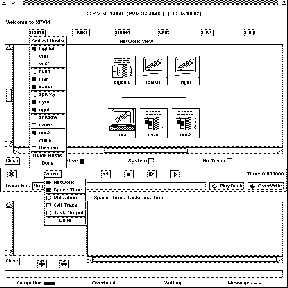
Figure: XPVM system adding hosts
If PVM has a problem starting up, it will print an error message either to the screen or in the log file /tmp/pvml.<uid>. This section describes the most common startup problems and how to solve them. Chapter 9 contains a more complete troubleshooting guide.
If the message says
[t80040000] Can't start pvmdfirst check that your .rhosts file on the remote host contains the name of the host from which you are starting PVM. An external check that your .rhosts file is set correctly is to type
% rsh remote_host lsIf your .rhosts is set up correctly, then you will see a listing of your files on the remote host.
Other reasons to get this message include not having PVM installed on a host or not having PVM_ROOT set correctly on some host. You can check these by typing
% rsh remote_host $PVM_ROOT/lib/pvmdSome Unix shells, for example ksh, do not set environment variables on remote hosts when using rsh. In PVM 3.3 there are two work arounds for such shells. First, if you set the environment variable, PVM_DPATH, on the master host to pvm3/lib/pvmd, then this will override the default dx path. The second method is to tell PVM explicitly were to find the remote pvmd executable by using the dx= option in the hostfile.
If PVM is manually killed, or stopped abnormally (e.g., by a system crash), then check for the existence of the file /tmp/pvmd.<uid>. This file is used for authentication and should exist only while PVM is running. If this file is left behind, it prevents PVM from starting. Simply delete this file.
If the message says
[t80040000] Login incorrectit probably means that no account is on the remote machine with your login name. If your login name is different on the remote machine, then you must use the lo= option in the hostfile (see Section 3.7).
If you get any other strange messages, then check your .cshrc file. It is important that you not have any I/O in the .cshrc file because this will interfere with the startup of PVM. If you wish to print out information (such as who or uptime) when you log in, you should do it in your .login script, not when you're running a csh command script.
In this section you'll learn how to compile and run PVM programs. Later chapters of this book describe how to write parallel PVM programs. In this section we will work with the example programs supplied with the PVM software. These example programs make useful templates on which to base your own PVM programs.
The first step is to copy the example programs into your own area:
% cp -r $PVM_ROOT/examples $HOME/pvm3/examples
% cd $HOME/pvm3/examples
The examples directory contains a Makefile.aimk and Readme file that describe how to build the examples. PVM supplies an architecture-independent make, aimk, that automatically determines PVM_ARCH and links any operating system specific libraries to your application. aimk was automatically added to your $PATH when you placed the cshrc.stub in your .cshrc file. Using aimk allows you to leave the source code and makefile unchanged as you compile across different architectures.
The master/slave programming model is the most popular model used in distributed computing. (In the general parallel programming arena, the SPMD model is more popular.) To compile the master/slave C example, type
% aimk master slaveIf you prefer to work with Fortran, compile the Fortran version with
% aimk fmaster fslaveDepending on the location of PVM_ROOT, the INCLUDE statement at the top of the Fortran examples may need to be changed. If PVM_ROOT is not HOME/pvm3, then change the include to point to $PVM_ROOT/include/fpvm3.h. Note that PVM_ROOT is not expanded inside the Fortran, so you must insert the actual path.
The makefile moves the executables to $HOME/pvm3/bin/PVM_ARCH, which is the default location PVM will look for them on all hosts. If your file system is not common across all your PVM hosts, then you will have to build or copy (depending on the architectures) these executables on all your PVM hosts.
Now, from one window, start PVM and configure some hosts. These examples are designed to run on any number of hosts, including one. In another window cd to $HOME/pvm3/bin/PVM_ARCH and type
% masterThe program will ask how many tasks. The number of tasks does not have to match the number of hosts in these examples. Try several combinations.
The first example illustrates the ability to run a PVM program from a Unix prompt on any host in the virtual machine. This is just like the way you would run a serial a.out program on a workstation. In the next example, which is also a master/slave model called hitc, you will see how to spawn PVM jobs from the PVM console and also from XPVM.
hitc illustrates dynamic load balancing using the pool-of-tasks paradigm. In the pool of tasks paradigm, the master program manages a large queue of tasks, always sending idle slave programs more work to do until the queue is empty. This paradigm is effective in situations where the hosts have very different computational powers, because the least loaded or more powerful hosts do more of the work and all the hosts stay busy until the end of the problem. To compile hitc, type
% aimk hitc hitc_slave
Since hitc does not require any user input, it can be spawned directly from the PVM console. Start up the PVM console and add a few hosts. At the PVM console prompt type
pvm> spawn -> hitcThe ``->" spawn option causes all the print statements in hitc and in the slaves to appear in the console window. This feature can be useful when debugging your first few PVM programs. You may wish to experiment with this option by placing print statements in hitc.f and hitc_slave.f and recompiling.
hitc can be used to illustrate XPVM's real-time animation capabilities. Start up XPVM and build a virtual machine with four hosts. Click on the ``tasks" button and select ``spawn" from the menu. Type ``hitc" where XPVM asks for the command, and click on ``start". You will see the host icons light up as the machines become busy. You will see the hitc_slave tasks get spawned and see all the messages that travel between the tasks in the Space Time display. Several other views are selectable from the XPVM ``views" menu. The ``task output" view is equivalent to the ``->" option in the PVM console. It causes the standard output from all tasks to appear in the window that pops up.
There is one restriction on programs that are spawned from XPVM (and the PVM console). The programs must not contain any interactive input, such as asking for how many slaves to start up or how big a problem to solve. This type of information can be read from a file or put on the command line as arguments, but there is nothing in place to get user input from the keyboard to a potentially remote task.
The PVM console, called pvm, is a stand-alone PVM task that allows the user to interactively start, query, and modify the virtual machine. The console may be started and stopped multiple times on any of the hosts in the virtual machine without affecting PVM or any applications that may be running.
When started, pvm determines whether PVM is already running; if it is not, pvm automatically executes pvmd on this host, passing pvmd the command line options and hostfile. Thus PVM need not be running to start the console.
pvm [-n<hostname>] [hostfile]
The -n option is useful for specifying an alternative name for the master pvmd (in case hostname doesn't match the IP address you want). Once PVM is started, the console prints the prompt
pvm>and accepts commands from standard input. The available commands are
The console reads $HOME/.pvmrc before reading commands from the tty, so you can do things like
    alias ? help
    alias h help
    alias j jobs
    setenv PVM_EXPORT DISPLAY
    # print my id
    echo new pvm shell
    id
PVM supports the use of multiple consoles
.
It is possible to run a
console on any host in an existing virtual machine and even
multiple consoles on the same machine. It is also possible to start
up a console in the middle of a PVM application and check on its
progress.
As we stated earlier, only one person at a site needs to install PVM, but each PVM user can have his own hostfile, which describes his own personal virtual machine.
The hostfile defines the initial configuration of hosts that PVM combines into a virtual machine. It also contains information about hosts that you may wish to add to the configuration later.
The hostfile in its simplest form is just a list of hostnames one to a line.
Blank lines are ignored, and lines that begin with a # are comment lines.
This allows you to document the hostfile
and also provides a handy way to modify the initial configuration
by commenting out various hostnames (see Figure
).
# configuration used for my run
sparky
azure.epm.ornl.gov
thud.cs.utk.edu
sun4
Several options can be specified on each line after the hostname. The options are separated by white space.
        [t80040000] ready   Fri Aug 27 18:47:47 1993
        *** Manual startup ***
        Login to "honk" and type:
        pvm3/lib/pvmd -S -d0 -nhonk 1 80a9ca95:0cb6 4096 2 80a95c43:0000
        Type response:
On honk, after typing the given line, you should see
ddpro<2312> arch<ALPHA> ip<80a95c43:0a8e> mtu<4096>which you should relay back to the master pvmd. At that point, you will see
Thanksand the two pvmds should be able to communicate.
If you want to set any of the above options as defaults for a series of hosts, you can place these options on a single line with a * for the hostname field. The defaults will be in effect for all the following hosts until they are overridden by another set-defaults line.
Hosts that you don't want in the initial configuration
but may add later can be specified in the hostfile by beginning
those lines with an &.
An example hostfile displaying most of these options is shown in
Figure
.
# Comment lines start with a # (blank lines ignored)
gstws
ipsc dx=/usr/geist/pvm3/lib/I860/pvmd3
ibm1.scri.fsu.edu lo=gst so=pw
# set default options for following hosts with *
* ep=$sun/problem1:~/nla/mathlib
sparky
#azure.epm.ornl.gov
midnight.epm.ornl.gov
# replace default options with new values
* lo=gageist so=pw ep=problem1
thud.cs.utk.edu
speedy.cs.utk.edu
# machines for adding later are specified with &
# these only need listing if options are required
&sun4   ep=problem1
&castor dx=/usr/local/bin/pvmd3
&dasher.cs.utk.edu lo=gageist
&elvis  dx=~/pvm3/lib/SUN4/pvmd3
Developing applications for the PVM system-in a general sense, at least-follows the traditional paradigm for programming distributed-memory multiprocessors such as the nCUBE or the Intel family of multiprocessors. The basic techniques are similar both for the logistical aspects of programming and for algorithm development. Significant differences exist, however, in terms of (a) task management, especially issues concerning dynamic process creation, naming, and addressing; (b) initialization phases prior to actual computation; (c) granularity choices; and (d) heterogeneity. In this chapter, we discuss the programming process for PVM and identify factors that may impact functionality and performance.
Parallel computing using a system such as PVM may be approached from three fundamental viewpoints, based on the organization of the computing tasks. Within each, different workload allocation strategies are possible and will be discussed later in this chapter. The first and most common model for PVM applications can be termed ``crowd'' computing : a collection of closely related processes, typically executing the same code, perform computations on different portions of the workload, usually involving the periodic exchange of intermediate results. This paradigm can be further subdivided into two categories:
The second model supported by PVM is termed a ``tree'' computation . In this scenario, processes are spawned (usually dynamically as the computation progresses) in a tree-like manner, thereby establishing a tree-like, parent-child relationship (as opposed to crowd computations where a star-like relationship exists). This paradigm, although less commonly used, is an extremely natural fit to applications where the total workload is not known a priori, for example, in branch-and-bound algorithms, alpha-beta search, and recursive ``divide-and-conquer'' algorithms.
The third model, which we term ``hybrid,'' can be thought of as a combination of the tree model and crowd model. Essentially, this paradigm possesses an arbitrary spawning structure: that is, at any point during application execution, the process relationship structure may resemble an arbitrary and changing graph.
We note that these three classifications are made on the basis of process relationships, though they frequently also correspond to communication topologies. Nevertheless, in all three, it is possible for any process to interact and synchronize with any other. Further, as may be expected, the choice of model is application dependent and should be selected to best match the natural structure of the parallelized program.
Crowd computations typically involve three phases. The first is the initialization of the process group; in the case of node-only computations, dissemination of group information and problem parameters, as well as workload allocation, is typically done within this phase. The second phase is computation. The third phase is collection results and display of output; during this phase, the process group is disbanded or terminated.
The master-slave model is illustrated below, using the well-known
Mandelbrot
set computation which is representative of the class of
problems termed ``embarrassingly''
parallel
. The computation
itself involves applying a recursive function to a collection of
points in the complex plane until the function values either
reach a specific value or begin to diverge. Depending upon
this condition, a graphical representation of each point in the plane
is constructed. Essentially, since the function outcome depends
only on the starting value of the point (and is independent of
other points), the problem
can be partitioned into
completely independent portions, the algorithm applied to each, and
partial results combined using simple combination schemes. However,
this model permits dynamic load balancing,
thereby allowing the processing elements to
share the workload unevenly. In this and subsequent examples within
this chapter, we only show a skeletal form of the algorithms, and
also take syntactic liberties with the PVM routines in the interest
of clarity. The control structure of the master-slave class of
applications is shown in Figure
.
{Master Mandelbrot algorithm.}
{Initial placement}
for i := 0 to NumWorkers - 1
	pvm_spawn(<worker name>)    {Start up worker i}
	pvm_send(<worker tid>,999)  {Send task to worker i}
endfor
{Receive-send}
while (WorkToDo)
	pvm_recv(888)         {Receive result}
	pvm_send(<available worker tid>,999)
	{Send next task to available worker}
	display result
endwhile
{Gather remaining results.}
for i := 0 to NumWorkers - 1
	pvm_recv(888)                {Receive result}
	pvm_kill(<worker tid i>)     {Terminate worker i}
	display result
endfor
{Worker Mandelbrot algorithm.}
while (true)
	pvm_recv(999)                          {Receive task}
	result := MandelbrotCalculations(task) {Compute result}
	pvm_send(<master tid>,888)     {Send result to master}
endwhile
The master-slave example described above involves no communication
among the slaves. Most crowd computations of any complexity do need
to communicate among the computational processes; we illustrate the
structure of such applications using a node-only example for
matrix multiply using Cannon's algorithm
[2]
(programming details
for a similar algorithm are given in another chapter).
The matrix-multiply example, shown
pictorially in Figure
multiplies matrix subblocks locally, and
uses row-wise multicast of matrix A subblocks in conjunction
with column-wise shifts of matrix B subblocks.
Figure: General crowd computation
{Matrix Multiplication Using Pipe-Multiply-Roll Algorithm}
{Processor 0 starts up other processes}
if (<my processor number> = 0) then
    for i := 1 to MeshDimension*MeshDimension
        pvm_spawn(<component name>, . .)
    endfor
endif
forall processors Pij, 0 <= i,j < MeshDimension
    for k := 0 to MeshDimension-1
        {Pipe.}
        if myrow = (mycolumn+k) mod MeshDimension
            {Send A to all Pxy, x = myrow, y <> mycolumn}
            pvm_mcast((Pxy, x = myrow, y <> mycolumn),999)
        else
            pvm_recv(999)   {Receive A}
        endif

        {Multiply.  Running totals maintained in C.}
        Multiply(A,B,C)

        {Roll.}
        {Send B to Pxy, x = myrow-1, y = mycolumn}
        pvm_send((Pxy, x = myrow-1, y = mycolumn),888)
        pvm_recv(888)       {Receive B}
    endfor
endfor
To successfully use this book, one should be experienced with common programming techniques and understand some basic parallel processing concepts. In particular, this guide assumes that the user knows how to write, execute, and debug Fortran or C programs and is familiar with Unix.
As mentioned earlier, tree computations
typically exhibit a tree-like
process control structure which also conforms to the communication pattern
in many instances. To illustrate this model, we consider a parallel sorting
algorithm that works as follows. One process (the manually started
process in PVM) possesses (inputs or generates) the list to be sorted.
It then spawns a second process and sends it half the list. At this
point, there are two processes each of which spawns a process and sends
them one-half of their already halved lists. This continues until
a tree of appropriate depth is constructed. Each process then independently
sorts its portion of the list, and a merge phase follows where sorted
sublists are transmitted upwards along the tree edges, with intermediate
merges being done at each node. This algorithm is illustrative of
a tree computation in which the workload is known in advance; a diagram
depicting the process is given in Figure
;
an algorithmic outline is given below.
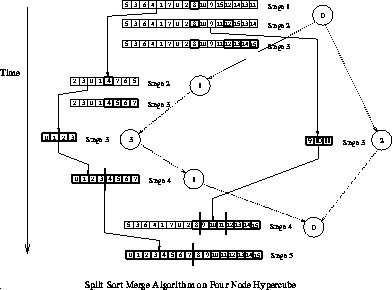
Figure: Tree-computation example
{ Spawn and partition list based on a broadcast tree pattern. }
for i := 1 to N, such that 2^N = NumProcs
	forall processors P such that P < 2^i
		pvm_spawn(...) {process id P XOR 2^i}
		if P < 2^(i-1) then
			midpt: = PartitionList(list);
			{Send list[0..midpt] to P XOR 2^i}
			pvm_send((P XOR 2^i),999)
			list := list[midpt+1..MAXSIZE]
		else
			pvm_recv(999)    {receive the list}
		endif
	endfor
endfor
{ Sort remaining list. }
Quicksort(list[midpt+1..MAXSIZE])
{ Gather/merge sorted sub-lists. }
for i := N downto 1, such that 2^N = NumProcs
	forall processors P such that P < 2^i
		if P > 2^(i-1) then
			pvm_send((P XOR 2^i),888)
			{Send list to P XOR 2^i}
		else
			pvm_recv(888)    {receive temp list}
			merge templist into list
		endif
	endfor
endfor
In the preceding section, we discussed the common parallel programming paradigms with respect to process structure, and we outlined representative examples in the context of the PVM system. In this section we address the issue of workload allocation, subsequent to establishing process structure, and describe some common paradigms that are used in distributed-memory parallel computing. Two general methodologies are commonly used. The first, termed data decomposition or partitioning, assumes that the overall problem involves applying computational operations or transformations on one or more data structures and, further, that these data structures may be divided and operated upon. The second, called function decomposition, divides the work based on different operations or functions. In a sense, the PVM computing model supports both function decomposition (fundamentally different tasks perform different operations) and data decomposition (identical tasks operate on different portions of the data).
As a simple example of data decomposition, consider the addition of two vectors, A[1..N] and B[1..N], to produce the result vector, C[1..N]. If we assume that P processes are working on this problem, data partitioning involves the allocation of N/P elements of each vector to each process, which computes the corresponding N/P elements of the resulting vector. This data partitioning may be done either ``statically,'' where each process knows a priori (at least in terms of the variables N and P) its share of the workload, or ``dynamically,'' where a control process (e.g., the master process) allocates subunits of the workload to processes as and when they become free. The principal difference between these two approaches is ``scheduling.'' With static scheduling, individual process workloads are fixed; with dynamic scheduling, they vary as the computation progresses. In most multiprocessor environments, static scheduling is effective for problems such as the vector addition example; however, in the general PVM environment, static scheduling is not necessarily beneficial. The reason is that PVM environments based on networked clusters are susceptible to external influences; therefore, a statically scheduled, data-partitioned problem might encounter one or more processes that complete their portion of the workload much faster or much slower than the others. This situation could also arise when the machines in a PVM system are heterogeneous, possessing varying CPU speeds and different memory and other system attributes.
In a real execution of even this trivial vector addition problem, an issue that cannot be ignored is input and output. In other words, how do the processes described above receive their workloads, and what do they do with the result vectors? The answer to these questions depends on the application and the circumstances of a particular run, but in general:
The third method of allocating individual workloads is also consistent with dynamic scheduling in applications where interprocess interactions during computations are rare or nonexistent. However, nontrivial algorithms generally require intermediate exchanges of data values, and therefore only the initial assignment of data partitions can be accomplished by these schemes. For example, consider the data partitioning method depicted in Figure 4.2. In order to multiply two matrices A and B, a group of processes is first spawned, using the master-slave or node-only paradigm. This set of processes is considered to form a mesh; the matrices to be multiplied are divided into subblocks, also forming a mesh. Each subblock of the A and B matrices is placed on the corresponding process, by utilizing one of the data decomposition and workload allocation strategies listed above. During computation, subblocks need to be forwarded or exchanged between processes, thereby transforming the original allocation map, as shown in the figure. At the end of the computation, however, result matrix subblocks are situated on the individual processes, in conformance with their respective positions on the process grid, and consistent with a data partitioned map of the resulting matrix C. The foregoing discussion illustrates the basics of data decomposition. In a later chapter, example programs highlighting details of this approach will be presented .
Parallelism in distributed-memory environments such as PVM may also be
achieved by partitioning the overall workload in terms of different
operations. The most obvious example of this form of decomposition
is with respect to the three stages of typical program execution,
namely, input, processing, and result output. In function decomposition,
such an application may consist of three separate and distinct
programs, each one dedicated to one of the three phases.
Parallelism is obtained by concurrently executing the three programs
and by establishing a "pipeline" (continuous or quantized) between
them. Note, however, that in such a scenario, data parallelism may
also exist within each phase. An example is shown in Figure
,
where distinct functions are realized as PVM components, with multiple
instances within each component implementing portions of different
data partitioned algorithms.
Although the concept of function decomposition is illustrated by
the trivial example above, the term is generally used to signify
partitioning and workload allocation by function within
the computational phase. Typically, application computations
contain several different subalgorithms-sometimes on the
same data (the MPSD
or multiple-program single-data scenario),
sometimes in a pipelined sequence of transformations, and sometimes
exhibiting an unstructured pattern of exchanges. We illustrate
the general functional decomposition paradigm by considering the
hypothetical simulation of an aircraft consisting of multiple
interrelated and interacting, functionally decomposed subalgorithms.
A diagram providing an overview of this example is shown in
Figure
(and will also be used in a later chapter dealing
with graphical PVM programming).
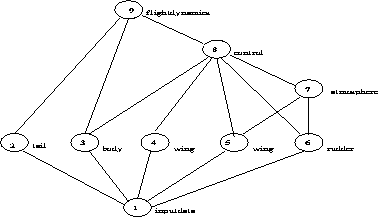
Figure: Function decomposition example
In the figure, each node or circle in the "graph" represents a functionally decomposed piece of the application. The input function distributes the particular problem parameters to the different functions 2 through 6, after spawning processes corresponding to distinct programs implementing each of the application subalgorithms. The same data may be sent to multiple functions (e.g., as in the case of the two wing functions), or data appropriate for the given function alone may be delivered. After performing some amount of computations these functions deliver intermediate or final results to functions 7, 8, and 9 that may have been spawned at the beginning of the computation or as results become available. The diagram indicates the primary concept of decomposing applications by function, as well as control and data dependency relationships. Parallelism is achieved in two respects-by the concurrent and independent execution of modules as in functions 2 through 6, and by the simultaneous, pipelined, execution of modules in a dependency chain, as, for example, in functions 1, 6, 8, and 9 .
In order to utilize the PVM system, applications must evolve through two stages. The first concerns development of the distributed-memory parallel version of the application algorithm(s); this phase is common to the PVM system as well as to other distributed-memory multiprocessors. The actual parallelization decisions fall into two major categories - those related to structure, and those related to efficiency. For structural decisions in parallelizing applications, the major decisions to be made include the choice of model to be used (i.e., crowd computation vs. tree computation and data decomposition vs. function decomposition). Decisions with respect to efficiency when parallelizing for distributed-memory environments are generally oriented toward minimizing the frequency and volume of communications. It is typically in this latter respect that the parallelization process differs for PVM and hardware multiprocessors; for PVM environments based on networks, large granularity generally leads to better performance. With this qualification, the parallelization process is very similar for PVM and for other distributed-memory environments, including hardware multiprocessors.
The parallelization of applications may be done ab initio, from existing sequential versions, or from existing parallel versions. In the first two cases, the stages involved are to select an appropriate algorithm for each of the subtasks in the application, usually from published descriptions or by inventing a parallel algorithm, and to then code these algorithms in the language of choice (C, C++, or Fortran 77 for PVM) and interface them with each other as well as with process management and other constructs. Parallelization from existing sequential programs also follows certain general guidelines, primary among which are to decompose loops, beginning with outermost loops and working inward. In this process, the main concern is to detect dependencies and to partition loops such that the dependencies are preserved while allowing for concurrency. This parallelization process is described in numerous textbooks and papers on parallel computing, although few textbooks discuss the practical and specific aspects of transforming a sequential program to a parallel one.
Existing parallel programs may be based upon either the shared-memory or distributed-memory paradigms. Converting existing shared-memory programs to PVM is similar to converting from sequential code, when the shared-memory versions are based upon vector or loop-level parallelism. In the case of explicit shared memory programs, the primary task is to locate synchronization points and replace these with message passing. In order to convert existing distributed-memory parallel code to PVM, the main task is to convert from one set of concurrency constructs to another. Typically, existing distributed memory parallel programs are written either for hardware multiprocessors or other networked environments such as p4 or Express. In both cases, the major changes required are with regard to process management. For example, in the Intel family of DMMPs, it is common for processes to be started from an interactive shell command line. Such a paradigm should be replaced for PVM by either a master program or a node program that takes responsibility for process spawning. With regard to interaction, there is, fortunately, a great deal of commonality between the message-passing calls in various programming environments. The major differences between PVM and other systems in this context are with regard to (a) process management and process addressing schemes; (b) virtual machine configuration/reconfiguration and its impact on executing applications; (c) heterogeneity in messages as well as the aspect of heterogeneity that deals with different architectures and data representations; and (d) certain unique and specialized features such as signaling, and task scheduling methods.
In this chapter we give a brief description of the routines in the PVM 3 user library. This chapter is organized by the functions of the routines. For example, in the section on Message Passing is a discussion of all the routines for sending and receiving data from one PVM task to another and a description of PVM's message passing options. The calling syntax of the C and Fortran PVM routines are highlighted by boxes in each section.
An alphabetical listing of all the routines is given in Appendix B. Appendix B contains a detailed description of each routine, including a description of each argument in each routine, the possible error codes a routine may return, and the possible reasons for the error. Each listing also includes examples of both C and Fortran use.
In PVM 3 all PVM tasks are identified by an integer supplied by the local pvmd. In the following descriptions this task identifier is called TID. It is similar to the process ID (PID) used in the Unix system and is assumed to be opaque to the user, in that the value of the TID has no special significance to him. In fact, PVM encodes information into the TID for its own internal use. Details of this encoding can be found in Chapter 7.
All the PVM routines are written in C. C++ applications can link to the PVM library. Fortran applications can call these routines through a Fortran 77 interface supplied with the PVM 3 source. This interface translates arguments, which are passed by reference in Fortran, to their values if needed by the underlying C routines. The interface also takes into account Fortran character string representations and the various naming conventions that different Fortran compilers use to call C functions.
The PVM communication model assumes that any task can send a message to any other PVM task and that there is no limit to the size or number of such messages. While all hosts have physical memory limitations that limits potential buffer space, the communication model does not restrict itself to a particular machine's limitations and assumes sufficient memory is available. The PVM communication model provides asynchronous blocking send, asynchronous blocking receive, and nonblocking receive functions. In our terminology, a blocking send returns as soon as the send buffer is free for reuse, and an asynchronous send does not depend on the receiver calling a matching receive before the send can return. There are options in PVM 3 that request that data be transferred directly from task to task. In this case, if the message is large, the sender may block until the receiver has called a matching receive.
A nonblocking receive immediately returns with either the data or a flag that the data has not arrived, while a blocking receive returns only when the data is in the receive buffer. In addition to these point-to-point communication functions, the model supports multicast to a set of tasks and broadcast to a user-defined group of tasks. There are also functions to perform global max, global sum, etc., across a user-defined group of tasks. Wildcards can be specified in the receive for the source and label, allowing either or both of these contexts to be ignored. A routine can be called to return information about received messages.
The PVM model guarantees that message order is preserved. If task 1 sends message A to task 2, then task 1 sends message B to task 2, message A will arrive at task 2 before message B. Moreover, if both messages arrive before task 2 does a receive, then a wildcard receive will always return message A.
Message buffers are allocated dynamically. Therefore, the maximum message size that can be sent or received is limited only by the amount of available memory on a given host. There is only limited flow control built into PVM 3.3. PVM may give the user a can't get memory error when the sum of incoming messages exceeds the available memory, but PVM does not tell other tasks to stop sending to this host.
int tid = pvm_mytid( void )
call pvmfmytid( tid )
The routine pvm_mytid() returns the TID of this process and can be called multiple times. It enrolls this process into PVM if this is the first PVM call. Any PVM system call (not just pvm_mytid) will enroll a task in PVM if the task is not enrolled before the call, but it is common practice to call pvm_mytid first to perform the enrolling.
int info = pvm_exit( void )
call pvmfexit( info )
The routine pvm_exit() tells the local pvmd that this process is leaving PVM. This routine does not kill the process, which can continue to perform tasks just like any other UNIX process. Users typically call pvm_exit right before exiting their C programs and right before STOP in their Fortran programs.
int numt = pvm_spawn(char *task, char **argv, int flag,
                     char *where, int ntask, int *tids )
call pvmfspawn( task, flag, where, ntask, tids, numt )
The routine pvm_spawn()
starts up ntask copies of an executable file task
on the virtual machine.
argv is a pointer to an array of arguments to task
with the end of the array specified by NULL.
If task takes no arguments, then argv is NULL.
The flag argument is used to specify options, and is a sum of:
Value    Option           Meaning
--------------------------------------------------------------------------
    0    PvmTaskDefault   PVM chooses where to spawn processes.
    1    PvmTaskHost      where argument is a particular host to spawn on.
    2    PvmTaskArch      where argument is a PVM_ARCH to spawn on.
    4    PvmTaskDebug     starts tasks under a debugger.
    8    PvmTaskTrace     trace data is generated.
   16    PvmMppFront      starts tasks on MPP front-end.
   32    PvmHostCompl     complements host set in where.
--------------------------------------------------------------------------
These names are predefined in pvm3/include/pvm3.h. In Fortran all the names are predefined in parameter statements which can be found in the include file pvm3/include/fpvm3.h.
PvmTaskTrace is a new feature in PVM 3.3. It causes spawned tasks to generate trace events . PvmTasktrace is used by XPVM (see Chapter 8). Otherwise, the user must specify where the trace events are sent in pvm_setopt().
On return, numt is set to the number of tasks successfully spawned or an error code if no tasks could be started. If tasks were started, then pvm_spawn() returns a vector of the spawned tasks' tids; and if some tasks could not be started, the corresponding error codes are placed in the last ntask - numt positions of the vector.
The pvm_spawn() call can also start tasks on multiprocessors. In the case of the Intel iPSC/860 the following restrictions apply. Each spawn call gets a subcube of size ntask and loads the program task on all of these nodes. The iPSC/860 OS has an allocation limit of 10 subcubes across all users, so it is better to start a block of tasks on an iPSC/860 with a single pvm_spawn() call rather than several calls. Two different blocks of tasks spawned separately on the iPSC/860 can still communicate with each other as well as any other PVM tasks even though they are in separate subcubes. The iPSC/860 OS has a restriction that messages going from the nodes to the outside world be less than 256 Kbytes.
int info = pvm_kill( int tid )
call pvmfkill( tid, info )
The routine pvm_kill() kills some other PVM task identified by TID. This routine is not designed to kill the calling task, which should be accomplished by calling pvm_exit() followed by exit().
int info = pvm_catchout( FILE *ff )
call pvmfcatchout( onoff )
The default is to have PVM write the stderr and stdout of spawned tasks to the log file /tmp/pvml.<uid>. The routine pvm_catchout causes the calling task to catch output from tasks subsequently spawned. Characters printed on stdout or stderr in children tasks are collected by the pvmds and sent in control messages to the parent task, which tags each line and appends it to the specified file (in C) or standard output (in Fortran). Each of the prints is prepended with information about which task generated the print, and the end of the print is marked to help separate outputs coming from several tasks at once.
If pvm_exit is called by the parent while output collection is in effect, it will block until all tasks sending it output have exited, in order to print all their output. To avoid this, one can turn off the output collection by calling pvm_catchout(0) before calling pvm_exit.
New capabilities in PVM 3.3 include the ability to register special PVM tasks to handle the jobs of adding new hosts, mapping tasks to hosts, and starting new tasks. This creates an interface for advanced batch schedulers (examples include Condor [7], DQS [6], and LSF [4]) to plug into PVM and run PVM jobs in batch mode. These register routines also create an interface for debugger writers to develop sophisticated debuggers for PVM.
The routine names are pvm_reg_rm(), pvm_reg_hoster(), and pvm_reg_tasker(). These are advanced functions not meant for the average PVM user and thus are not presented in detail here. Specifics can be found in Appendix B.
int tid = pvm_parent( void )
call pvmfparent( tid )
The routine pvm_parent() returns the TID of the process that spawned this task or the value of PvmNoParent if not created by pvm_spawn().
int dtid  = pvm_tidtohost( int tid )
call pvmftidtohost( tid, dtid )
The routine pvm_tidtohost() returns the TID dtid of the daemon running on the same host as TID. This routine is useful for determining on which host a given task is running. More general information about the entire virtual machine, including the textual name of the configured hosts, can be obtained by using the following functions:
int info  = pvm_config(    int *nhost, int *narch,
                            struct pvmhostinfo **hostp )
call pvmfconfig( nhost, narch, dtid, name, arch, speed, info)
The routine pvm_config() returns information about the virtual machine including the number of hosts, nhost, and the number of different data formats, narch. hostp is a pointer to a user declaried array of pvmhostinfo structures. The array should be of size at least nhost. On return, each pvmhostinfo structure contains the pvmd TID, host name, name of the architecture, and relative CPU speed for that host in the configuration.
The Fortran function returns information about one host per call and cycles through all the hosts. Thus, if pvmfconfig is called nhost times, the entire virtual machine will be represented. The Fortran interface works by saving a copy of the hostp array and returning one entry per call. All the hosts must be cycled through before a new hostp array is obtained. Thus, if the virtual machine is changing during these calls, then the change will appear in the nhost and narch parameters, but not in the host information. Presently, there is no way to reset pvmfconfig() and force it to restart the cycle when it is in the middle.
int info  = pvm_tasks(    int which, int *ntask,
                          struct pvmtaskinfo **taskp )
call pvmftasks(    which, ntask, tid, ptid, dtid,
                   flag, aout, info )
The routine pvm_tasks() returns information about the PVM tasks running on the virtual machine. The integer which specifies which tasks to return information about. The present options are (0), which means all tasks, a pvmd TID (dtid), which means tasks running on that host, or a TID, which means just the given task.
The number of tasks is returned in ntask. taskp is a pointer to an array of pvmtaskinfo structures. The array is of size ntask. Each pvmtaskinfo structure contains the TID, pvmd TID, parent TID, a status flag, and the spawned file name. (PVM doesn't know the file name of manually started tasks and so leaves these blank.) The Fortran function returns information about one task per call and cycles through all the tasks. Thus, if where = 0, and pvmftasks is called ntask times, all tasks will be represented. The Fortran implementation assumes that the task pool is not changing while it cycles through the tasks. If the pool changes, these changes will not appear until the next cycle of ntask calls begins.
Examples of the use of pvm_config and pvm_tasks can be found in the source to the PVM console, which is just a PVM task itself. Examples of the use of the Fortran versions of these routines can be found in the source pvm3/examples/testall.f.
int info = pvm_addhosts( char **hosts, int nhost, int *infos)
int info = pvm_delhosts( char **hosts, int nhost, int *infos)
call pvmfaddhost( host, info )
call pvmfdelhost( host, info )
The C routines add or delete a set of hosts in the virtual machine. The Fortran routines add or delete a single host in the virtual machine. In the Fortran routine info is returned as 1 or a status code. In the C version info is returned as the number of hosts successfully added. The argument infos is an array of length nhost that contains the status code for each individual host being added or deleted. This allows the user to check whether only one of a set of hosts caused a problem rather than trying to add or delete the entire set of hosts again.
These routines are sometimes used to set up a virtual machine, but more often they are used to increase the flexibility and fault tolerance of a large application. These routines allow an application to increase the available computing power (adding hosts) if it determines the problem is getting harder to solve. One example of this would be a CAD/CAM program where, during the computation, the finite-element grid is refined, dramatically increasing the size of the problem. Another use would be to increase the fault tolerance of an application by having it detect the failure of a host and adding in a replacement .
int info = pvm_sendsig( int tid, int signum )
call pvmfsendsig( tid, signum, info )
int info = pvm_notify( int what, int msgtag, int cnt, int tids )
call pvmfnotify( what, msgtag, cnt, tids, info )
The routine pvm_sendsig() sends a signal signum to another PVM task identified by TID. The routine pvm_notify requests PVM to notify the caller on detecting certain events. The present options are as follows:
In response to a notify request, some number of messages (see Appendix B) are sent by PVM back to the calling task. The messages are tagged with the user supplied msgtag. The tids array specifies who to monitor when using TaskExit or HostDelete. The array contains nothing when using HostAdd. If required, the routines pvm_config and pvm_tasks can be used to obtain task and pvmd tids.
If the host on which task A is running fails, and task B has asked to be notified if task A exits, then task B will be notified even though the exit was caused indirectly by the host failure .
We use the following conventions in this book:
int oldval = pvm_setopt( int what, int val )
int val = pvm_getopt( int what )
call pvmfsetopt( what, val, oldval )
call pvmfgetopt( what, val )
The routine pvm_setopt is a general-purpose function that allows the user to set or get options in the PVM system. In PVM 3, pvm_setopt can be used to set several options, including automatic error message printing, debugging level, and communication routing method for all subsequent PVM calls. pvm_setopt returns the previous value of set in oldval. The PVM 3.3 what can have the following values:
     Option Value         Meaning
------------------------------------------------------------------
PvmRoute            1     routing policy
PvmDebugMask        2     debugmask
PvmAutoErr          3     auto error reporting
PvmOutputTid        4     stdout destination for children
PvmOutputCode       5     output msgtag
PvmTraceTid         6     trace destination for children
PvmTraceCode        7     trace msgtag
PvmFragSize         8     message fragment size
PvmResvTids         9     allow messages to reserved tags and tids
PvmSelfOutputTid   10     stdout destination for self
PvmSelfOutputCode  11     output msgtag
PvmSelfTraceTid    12     trace destination for self
PvmSelfTraceCode   13     trace msgtag
------------------------------------------------------------------
See Appendix B for allowable values for these options.
Future expansions to this list are planned.
The most popular use of pvm_setopt is to enable direct route communication between PVM tasks. As a general rule of thumb, PVM communication bandwidth over a network doubles by calling
pvm_setopt( PvmRoute, PvmRouteDirect );The drawback is that this faster communication method is not scalable under Unix; hence, it may not work if the application involves over 60 tasks that communicate randomly with each other. If it doesn't work, PVM automatically switches back to the default communication method. It can be called multiple times during an application to selectively set up direct task-to-task communication links, but typical use is to call it once after the initial call to pvm_mytid().
Sending a message comprises three steps in PVM. First, a send buffer must be initialized by a call to pvm_initsend() or pvm_mkbuf(). Second, the message must be ``packed'' into this buffer using any number and combination of pvm_pk*() routines. (In Fortran all message packing is done with the pvmfpack() subroutine.) Third, the completed message is sent to another process by calling the pvm_send() routine or multicast with the pvm_mcast() routine.
A message is received by calling either a blocking or nonblocking receive routine and then ``unpacking'' each of the packed items from the receive buffer. The receive routines can be set to accept any message, or any message from a specified source, or any message with a specified message tag, or only messages with a given message tag from a given source. There is also a probe function that returns whether a message has arrived, but does not actually receive it.
If required, other receive contexts can be handled by PVM 3. The routine pvm_recvf() allows users to define their own receive contexts that will be used by the subsequent PVM receive routines.
int bufid = pvm_initsend( int encoding )
call pvmfinitsend( encoding, bufid )
If the user is using only a single send buffer (and this is the typical case) then pvm_initsend() is the only required buffer routine. It is called before packing a new message into the buffer. The routine pvm_initsend clears the send buffer and creates a new one for packing a new message. The encoding scheme used for this packing is set by encoding. The new buffer identifier is returned in bufid.
The encoding options are as follows:
The following message buffer routines are required only if the user wishes to manage multiple message buffers inside an application. Multiple message buffers are not required for most message passing between processes. In PVM 3 there is one active send buffer and one active receive buffer per process at any given moment. The developer may create any number of message buffers and switch between them for the packing and sending of data. The packing, sending, receiving, and unpacking routines affect only the active buffers.
int bufid = pvm_mkbuf( int encoding )
call pvmfmkbuf( encoding, bufid )
The routine pvm_mkbuf creates a new empty send buffer and specifies the encoding method used for packing messages. It returns a buffer identifier bufid.
int info = pvm_freebuf( int bufid )
call pvmffreebuf( bufid, info )
The routine pvm_freebuf() disposes of the buffer with identifier bufid. This should be done after a message has been sent and is no longer needed. Call pvm_mkbuf() to create a buffer for a new message if required. Neither of these calls is required when using pvm_initsend(), which performs these functions for the user.
int bufid = pvm_getsbuf( void )
call pvmfgetsbuf( bufid )
int bufid = pvm_getrbuf( void )
call pvmfgetrbuf( bufid )
pvm_getsbuf() returns the active send buffer identifier. pvm_getrbuf() returns the active receive buffer identifier.
int oldbuf  = pvm_setsbuf( int bufid )
call pvmfsetrbuf( bufid, oldbuf )
int oldbuf  = pvm_setrbuf( int bufid )
call pvmfsetrbuf( bufid, oldbuf )
These routines set the active send (or receive) buffer to bufid, save the state of the previous buffer, and return the previous active buffer identifier oldbuf.
If bufid is set to 0 in pvm_setsbuf() or pvm_setrbuf(), then the present buffer is saved and there is no active buffer. This feature can be used to save the present state of an application's messages so that a math library or graphical interface which also uses PVM messages will not interfere with the state of the application's buffers. After they complete, the application's buffers can be reset to active.
It is possible to forward messages without repacking them by using the message buffer routines. This is illustrated by the following fragment.
bufid = pvm_recv( src, tag );
oldid = pvm_setsbuf( bufid );
info  = pvm_send( dst, tag );
info  = pvm_freebuf( oldid );
Each of the following C routines packs an array of the given data type into the active send buffer. They can be called multiple times to pack data into a single message. Thus, a message can contain several arrays each with a different data type. C structures must be passed by packing their individual elements. There is no limit to the complexity of the packed messages, but an application should unpack the messages exactly as they were packed. Although this is not strictly required, it is a safe programming practice.
The arguments for each of the routines are a pointer to the first item to be packed, nitem which is the total number of items to pack from this array, and stride which is the stride to use when packing. A stride of 1 means a contiguous vector is packed, a stride of 2 means every other item is packed, and so on. An exception is pvm_pkstr() which by definition packs a NULL terminated character string and thus does not need nitem or stride arguments.
int info = pvm_pkbyte(   char   *cp, int nitem, int stride )
int info = pvm_pkcplx(   float  *xp, int nitem, int stride )
int info = pvm_pkdcplx(  double *zp, int nitem, int stride )
int info = pvm_pkdouble( double *dp, int nitem, int stride )
int info = pvm_pkfloat(  float  *fp, int nitem, int stride )
int info = pvm_pkint(    int    *np, int nitem, int stride )
int info = pvm_pklong(   long   *np, int nitem, int stride )
int info = pvm_pkshort(  short  *np, int nitem, int stride )
int info = pvm_pkstr(    char   *cp )
int info = pvm_packf( const char *fmt, ... )
PVM also supplies a packing routine that uses a printf-like format expression to specify what data to pack and how to pack it into the send buffer. All variables are passed as addresses if count and stride are specified; otherwise, variables are assumed to be values. A description of the format syntax is given in Appendix B.
A single Fortran subroutine handles all the packing functions of the above C routines.
call pvmfpack( what, xp, nitem, stride, info )
The argument xp is the first item of the array to be packed. Note that in Fortran the number of characters in a string to be packed must be specified in nitem. The integer what specifies the type of data to be packed. The supported options are as follows:
 STRING     0       REAL4      4
 BYTE1      1       COMPLEX8   5
 INTEGER2   2       REAL8      6
 INTEGER4   3       COMPLEX16  7
These names have been predefined in parameter statements in the include file pvm3/include/fpvm3.h. Some vendors may extend this list to include 64-bit architectures in their PVM implementations. We will be adding INTEGER8, REAL16, etc., as soon as XDR support for these data types is available.
int info = pvm_send( int tid, int msgtag )
call pvmfsend( tid, msgtag, info )
int info = pvm_mcast( int *tids, int ntask, int msgtag )
call pvmfmcast( ntask, tids, msgtag, info )
The routine pvm_send() labels the message with an integer identifier msgtag and sends it immediately to the process TID.
The routine pvm_mcast() labels the message with an integer identifier msgtag and broadcasts the message to all tasks specified in the integer array tids (except itself). The tids array is of length ntask.
int info = pvm_psend(   int tid, int msgtag,
                         void *vp, int cnt, int type )
call pvmfpsend( tid, msgtag, xp, cnt, type, info )
The routine pvm_psend() packs and sends an array of the specified datatype to the task identified by TID. The defined datatypes for Fortran are the same as for pvmfpack(). In C the type argument can be any of the following:
 PVM_STR       PVM_FLOAT
 PVM_BYTE      PVM_CPLX
 PVM_SHORT     PVM_DOUBLE
 PVM_INT       PVM_DCPLX
 PVM_LONG      PVM_UINT
 PVM_USHORT    PVM_ULONG
PVM contains several methods of receiving messages at a task. There is no function matching in PVM, for example, that a pvm_psend must be matched with a pvm_precv. Any of the following routines can be called for any incoming message no matter how it was sent (or multicast).
int bufid = pvm_recv( int tid, int msgtag )
call pvmfrecv( tid, msgtag, bufid )
This blocking receive routine will wait until a message with label msgtag has arrived from TID. A value of -1 in msgtag or TID matches anything (wildcard). It then places the message in a new active receive buffer that is created. The previous active receive buffer is cleared unless it has been saved with a pvm_setrbuf() call.
int bufid = pvm_nrecv( int tid, int msgtag )
call pvmfnrecv( tid, msgtag, bufid )
If the requested message has not arrived, then the nonblocking receive pvm_nrecv() returns bufid = 0. This routine can be called multiple times for the same message to check whether it has arrived, while performing useful work between calls. When no more useful work can be performed, the blocking receive pvm_recv() can be called for the same message. If a message with label msgtag has arrived from TID, pvm_nrecv() places this message in a new active receive buffer (which it creates) and returns the ID of this buffer. The previous active receive buffer is cleared unless it has been saved with a pvm_setrbuf() call. A value of -1 in msgtag or TID matches anything (wildcard).
int bufid = pvm_probe( int tid, int msgtag )
call pvmfprobe( tid, msgtag, bufid )
If the requested message has not arrived, then pvm_probe() returns bufid = 0. Otherwise, it returns a bufid for the message, but does not ``receive'' it. This routine can be called multiple times for the same message to check whether it has arrived, while performing useful work between calls. In addition, pvm_bufinfo() can be called with the returned bufid to determine information about the message before receiving it.
int bufid = pvm_trecv( int tid, int msgtag, struct timeval *tmout )
call pvmftrecv( tid, msgtag, sec, usec, bufid )
PVM also supplies a timeout version of receive. Consider the case where a message is never going to arrive (because of error or failure); the routine pvm_recv would block forever. To avoid such situations, the user may wish to give up after waiting for a fixed amount of time. The routine pvm_trecv() allows the user to specify a timeout period. If the timeout period is set very large, then pvm_trecv acts like pvm_recv. If the timeout period is set to zero, then pvm_trecv acts like pvm_nrecv. Thus, pvm_trecv fills the gap between the blocking and nonblocking receive functions.
int info = pvm_bufinfo( int bufid, int *bytes, int *msgtag, int *tid )
call pvmfbufinfo( bufid, bytes, msgtag, tid, info )
The routine pvm_bufinfo() returns msgtag, source TID, and length in bytes of the message identified by bufid. It can be used to determine the label and source of a message that was received with wildcards specified.
int info = pvm_precv(  int tid, int msgtag, void *vp, int cnt,
                        int type, int *rtid, int *rtag, int *rcnt )
call pvmfprecv( tid, msgtag, xp, cnt, type, rtid, rtag, rcnt, info )
The routine pvm_precv() combines the functions of a blocking receive and unpacking the received buffer. It does not return a bufid. Instead, it returns the actual values of TID, msgtag, and cnt.
int (*old)() = pvm_recvf(int (*new)(int buf, int tid, int tag))
The routine pvm_recvf() modifies the receive context used by the receive functions and can be used to extend PVM. The default receive context is to match on source and message tag. This can be modified to any user-defined comparison function. (See Appendix B for an example of creating a probe function with pvm_recf().) There is no Fortran interface routine for pvm_recvf().
The following C routines unpack (multiple) data types from the active receive buffer. In an application they should match their corresponding pack routines in type, number of items, and stride. nitem is the number of items of the given type to unpack, and stride is the stride.
int info = pvm_upkbyte(   char   *cp, int nitem, int stride )
int info = pvm_upkcplx(   float  *xp, int nitem, int stride )
int info = pvm_upkdcplx(  double *zp, int nitem, int stride )
int info = pvm_upkdouble( double *dp, int nitem, int stride )
int info = pvm_upkfloat(  float  *fp, int nitem, int stride )
int info = pvm_upkint(    int    *np, int nitem, int stride )
int info = pvm_upklong(   long   *np, int nitem, int stride )
int info = pvm_upkshort(  short  *np, int nitem, int stride )
int info = pvm_upkstr(    char   *cp )
int info = pvm_unpackf( const char *fmt, ... )
The routine pvm_unpackf() uses a printf-like format expression to specify what data to unpack and how to unpack it from the receive buffer.
A single Fortran subroutine handles all the unpacking functions of the above C routines.
call pvmfunpack( what, xp, nitem, stride, info )
The argument xp is the array to be unpacked into. The integer argument what specifies the type of data to be unpacked. (Same what options as for pvmfpack()).
The dynamic process group functions are built on top of the core PVM routines. A separate library libgpvm3.a must be linked with user programs that make use of any of the group functions. The pvmd does not perform the group functions. This task is handled by a group server that is automatically started when the first group function is invoked. There is some debate about how groups should be handled in a message-passing interface. The issues include efficiency and reliability, and there are tradeoffs between static versus dynamic groups. Some people argue that only tasks in a group can call group functions.
In keeping with the PVM philosophy, the group functions are designed to be very general and transparent to the user, at some cost in efficiency. Any PVM task can join or leave any group at any time without having to inform any other task in the affected groups. Tasks can broadcast messages to groups of which they are not a member. In general, any PVM task may call any of the following group functions at any time. The exceptions are pvm_lvgroup(), pvm_barrier(), and pvm_reduce(), which by their nature require the calling task to be a member of the specified group.
int inum = pvm_joingroup( char *group )
int info = pvm_lvgroup( char *group )
call pvmfjoingroup( group, inum )
call pvmflvgroup( group, info )
These routines allow a task to join or leave a user named group. The first call to pvm_joingroup() creates a group with name group and puts the calling task in this group. pvm_joingroup() returns the instance number (inum) of the process in this group. Instance numbers run from 0 to the number of group members minus 1. In PVM 3, a task can join multiple groups.
If a process leaves a group and then rejoins it, that process may receive a different instance number. Instance numbers are recycled so a task joining a group will get the lowest available instance number. But if multiple tasks are joining a group, there is no guarantee that a task will be assigned its previous instance number.
To assist the user in maintaining a continuous set of instance numbers despite joining and leaving, the pvm_lvgroup() function does not return until the task is confirmed to have left. A pvm_joingroup() called after this return will assign the vacant instance number to the new task. It is the user's responsibility to maintain a contiguous set of instance numbers if the algorithm requires it. If several tasks leave a group and no tasks join, then there will be gaps in the instance numbers.
int tid = pvm_gettid( char *group, int inum )
int inum = pvm_getinst( char *group, int tid )
int size = pvm_gsize( char *group )
call pvmfgettid( group, inum, tid )
call pvmfgetinst( group, tid, inum )
call pvmfgsize( group, size )
The routine pvm_gettid() returns the TID of the process with a given group name and instance number. pvm_gettid() allows two tasks with no knowledge of each other to get each other's TID simply by joining a common group. The routine pvm_getinst() returns the instance number of TID in the specified group. The routine pvm_gsize() returns the number of members in the specified group.
int info = pvm_barrier( char *group, int count )
call pvmfbarrier( group, count, info )
On calling pvm_barrier() the process blocks until count members of a group have called pvm_barrier. In general count should be the total number of members of the group. A count is required because with dynamic process groups PVM cannot know how many members are in a group at a given instant. It is an error for processes to call pvm_barrier with a group it is not a member of. It is also an error if the count arguments across a given barrier call do not match. For example it is an error if one member of a group calls pvm_barrier() with a count of 4, and another member calls pvm_barrier() with a count of 5.
int info = pvm_bcast( char *group, int msgtag )
call pvmfbcast( group, msgtag, info )
pvm_bcast() labels the message with an integer identifier msgtag and broadcasts the message to all tasks in the specified group except itself (if it is a member of the group). For pvm_bcast() ``all tasks'' is defined to be those tasks the group server thinks are in the group when the routine is called. If tasks join the group during a broadcast, they may not receive the message. If tasks leave the group during a broadcast, a copy of the message will still be sent to them.
int info = pvm_reduce(   void (*func)(), void *data,
                          int nitem, int datatype,
                          int msgtag, char *group, int root )
call pvmfreduce(   func, data, count, datatype,
                   msgtag, group, root, info )
pvm_reduce() performs a global arithmetic operation across the group, for example, global sum or global max . The result of the reduction operation appears on root. PVM supplies four predefined functions that the user can place in func. These are
    PvmMax
    PvmMin
    PvmSum
    PvmProduct
The reduction operation is performed element-wise on the input data.
For example, if the data array contains two floating-point numbers
and func is PvmMax,
then the result contains two numbers-the global maximum of each group members first number
and the global maximum of each member's second number.
In addition users can define their own global operation function to place in func. See Appendix B for details. An example is given in the source code for PVM. For more information see PVM_ROOT/examples/gexamples.
Note: pvm_reduce() does not block. If a task calls pvm_reduce and then leaves the group before the root has called pvm_reduce, an error may occur.
In this chapter we discuss several complete PVM programs in
detail. The first example, forkjoin.c, shows how to to spawn off
processes and synchronize with them. The second example
discusses a Fortran dot
product program, PSDOT.F. The third example, failure.c, demonstrates
how the user can
use the pvm_notify() call
to create fault tolerant appliations.
We present an example that performs a matrix multiply.
Lastly, we show how PVM can be used to compute heat diffusion through a
wire.
Our first example demonstrates how to spawn off PVM tasks and synchronize with them. The program spawns several tasks, three by default. The children then synchronize by sending a message to their parent task. The parent receives a message from each of the spawned tasks and prints out information about the message from the child tasks.
The fork-join program contains the code for both the parent and the child
tasks. Let's examine it in more detail. The very first thing the
program does is call pvm_mytid(). This function must be called
before any other PVM call can be made. The result of the
pvm_mytid() call should always be a positive integer. If it is
not, then something is seriously wrong. In fork-join we check the value
of mytid; if it indicates an error, we call pvm_perror() and
exit the program. The pvm_perror() call will print a message
indicating what went wrong with the last PVM call. In our example the
last call was pvm_mytid(), so pvm_perror() might print a
message indicating that PVM hasn't been started on this machine. The
argument to pvm_perror() is a string that will be prepended to
any error message printed by pvm_perror(). In this case we pass
argv[0], which is the name of the program as it was typed on the
command line. The pvm_perror() function is modeled after the
Unix perror() function.
Assuming we obtained a valid result for mytid, we now call
pvm_parent(). The pvm_parent() function will return the
TID of the task that spawned the calling task. Since we run the
initial fork-join program from the Unix shell, this initial task will
not have a parent; it will not have been spawned by some other PVM task
but will have been started manually by the user. For the initial
forkjoin task the result of pvm_parent() will not be any
particular task id but an error code, PvmNoParent. Thus we can
distinguish the parent forkjoin task from the children by checking whether
the result of the pvm_parent() call is equal to PvmNoParent. If
this task is the parent, then it must spawn the children. If it is not
the parent, then it must send a message to the parent.
Let's examine the code executed by the parent task. The number of
tasks is taken from the command line as argv[1]. If the number of
tasks is not legal, then we exit the program, calling pvm_exit()
and then returning. The call to pvm_exit() is important because
it tells PVM this program will no longer be using any of the PVM
facilities. (In this case the task exits and PVM will deduce that the
dead task no longer needs its services. Regardless, it is good style
to exit cleanly.) Assuming the number of tasks is valid, forkjoin will
then attempt to spawn the children.
The pvm_spawn() call tells PVM to start ntask tasks named
argv[0]. The second parameter is the argument list given to the
spawned tasks. In this case we don't care to give the children any
particular command line arguments, so this value is null. The third
parameter to spawn, PvmTaskDefault, is a flag telling PVM to spawn the
tasks in the default location. Had we been interested in placing the
children on a specific machine or a machine of a particular
architecture, then we would have used PvmTaskHost or PvmTaskArch for
this flag and specified the host or architecture as the fourth
parameter. Since we don't care where the tasks execute, we use
PvmTaskDefault for the flag and null for the fourth parameter.
Finally, ntask tells spawn how many tasks to start; the integer
array child will hold the task ids of the newly spawned children. The
return value of pvm_spawn() indicates how many tasks were
successfully spawned. If info is not equal to ntask, then some error
occurred during the spawn. In case of an error, the error code is
placed in the task id array, child, instead of the actual task id.
The fork-join program loops over this array and prints the task ids or any error
codes. If no tasks were successfully spawned, then the program exits.
For each child task, the parent receives a message and prints out
information about that message. The pvm_recv() call receives a
message (with that JOINTAG) from any task.
The return value of pvm_recv() is an integer indicating a
message buffer. This integer can be used to find out information about
message buffers. The subsequent call to pvm_bufinfo() does just
this; it gets the length, tag, and task id of the sending process for
the message indicated by buf. In fork-join the messages sent by the
children contain a single integer value, the task id of the child
task. The pvm_upkint() call unpacks the integer from the
message into the mydata variable. As a sanity check, forkjoin tests
the value of mydata and the task id returned by pvm_bufinfo().
If the values differ, the program has a bug, and an error message
is printed. Finally, the information about the message is printed, and
the parent program exits.
The last segment of code in forkjoin will be executed by the child
tasks. Before placing data in a message buffer, the buffer must be
initialized by calling pvm_initsend(). The parameter
PvmDataDefault indicates that PVM should do whatever data conversion is
needed to ensure that the data arrives in the correct format on the
destination processor. In some cases this may result in unnecessary
data conversions. If the user is sure no data conversion will be needed
since the destination machine uses the same data format, then he can
use PvmDataRaw as a parameter to pvm_initsend(). The
pvm_pkint() call places a single integer, mytid, into the
message buffer. It is important to make sure the corresponding unpack
call exactly matches the pack call. Packing an integer and unpacking
it as a float will not work correctly. Similarly, if the user packs two
integers with a single call, he cannot unpack those integers by
calling pvm_upkint() twice, once for each integer. There must
be a one to one correspondence between pack and unpack calls. Finally,
the message is sent to the parent task using a message tag of JOINTAG.
/*
    Fork Join Example
    Demonstrates how to spawn processes and exchange messages
*/
/* defines and prototypes for the PVM library */
#include <pvm3.h>
/* Maximum number of children this program will spawn */
#define MAXNCHILD   20
/* Tag to use for the joing message */
#define JOINTAG     11
int
main(int argc, char* argv[])
{
    /* number of tasks to spawn, use 3 as the default */
    int ntask = 3;
    /* return code from pvm calls */
    int info;
    /* my task id */
    int mytid;
    /* my parents task id */
    int myparent;
    /* children task id array */
    int child[MAXNCHILD];
    int i, mydata, buf, len, tag, tid;
    /* find out my task id number */
    mytid = pvm_mytid();
    /* check for error */
    if (mytid < 0) {
        /* print out the error */
        pvm_perror(argv[0]);
        /* exit the program */
        return -1;
        }
    /* find my parent's task id number */
    myparent = pvm_parent();
    /* exit if there is some error other than PvmNoParent */
    if ((myparent < 0) && (myparent != PvmNoParent)) {
        pvm_perror(argv[0]);
        pvm_exit();
        return -1;
        }
    /* if i don't have a parent then i am the parent */
    if (myparent == PvmNoParent) {
        /* find out how many tasks to spawn */
        if (argc == 2) ntask = atoi(argv[1]);
        /* make sure ntask is legal */
        if ((ntask < 1) || (ntask > MAXNCHILD)) { pvm_exit(); return 0; }
        /* spawn the child tasks */
        info = pvm_spawn(argv[0], (char**)0, PvmTaskDefault, (char*)0,
            ntask, child);
        /* print out the task ids */
        for (i = 0; i < ntask; i++)
            if (child[i] < 0) /* print the error code in decimal*/
                printf(" %d", child[i]);
            else  /* print the task id in hex */
                printf("t%x\t", child[i]);
        putchar('\n');
        /* make sure spawn succeeded */
        if (info == 0) { pvm_exit(); return -1; }
        /* only expect responses from those spawned correctly */
        ntask = info;

        for (i = 0; i < ntask; i++) {
            /* recv a message from any child process */
            buf = pvm_recv(-1, JOINTAG);
            if (buf < 0) pvm_perror("calling recv");
            info = pvm_bufinfo(buf, &len, &tag, &tid);
            if (info < 0) pvm_perror("calling pvm_bufinfo");
            info = pvm_upkint(&mydata, 1, 1);
            if (info < 0) pvm_perror("calling pvm_upkint");
            if (mydata != tid) printf("This should not happen!\n");
            printf("Length %d, Tag %d, Tid t%x\n", len, tag, tid);
            }
        pvm_exit();
        return 0;
        }
   /* i'm a child */
   info = pvm_initsend(PvmDataDefault);
   if (info < 0) {
      pvm_perror("calling pvm_initsend"); pvm_exit(); return -1;
      }
   info = pvm_pkint(&mytid, 1, 1);
   if (info < 0) {
      pvm_perror("calling pvm_pkint"); pvm_exit(); return -1;
      }
   info = pvm_send(myparent, JOINTAG);
   if (info < 0) {
      pvm_perror("calling pvm_send"); pvm_exit(); return -1;
      }
   pvm_exit();
   return 0;
}
Figure
shows the output of running forkjoin. Notice that
the order the messages were received is nondeterministic. Since the
main loop of the parent processes messages on a first-come first-serve
basis, the order of the prints are simply determined by time it takes
messages to travel from the child tasks
to the parent
.
 % forkjoin
 t10001c t40149  tc0037
 Length 4, Tag 11, Tid t40149
 Length 4, Tag 11, Tid tc0037
 Length 4, Tag 11, Tid t10001c
 % forkjoin 4
 t10001e t10001d t4014b  tc0038
 Length 4, Tag 11, Tid t4014b
 Length 4, Tag 11, Tid tc0038
 Length 4, Tag 11, Tid t10001d
 Length 4, Tag 11, Tid t10001e
This guide is divided into three major parts; it includes nine chapters, a glossary, two appendixes and a bibliography.
netlib2.cs.utk.edu;
cd pvm3/book;
get refcard.ps.)
Here we show a simple Fortran program, PSDOT, for computing a dot product. The program computes the dot product of arrays, X and Y. First PSDOT calls PVMFMYTID() and PVMFPARENT(). The PVMFPARENT call will return PVMNOPARENT if the task wasn't spawned by another PVM task. If this is the case, then PSDOT is the master and must spawn the other worker copies of PSDOT. PSDOT then asks the user for the number of processes to use and the length of vectors to compute. Each spawned process will receive n/nproc elements of X and Y, where n is the length of the vectors and nproc is the number of processes being used in the computation. If nproc does not divide n evenly, then the master will compute the dot product on extra the elements. The subroutine SGENMAT randomly generates values for X and Y. PSDOT then spawns nproc - 1 copies of itself and sends each new task a part of the X and Y arrays. The message contains the length of the subarrays in the message and the subarrays themselves. After the master spawns the worker processes and sends out the subvectors, the master then computes the dot product on its portion of X and Y. The master process then receives the other local dot products from the worker processes. Notice that the PVMFRECV call uses a wildcard (-1) for the task id parameter. This indicates that a message from any task will satisfy the receive. Using the wildcard in this manner results in a race condition. In this case the race condition does not cause a problem since addition is commutative. In other words, it doesn't matter in which order we add the partial sums from the workers. Unless one is certain that the race will not have an adverse effect on the program, race conditions should be avoided.
Once the master receives all the local dot products and sums them into a global dot product, it then calculates the entire dot product locally. These two results are then subtracted, and the difference between the two values is printed. A small difference can be expected because of the variation in floating-point roundoff errors.
If the PSDOT program is a worker then it receives a message from the master process containing subarrays of X and Y. It calculates the dot product of these subarrays and sends the result back to the master process. In the interests of brevity we do not include the SGENMAT and SDOT subroutines.
      PROGRAM PSDOT
*
*  PSDOT performs a parallel inner (or dot) product, where the vectors
*  X and Y start out on a master node, which then sets up the virtual
*  machine, farms out the data and work, and sums up the local pieces
*  to get a global inner product.
*
*     .. External Subroutines ..
      EXTERNAL PVMFMYTID, PVMFPARENT, PVMFSPAWN, PVMFEXIT, PVMFINITSEND
      EXTERNAL PVMFPACK, PVMFSEND, PVMFRECV, PVMFUNPACK, SGENMAT
*
*     .. External Functions ..
      INTEGER ISAMAX
      REAL SDOT
      EXTERNAL ISAMAX, SDOT
*
*     .. Intrinsic Functions ..
      INTRINSIC MOD
*
*     .. Parameters ..
      INTEGER MAXN
      PARAMETER ( MAXN = 8000 )
      INCLUDE 'fpvm3.h'
*
*     .. Scalars ..
      INTEGER N, LN, MYTID, NPROCS, IBUF, IERR
      INTEGER I, J, K
      REAL LDOT, GDOT
*
*     .. Arrays ..
      INTEGER TIDS(0:63)
      REAL X(MAXN), Y(MAXN)
*
*     Enroll in PVM and get my and the master process' task ID number
*
      CALL PVMFMYTID( MYTID )
      CALL PVMFPARENT( TIDS(0) )
*
*     If I need to spawn other processes (I am master process)
*
      IF ( TIDS(0) .EQ. PVMNOPARENT ) THEN
*
*        Get starting information
*
         WRITE(*,*) 'How many processes should participate (1-64)?'
         READ(*,*) NPROCS
         WRITE(*,2000) MAXN
         READ(*,*) N
         TIDS(0) = MYTID
         IF ( N .GT. MAXN ) THEN
            WRITE(*,*) 'N too large.  Increase parameter MAXN to run'//
     $                 'this case.'
            STOP
         END IF
*
*        LN is the number of elements of the dot product to do
*        locally.  Everyone has the same number, with the master
*        getting any left over elements.  J stores the number of
*        elements rest of procs do.
*
         J = N / NPROCS
         LN = J + MOD(N, NPROCS)
         I = LN + 1
*
*        Randomly generate X and Y
*
         CALL SGENMAT( N, 1, X, N, MYTID, NPROCS, MAXN, J )
         CALL SGENMAT( N, 1, Y, N, I, N, LN, NPROCS )
*
*        Loop over all worker processes
*
         DO 10 K = 1, NPROCS-1
*
*           Spawn process and check for error
*
            CALL PVMFSPAWN( 'psdot', 0, 'anywhere', 1, TIDS(K), IERR )
            IF (IERR .NE. 1) THEN
               WRITE(*,*) 'ERROR, could not spawn process #',K,
     $                    '.  Dying . . .'
               CALL PVMFEXIT( IERR )
               STOP
            END IF
*
*           Send out startup info
*
            CALL PVMFINITSEND( PVMDEFAULT, IBUF )
            CALL PVMFPACK( INTEGER4, J, 1, 1, IERR )
            CALL PVMFPACK( REAL4, X(I), J, 1, IERR )
            CALL PVMFPACK( REAL4, Y(I), J, 1, IERR )
            CALL PVMFSEND( TIDS(K), 0, IERR )
            I = I + J
   10    CONTINUE
*
*        Figure master's part of dot product
*
         GDOT = SDOT( LN, X, 1, Y, 1 )
*
*        Receive the local dot products, and
*        add to get the global dot product
*
         DO 20 K = 1, NPROCS-1
            CALL PVMFRECV( -1, 1, IBUF )
            CALL PVMFUNPACK( REAL4, LDOT, 1, 1, IERR )
            GDOT = GDOT + LDOT
   20    CONTINUE
*
*        Print out result
*
         WRITE(*,*) '  '
         WRITE(*,*) '<x,y> = ',GDOT
*
*        Do sequential dot product and subtract from
*        distributed dot product to get desired error estimate
*
         LDOT = SDOT( N, X, 1, Y, 1 )
         WRITE(*,*) '<x,y> : sequential dot product.  <x,y>^ : '//
     $              'distributed dot product.'
         WRITE(*,*) '| <x,y> - <x,y>^ | = ',ABS(GDOT - LDOT)
         WRITE(*,*) 'Run completed.'
*
*     If I am a worker process (i.e. spawned by master process)
*
      ELSE
*
*        Receive startup info
*
         CALL PVMFRECV( TIDS(0), 0, IBUF )
         CALL PVMFUNPACK( INTEGER4, LN, 1, 1, IERR )
         CALL PVMFUNPACK( REAL4, X, LN, 1, IERR )
         CALL PVMFUNPACK( REAL4, Y, LN, 1, IERR )
*
*        Figure local dot product and send it in to master
*
         LDOT = SDOT( LN, X, 1, Y, 1 )
         CALL PVMFINITSEND( PVMDEFAULT, IBUF )
         CALL PVMFPACK( REAL4, LDOT, 1, 1, IERR )
         CALL PVMFSEND( TIDS(0), 1, IERR )
      END IF
*
      CALL PVMFEXIT( 0 )
*
1000  FORMAT(I10,' Successfully spawned process #',I2,', TID =',I10)
2000  FORMAT('Enter the length of vectors to multiply (1 -',I7,'):')
      STOP
*
*     End program PSDOT
*
      END
The failure example demonstrates how one can
kill tasks and how one can find out when tasks exit or fail. For this
example we spawn several tasks, just as we did in the previous
examples. One of these unlucky tasks gets killed by the parent. Since
we are interested in finding out when a task fails, we call
pvm_notify() after spawning the tasks. The pvm_notify()
call tells PVM to send the calling task a message when certain tasks
exit. Here we are interested in all the children. Note that
the task calling pvm_notify() will receive the notification,
not the tasks given in the task id array. It wouldn't make much
sense to send a notification message to a task that has exited. The
notify call can also be used to notify a task when a new host has been
added or deleted from the virtual machine. This might be useful if a
program wants to dynamically adapt to the currently available
machines.
After requesting notification, the parent task then kills one of the
children; in this case, one of the middle children is killed. The call
to pvm_kill() simply kills the task indicated by the task id parameter.
After killing one of the spawned tasks, the parent waits on a
pvm_recv(-1, TASKDIED) for the message notifying it the task has
died. The task id of the task that has exited is stored as a single integer
in the notify message.
The process unpacks the dead task's id and prints it out.
For good measure it also prints out the task id of the task it killed. These
ids should be the same.
The child tasks simply wait for about a minute and then quietly exit.
/*
    Failure notification example
    Demonstrates how to tell when a task exits
*/
/* defines and prototypes for the PVM library */
#include <pvm3.h>
/* Maximum number of children this program will spawn */
#define MAXNCHILD   20
/* Tag to use for the task done message */
#define TASKDIED        11
int
main(int argc, char* argv[])
{
    /* number of tasks to spawn, use 3 as the default */
    int ntask = 3;
    /* return code from pvm calls */
    int info;
    /* my task id */
    int mytid;
    /* my parents task id */
    int myparent;
    /* children task id array */
    int child[MAXNCHILD];
    int i, deadtid;
    int tid;
    char *argv[5];
    /* find out my task id number */
    mytid = pvm_mytid();
    /* check for error */
    if (mytid < 0) {
        /* print out the error */
        pvm_perror(argv[0]);
        /* exit the program */
        return -1;
        }
    /* find my parent's task id number */
    myparent = pvm_parent();
    /* exit if there is some error other than PvmNoParent */
    if ((myparent < 0) && (myparent != PvmNoParent)) {
        pvm_perror(argv[0]);
        pvm_exit();
        return -1;
        }
    /* if i don't have a parent then i am the parent */
    if (myparent == PvmNoParent) {
        /* find out how many tasks to spawn */
        if (argc == 2) ntask = atoi(argv[1]);
        /* make sure ntask is legal */
        if ((ntask < 1) || (ntask > MAXNCHILD)) { pvm_exit(); return 0; }
        /* spawn the child tasks */
        info = pvm_spawn(argv[0], (char**)0, PvmTaskDebug, (char*)0,
            ntask, child);
        /* make sure spawn succeeded */
        if (info != ntask) { pvm_exit(); return -1; }
        /* print the tids */
        for (i = 0; i < ntask; i++) printf("t%x\t",child[i]); putchar('\n');
        /* ask for notification when child exits */
        info = pvm_notify(PvmTaskExit, TASKDIED, ntask, child);
        if (info < 0) { pvm_perror("notify"); pvm_exit(); return -1; }
        /* reap the middle child */
        info = pvm_kill(child[ntask/2]);
        if (info < 0) { pvm_perror("kill"); pvm_exit(); return -1; }
        /* wait for the notification */
        info = pvm_recv(-1, TASKDIED);
        if (info < 0) { pvm_perror("recv"); pvm_exit(); return -1; }
        info = pvm_upkint(&deadtid, 1, 1);
        if (info < 0) pvm_perror("calling pvm_upkint");
        /* should be the middle child */
        printf("Task t%x has exited.\n", deadtid);
        printf("Task t%x is middle child.\n", child[ntask/2]);
        pvm_exit();
        return 0;
        }
    /* i'm a child */
    sleep(63);
    pvm_exit();
    return 0;
}
file
pvm3/book/pvm-book.ps
for	The postscript file for the book ``PVM A Users' Guide
,  	and Tutorial for Networked Parallel Computing''.
In our next example we program a matrix-multiply algorithm described by Fox
et al. in
[5]. The mmult program can be found at the end of this
section.
The mmult program will calculate C = AB, where
C, A, and B are all square matrices. For simplicity we
assume that m x m tasks will be used to calculate the solution.
Each task will calculate a subblock of the resulting matrix C. The
block size and the value of m is given as a command line argument to
the program. The matrices A and B are also stored as blocks distributed
over the  tasks. Before delving into the details of the program,
let us first describe the algorithm at a high level.
tasks. Before delving into the details of the program,
let us first describe the algorithm at a high level.
Assume we have a grid of m x m tasks. Each task ( where
0 < = i,j < m) initially contains blocks
where
0 < = i,j < m) initially contains blocks  ,
,  , and
, and
 . In the first step of the algorithm the tasks on the diagonal
(
where i = j) send their block
. In the first step of the algorithm the tasks on the diagonal
(
where i = j) send their block  to all the other tasks
in row i. After the transmission of
, all tasks calculate
to all the other tasks
in row i. After the transmission of
, all tasks calculate
 and add the result into
. In the next
step, the column blocks of B are rotated. That is,
sends
its block of B to
and add the result into
. In the next
step, the column blocks of B are rotated. That is,
sends
its block of B to  . (Task
  sends its B block
to
sends its B block
to  .) The tasks now return to the first step;
 is multicast to all other tasks in row i, and the
algorithm continues. After m iterations the C matrix contains A x B, and the B matrix has been rotated back into place.
is multicast to all other tasks in row i, and the
algorithm continues. After m iterations the C matrix contains A x B, and the B matrix has been rotated back into place.
Let's now go over the matrix multiply as it is programmed in PVM. In
PVM there is no restriction on which tasks may communicate with which
other tasks. However, for this program we would like to think of the
tasks as a two-dimensional conceptual torus. In order to enumerate the
tasks, each task joins the group mmult. Group ids are used to
map tasks to our torus. The first task to join a group is given the
group id of zero. In the mmult program, the task with group id zero
spawns the other tasks and sends the parameters for the matrix multiply
to those tasks. The parameters are m and bklsize: the square root of
the number of blocks and the size of a block, respectively. After all the
tasks have been spawned and the parameters transmitted,
pvm_barrier() is called to make sure all the tasks have joined
the group. If the barrier is not performed, later
calls to pvm_gettid() might fail since a task may not have yet
joined the group.
After the barrier, we store the task ids for the other tasks in our ``row'' in the array myrow. This is done by calculating the group ids for all the tasks in the row and asking PVM for the task id for the corresponding group id. Next we allocate the blocks for the matrices using malloc(). In an actual application program we would expect that the matrices would already be allocated. Next the program calculates the row and column of the block of C it will be computing. This is based on the value of the group id. The group ids range from 0 to m - 1 inclusive. Thus the integer division of (mygid/m) will give the task's row and (mygid mod m) will give the column, if we assume a row major mapping of group ids to tasks. Using a similar mapping, we calculate the group id of the task directly above and below in the torus and store their task ids in up and down, respectively.
Next the blocks are initialized by calling InitBlock(). This function simply initializes A to random values, B to the identity matrix, and C to zeros. This will allow us to verify the computation at the end of the program by checking that A = C.
Finally we enter the main loop to calculate the matrix multiply. First
the tasks on the diagonal multicast their block of A to the other tasks
in their row. Note that the array myrow actually contains the
task id of the task doing the multicast. Recall that pvm_mcast() will
send to all the tasks in the tasks array except the calling task. This
procedure works well in the case of mmult since we don't want to have to needlessly
handle the extra message coming into the multicasting task with an extra
pvm_recv(). Both the multicasting task and the tasks receiving the block
calculate the AB for the diagonal block and the block of B residing in
the task.
After the subblocks have been multiplied and added into the C block, we now shift the B blocks vertically. Specifically, we pack the block of B into a message, send it to the up task id, and then receive a new B block from the down task id.
Note that we use different message tags for sending the A blocks and the
B blocks as well as for different iterations of the loop. We also fully
specify the task ids when doing a pvm_recv(). It's tempting to use
wildcards for the fields of pvm_recv(); however, such a practice can be dangerous. For instance,
had we incorrectly calculated the value for up and used a wildcard
for the pvm_recv() instead of down,
we might have sent
messages to the wrong tasks without knowing it. In this example we fully
specify messages, thereby reducing the possibility of mistakes by receiving
a message from the wrong task or the wrong phase of the algorithm.
Once the computation is complete, we check to see that A = C, just to verify that the matrix multiply correctly calculated the values of C. This check would not be done in a matrix multiply library routine, for example.
It is not necessary to call pvm_lvgroup(), since PVM will
realize the task has exited and will remove it from the group. It is good
form, however, to leave the group before calling pvm_exit(). The
reset command from the PVM console will reset all the PVM groups. The
pvm_gstat command will print the status of any groups that
currently exist.
/*
    Matrix Multiply
*/
/* defines and prototypes for the PVM library */
#include <pvm3.h>
#include <stdio.h>
/* Maximum number of children this program will spawn */
#define MAXNTIDS    100
#define MAXROW      10
/* Message tags */
#define ATAG        2
#define BTAG        3
#define DIMTAG      5
void
InitBlock(float *a, float *b, float *c, int blk, int row, int col)
{
    int len, ind;
    int i,j;
    srand(pvm_mytid());
    len = blk*blk;
    for (ind = 0; ind < len; ind++)
        { a[ind] = (float)(rand()%1000)/100.0; c[ind] = 0.0; }
    for (i = 0; i < blk; i++) {
        for (j = 0; j < blk; j++) {
            if (row == col)
                b[j*blk+i] = (i==j)? 1.0 : 0.0;
            else
                b[j*blk+i] = 0.0;
            }
        }
}
void
BlockMult(float* c, float* a, float* b, int blk)
{
    int i,j,k;
    for (i = 0; i < blk; i++)
        for (j = 0; j < blk; j ++)
            for (k = 0; k < blk; k++)
                c[i*blk+j] += (a[i*blk+k] * b[k*blk+j]);
}
int
main(int argc, char* argv[])
{
    /* number of tasks to spawn, use 3 as the default */
    int ntask = 2;
    /* return code from pvm calls */
    int info;
    /* my task and group id */
    int mytid, mygid;
    /* children task id array */
    int child[MAXNTIDS-1];
    int i, m, blksize;
    /* array of the tids in my row */
    int myrow[MAXROW];
    float *a, *b, *c, *atmp;
    int row, col, up, down;
    /* find out my task id number */
    mytid = pvm_mytid();
    pvm_advise(PvmRouteDirect);
    /* check for error */
    if (mytid < 0) {
        /* print out the error */
        pvm_perror(argv[0]);
        /* exit the program */
        return -1;
        }
    /* join the mmult group */
    mygid = pvm_joingroup("mmult");
    if (mygid < 0) {
        pvm_perror(argv[0]); pvm_exit(); return -1;
        }
    /* if my group id is 0 then I must spawn the other tasks */
    if (mygid == 0) {
        /* find out how many tasks to spawn */
        if (argc == 3) {
            m = atoi(argv[1]);
            blksize = atoi(argv[2]);
            }
        if (argc < 3) {
            fprintf(stderr, "usage: mmult m blk\n");
            pvm_lvgroup("mmult"); pvm_exit(); return -1;
            }
        /* make sure ntask is legal */
        ntask = m*m;
        if ((ntask < 1) || (ntask >= MAXNTIDS)) {
            fprintf(stderr, "ntask = %d not valid.\n", ntask);
            pvm_lvgroup("mmult"); pvm_exit(); return -1;
            }
        /* no need to spawn if there is only one task */
        if (ntask == 1) goto barrier;
        /* spawn the child tasks */
        info = pvm_spawn("mmult", (char**)0, PvmTaskDefault, (char*)0,
            ntask-1, child);
        /* make sure spawn succeeded */
        if (info != ntask-1) {
            pvm_lvgroup("mmult"); pvm_exit(); return -1;
            }
        /* send the matrix dimension */
        pvm_initsend(PvmDataDefault);
        pvm_pkint(&m, 1, 1);
        pvm_pkint(&blksize, 1, 1);
        pvm_mcast(child, ntask-1, DIMTAG);
        }
    else {
        /* recv the matrix dimension */
        pvm_recv(pvm_gettid("mmult", 0), DIMTAG);
        pvm_upkint(&m, 1, 1);
        pvm_upkint(&blksize, 1, 1);
        ntask = m*m;
        }
    /* make sure all tasks have joined the group */
barrier:
    info = pvm_barrier("mmult",ntask);
    if (info < 0) pvm_perror(argv[0]);
    /* find the tids in my row */
    for (i = 0; i < m; i++)
        myrow[i] = pvm_gettid("mmult", (mygid/m)*m + i);
    /* allocate the memory for the local blocks */
    a = (float*)malloc(sizeof(float)*blksize*blksize);
    b = (float*)malloc(sizeof(float)*blksize*blksize);
    c = (float*)malloc(sizeof(float)*blksize*blksize);
    atmp = (float*)malloc(sizeof(float)*blksize*blksize);
    /* check for valid pointers */
    if (!(a && b && c && atmp)) {
        fprintf(stderr, "%s: out of memory!\n", argv[0]);
        free(a); free(b); free(c); free(atmp);
        pvm_lvgroup("mmult"); pvm_exit(); return -1;
        }
    /* find my block's row and column */
    row = mygid/m; col = mygid % m;
    /* calculate the neighbor's above and below */
    up = pvm_gettid("mmult", ((row)?(row-1):(m-1))*m+col);
    down = pvm_gettid("mmult", ((row == (m-1))?col:(row+1)*m+col));
    /* initialize the blocks */
    InitBlock(a, b, c, blksize, row, col);
    /* do the matrix multiply */
    for (i = 0; i < m; i++) {
        /* mcast the block of matrix A */
        if (col == (row + i)%m) {
            pvm_initsend(PvmDataDefault);
            pvm_pkfloat(a, blksize*blksize, 1);
            pvm_mcast(myrow, m, (i+1)*ATAG);
            BlockMult(c,a,b,blksize);
            }
        else {
            pvm_recv(pvm_gettid("mmult", row*m + (row +i)%m), (i+1)*ATAG);
            pvm_upkfloat(atmp, blksize*blksize, 1);
            BlockMult(c,atmp,b,blksize);
            }
        /* rotate the columns of B */
        pvm_initsend(PvmDataDefault);
        pvm_pkfloat(b, blksize*blksize, 1);
        pvm_send(up, (i+1)*BTAG);
        pvm_recv(down, (i+1)*BTAG);
        pvm_upkfloat(b, blksize*blksize, 1);
        }
    /* check it */
    for (i = 0 ; i < blksize*blksize; i++)
        if (a[i] != c[i])
            printf("Error a[%d] (%g) != c[%d] (%g) \n", i, a[i],i,c[i]);
    printf("Done.\n");
    free(a); free(b); free(c); free(atmp);
    pvm_lvgroup("mmult");
    pvm_exit();
    return 0;
}
Here we present a PVM program that calculates heat diffusion through
a substrate, in this case a wire. Consider the one-dimensional heat
equation on a thin wire:

and a discretization of the form

giving the explicit formula

initial and boundary conditions:

The pseudo code for this computation is as follows:
    for i = 1:tsteps-1;
        t = t+dt;
        a(i+1,1)=0;
        a(i+1,n+2)=0;
        for j = 2:n+1;
            a(i+1,j)=a(i,j) + mu*(a(i,j+1)-2*a(i,j)+a(i,j-1));
        end;
        t;
        a(i+1,1:n+2);
        plot(a(i,:))
    end
For this example we will use a master-slave programming model. The master, heat.c, spawns five copies of the program heatslv. The slaves compute the heat diffusion for subsections of the wire in parallel. At each time step the slaves exchange boundary information, in this case the temperature of the wire at the boundaries between processors.
Let's take a closer look at the code. In heat.c the array solution will hold the solution for the heat diffusion equation at each time step. This array will be output at the end of the program in xgraph format. (xgraph is a program for plotting data.) First the heatslv tasks are spawned. Next, the initial data set is computed. Notice that the ends of the wires are given initial temperature values of zero.
The main part of the program is then executed four times, each with
a different value for  . A timer is used to compute the
elapsed time of each compute phase. The initial data sets are sent to the
heatslv tasks. The left and right neighbor task ids are sent along with
the initial data set. The heatslv tasks use these to communicate boundary
information. (Alternatively, we could have used the PVM group calls to
map tasks to segments of the wire. By using the group calls we would
have avoided explicitly communicating the task ids to the slave processes.)
. A timer is used to compute the
elapsed time of each compute phase. The initial data sets are sent to the
heatslv tasks. The left and right neighbor task ids are sent along with
the initial data set. The heatslv tasks use these to communicate boundary
information. (Alternatively, we could have used the PVM group calls to
map tasks to segments of the wire. By using the group calls we would
have avoided explicitly communicating the task ids to the slave processes.)
After sending the initial data, the master process simply waits for results. When the results arrive, they are integrated into the solution matrix, the elapsed time is calculated, and the solution is written out to the xgraph file.
Once the data for all four phases has been computed and stored, the master program prints out the elapsed times and kills the slave processes.
/*
heat.c
  Use PVM to solve a simple heat diffusion differential equation,
  using 1 master program and 5 slaves.
  The master program sets up the data, communicates it to the slaves
  and waits for the results to be sent from the slaves.
  Produces xgraph ready files of the results.
*/
#include "pvm3.h"
#include <stdio.h>
#include <math.h>
#include <time.h>
#define SLAVENAME "heatslv"
#define NPROC 5
#define TIMESTEP 100
#define PLOTINC 10
#define SIZE 1000
int num_data = SIZE/NPROC;
main()
{   int mytid, task_ids[NPROC], i, j;
    int left, right, k, l;
    int step = TIMESTEP;
    int info;
    double init[SIZE], solution[TIMESTEP][SIZE];
    double result[TIMESTEP*SIZE/NPROC], deltax2;
    FILE *filenum;
    char *filename[4][7];
    double deltat[4];
    time_t t0;
    int etime[4];
    filename[0][0] = "graph1";
    filename[1][0] = "graph2";
    filename[2][0] = "graph3";
    filename[3][0] = "graph4";
    deltat[0] = 5.0e-1;
    deltat[1] = 5.0e-3;
    deltat[2] = 5.0e-6;
    deltat[3] = 5.0e-9;
/* enroll in pvm */
    mytid = pvm_mytid();
/* spawn the slave tasks */
    info = pvm_spawn(SLAVENAME,(char **)0,PvmTaskDefault,"",
        NPROC,task_ids);
/* create the initial data set */
    for (i = 0; i < SIZE; i++)
        init[i] = sin(M_PI * ( (double)i / (double)(SIZE-1) ));
    init[0] = 0.0;
    init[SIZE-1] = 0.0;
/* run the problem 4 times for different values of delta t */
    for (l = 0; l < 4; l++) {
        deltax2 = (deltat[l]/pow(1.0/(double)SIZE,2.0));
        /* start timing for this run */
        time(&t0);
        etime[l] = t0;
/* send the initial data to the slaves. */
/* include neighbor info for exchanging boundary data */
        for (i = 0; i < NPROC; i++) {
            pvm_initsend(PvmDataDefault);
            left = (i == 0) ? 0 : task_ids[i-1];
            pvm_pkint(&left, 1, 1);
            right = (i == (NPROC-1)) ? 0 : task_ids[i+1];
            pvm_pkint(&right, 1, 1);
            pvm_pkint(&step, 1, 1);
            pvm_pkdouble(&deltax2, 1, 1);
            pvm_pkint(&num_data, 1, 1);
            pvm_pkdouble(&init[num_data*i], num_data, 1);
            pvm_send(task_ids[i], 4);
            }

/* wait for the results */
        for (i = 0; i < NPROC; i++) {
            pvm_recv(task_ids[i], 7);
            pvm_upkdouble(&result[0], num_data*TIMESTEP, 1);
/* update the solution */
            for (j = 0; j < TIMESTEP; j++)
                for (k = 0; k < num_data; k++)
                    solution[j][num_data*i+k] = result[wh(j,k)];
            }
/* stop timing */
        time(&t0);
        etime[l] = t0 - etime[l];
/* produce the output */
        filenum = fopen(filename[l][0], "w");
        fprintf(filenum,"TitleText: Wire Heat over Delta Time: %e\n",
            deltat[l]);
        fprintf(filenum,"XUnitText: Distance\nYUnitText: Heat\n");
        for (i = 0; i < TIMESTEP; i = i + PLOTINC) {
            fprintf(filenum,"\"Time index: %d\n",i);
            for (j = 0; j < SIZE; j++)
                fprintf(filenum,"%d %e\n",j, solution[i][j]);
            fprintf(filenum,"\n");
            }
        fclose (filenum);
    }
/* print the timing information */
    printf("Problem size: %d\n",SIZE);
    for (i = 0; i < 4; i++)
        printf("Time for run %d: %d sec\n",i,etime[i]);
/* kill the slave processes */
    for (i = 0; i < NPROC; i++) pvm_kill(task_ids[i]);
    pvm_exit();
}
int wh(x, y)
int x, y;
{
    return(x*num_data+y);
}
The heatslv programs do the actual computation of the heat diffusion through the wire. The slave program consists of an infinite loop that receives an initial data set, iteratively computes a solution based on this data set (exchanging boundary information with neighbors on each iteration), and sends the resulting partial solution back to the master process.
Rather than using an infinite loop in the slave tasks, we could send a special message to the slave ordering it to exit. To avoid complicating the message passing, however, we simply use the infinite loop in the slave tasks and kill them off from the master program. A third option would be to have the slaves execute only once, exiting after processing a single data set from the master. This would require placing the master's spawn call inside the main for loop of heat.c. While this option would work, it would needlessly add overhead to the overall computation.
For each time step and before each compute phase, the boundary values of the temperature matrix are exchanged. The left-hand boundary elements are first sent to the left neighbor task and received from the right neighbor task. Symmetrically, the right-hand boundary elements are sent to the right neighbor and then received from the left neighbor. The task ids for the neighbors are checked to make sure no attempt is made to send or receive messages to nonexistent tasks.
/*
heatslv.c
The slaves receive the initial data from the host,
exchange boundary information with neighbors,
and calculate the heat change in the wire.
This is done for a number of iterations, sent by the master.
*/
#include "pvm3.h"
#include <stdio.h>
int num_data;
main()
{
int mytid, left, right, i, j, master;
int timestep;
double *init, *A;
double leftdata, rightdata, delta, leftside, rightside;
/* enroll in pvm */
mytid = pvm_mytid();
master = pvm_parent();
/* receive my data from the master program */
while(1) {
pvm_recv(master, 4);
pvm_upkint(&left, 1, 1);
pvm_upkint(&right, 1, 1);
pvm_upkint(×tep, 1, 1);
pvm_upkdouble(&delta, 1, 1);
pvm_upkint(&num_data, 1, 1);
init = (double *) malloc(num_data*sizeof(double));
pvm_upkdouble(init, num_data, 1);
/* copy the initial data into my working array */
A = (double *) malloc(num_data * timestep * sizeof(double));
for (i = 0; i < num_data; i++) A[i] = init[i];
/* perform the calculation */
for (i = 0; i < timestep-1; i++) {
/* trade boundary info with my neighbors */
/* send left, receive right */
if (left != 0) {
pvm_initsend(PvmDataDefault);
pvm_pkdouble(&A[wh(i,0)],1,1);
pvm_send(left, 5);
}
if (right != 0) {
pvm_recv(right, 5);
pvm_upkdouble(&rightdata, 1, 1);
/* send right, receive left */
pvm_initsend(PvmDataDefault);
pvm_pkdouble(&A[wh(i,num_data-1)],1,1);
pvm_send(right, 6);
}
if (left != 0) {
pvm_recv(left, 6);
pvm_upkdouble(&leftdata,1,1);
}
/* do the calculations for this iteration */
for (j = 0; j < num_data; j++) {
leftside = (j == 0) ? leftdata : A[wh(i,j-1)];
rightside = (j == (num_data-1)) ? rightdata : A[wh(i,j+1)];
if ((j==0)&&(left==0))
A[wh(i+1,j)] = 0.0;
else if ((j==(num_data-1))&&(right==0))
A[wh(i+1,j)] = 0.0;
else
A[wh(i+1,j)]=
A[wh(i,j)]+delta*(rightside-2*A[wh(i,j)]+leftside);
}
}
/* send the results back to the master program */
pvm_initsend(PvmDataDefault);
pvm_pkdouble(&A[0],num_data*timestep,1);
pvm_send(master,7);
}
/* just for good measure */
pvm_exit();
}
int wh(x, y)
int x, y;
{
return(x*num_data+y);
}
In this chapter we have given a variety of example programs written in Fortran and C. These examples demonstrate various ways of writing PVM programs. Some break the code into two separate programs, while others use a single program with conditionals to handle spawning and computing phases. These examples show different styles of communication, both among worker tasks and between worker and master tasks. In some cases messages are used for synchronization; in others the master processes simply kill of the workers when they are no longer needed. We hope that these examples can be used as a basis for better understanding how to write PVM programs and for appreciating the design tradeoffs involved.
PVM is an ongoing research project. As such,
we provide limited
support.
We welcome
feedback on this book and other aspects of the system to help in enhancing PVM.
Please send comments and questions
to pvm@msr.epm.ornl.gov.
by e-mail.
While we would like to respond to all the electronic mail received,
this may not be always possible.
We
therefore recommend
also posting messages to the newsgroup
comp.parallel.pvmThis unmoderated newsgroup was established on the Internet in
May 1993
to provide a forum for discussing issues
related to the use of PVM.
Questions
(from beginner to the very experienced),
advice, exchange of public-domain
extensions to PVM, and bug reports can be posted to the newsgroup.
In this chapter we describe the implementation of the PVM software and the reasons behind the basic design decisions. The most important goals for PVM 3 are fault tolerance, scalability, heterogeneity, and portability. PVM is able to withstand host and network failures. It doesn't automatically recover an application after a crash, but it does provide polling and notification primitives to allow fault-tolerant applications to be built. The virtual machine is dynamically reconfigurable. This property goes hand in hand with fault tolerance: an application may need to acquire more resources in order to continue running once a host has failed. Management is as decentralized and localized as possible, so virtual machines should be able to scale to hundreds of hosts and run thousands of tasks. PVM can connect computers of different types in a single session. It runs with minimal modification on any flavor of Unix or an operating system with comparable facilities (multitasking, networkable). The programming interface is simple but complete, and any user can install the package without special privileges.
To allow PVM to be highly portable, we avoid the use of operating system and language features that would be be hard to retrofit if unavailable, such as multithreaded processes and asynchronous I/O. These exist in many versions of Unix, but they vary enough from product to product that different versions of PVM might need to be maintained. The generic port is kept as simple as possible, though PVM can always be optimized for any particular machine.
We assume that sockets are used for interprocess communication and that each host in a virtual machine group can connect directly to every other host via TCP [9] and UDP [10] protocols. The requirement of full IP connectivity could be removed by specifying message routes and using the pvmds to forward messages. Some multiprocessor machines don't make sockets available on the processing nodes, but do have them on the front-end (where the pvmd runs).
PVM uses a task identifier (TID) to address pvmds,
tasks, and groups of tasks within a virtual machine.
The TID contains four fields, as shown in Figure
.
Since the TID is used so heavily,
it is made to fit into the largest integer data type (32 bits) available
on a wide range of machines.
The fields S, G, and H have global meaning: each
pvmd of a virtual machine interprets them in the same way.
The H field contains a host number relative to the virtual machine.
As it starts up,
each pvmd is configured with a unique host number
and therefore ``owns''
part of the TID address space.
The maximum number of hosts in a virtual machine is limited to
 (4095).
The mapping between host numbers and hosts is known to each pvmd,
synchronized by a global host table.
Host number zero is used,
depending on context,
to refer to the local pvmd
or a shadow pvmd, called pvmd' (Section
).
(4095).
The mapping between host numbers and hosts is known to each pvmd,
synchronized by a global host table.
Host number zero is used,
depending on context,
to refer to the local pvmd
or a shadow pvmd, called pvmd' (Section
).
The S bit is used to address pvmds, with the H field set to the host number and the L field cleared. This bit is a historical leftover and causes slightly schizoid naming; sometimes pvmds are addressed with the S bit cleared. It should someday be reclaimed to make the H or L space larger.
Each pvmd is allowed to assign private meaning to the L field
(with the H field set to its own host number),
except that ``all bits cleared''
is reserved to mean the pvmd itself.
The L field is 18 bits wide,
so up to  tasks can exist concurrently on each host.
In the generic Unix port,
L values are assigned by a counter,
and
the pvmd maintains a map between L values and Unix process id's.
Use of the L field in multiprocessor ports is described in Section
.
tasks can exist concurrently on each host.
In the generic Unix port,
L values are assigned by a counter,
and
the pvmd maintains a map between L values and Unix process id's.
Use of the L field in multiprocessor ports is described in Section
.
The G bit is set to form multicast addresses (GIDs),
which refer to groups of tasks.
Multicasting is described in Section
.
The design of the TID enables the implementation to meet the design goals. Tasks can be assigned TIDs by their local pvmds without off-host communication. Messages can be routed from anywhere in a virtual machine to anywhere else, by hierarchical naming. Portability is enhanced because the L field can be redefined. Finally, space is reserved for error codes. When a function can return a vector of TIDs mixed with error codes, it is useful if the error codes don't correspond to legal TIDs. The TID space is divided up as follows:
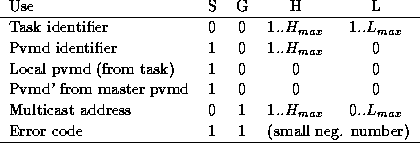
Naturally, TIDs are intended to be opaque to the application, and the programmer should not attempt to predict their values or modify them without using functions supplied in the programming library. More symbolic naming can be obtained by using a name server library layered on top of the raw PVM calls, if the convenience is deemed worth the cost of name lookup.
PVM assigns an architecture name to each kind of machine on which it runs, to distinguish between machines that run different executables, because of hardware or operating system differences. Many standard names are defined, and others can be added.
Sometimes machines with incompatible executables use the same binary data representation. PVM takes advantage of this to avoid data conversion. Architecture names are mapped to data encoding numbers, and the encoding numbers are used to determine when it is necessary to convert.
PVM daemons and tasks can compose and send messages of arbitrary lengths containing typed data. The data can be converted using XDR [12] when passing between hosts with incompatible data formats. Messages are tagged at send time with a user-defined integer code and can be selected for receipt by source address or tag.
The sender of a message does not wait for an acknowledgment from the receiver, but continues as soon as the message has been handed to the network and the message buffer can be safely deleted or reused. Messages are buffered at the receiving end until received. PVM reliably delivers messages, provided the destination exists. Message order from each sender to each receiver in the system is preserved; if one entity sends several messages to another, they will be received in the same order.
Both blocking and nonblocking receive primitives are provided, so a task can wait for a message without (necessarily) consuming processor time by polling for it. Or, it can poll for a message without hanging. A receive with timeout is also provided, which returns after a specified time if no message has arrived.
No acknowledgments are used between sender and receiver.
Messages are reliably delivered and buffered by the system.
If we ignore fault recovery,
then either an application will run to completion or,
if some component goes down, it won't.
In order to provide fault recovery,
a task ( ) must be prepared for another task
(
) must be prepared for another task
( ,
from which it wants a message) to crash,
and must be able to take corrective action.
For example,
it might reschedule its request to a different server,
or even start a new server.
From the viewpoint of
,
it doesn't matter specifically when
crashes
relative to messages sent from
.
While waiting for
,
will receive either a message from
or notification
that
has crashed.
For the purposes of flow control,
a fully blocking send can easily be built using the semi-synchronous
send primitive.
,
from which it wants a message) to crash,
and must be able to take corrective action.
For example,
it might reschedule its request to a different server,
or even start a new server.
From the viewpoint of
,
it doesn't matter specifically when
crashes
relative to messages sent from
.
While waiting for
,
will receive either a message from
or notification
that
has crashed.
For the purposes of flow control,
a fully blocking send can easily be built using the semi-synchronous
send primitive.
PVM provides notification messages as a means to implement fault recovery in an application. A task can request that the system send a message on one of the following three events:
Type              Meaning
-----------------------------------------------
PvmTaskExit       Task exits or crashes
PvmHostDelete     Host is deleted or crashes
PvmHostAdd        New hosts are added to the VM
-----------------------------------------------
Notify requests are stored in the pvmds, attached to objects they monitor. Requests for remote events (occurring on a different host than the requester) are kept on both hosts. The remote pvmd sends the message if the event occurs, while the local one sends the message if the remote host goes down. The assumption is that a local pvmd can be trusted; if it goes down, tasks running under it won't be able to do anything, so they don't need to be notified.
One pvmd runs on each host of a virtual machine. Pvmds owned by (running as) one user do not interact with those owned by others, in order to reduce security risk, and minimize the impact of one PVM user on another.
The pvmd serves as a message router and controller. It provides a point of contact, authentication, process control, and fault detection. An idle pvmd occasionally checks that its peers are still running. Even if application programs crash, pvmds continue to run, to aid in debugging.
The first pvmd (started by hand) is designated the master, while the others (started by the master) are called slaves. During normal operation, all are considered equal. But only the master can start new slaves and add them to the configuration. Reconfiguration requests originating on a slave host are forwarded to the master. Likewise, only the master can forcibly delete hosts from the machine.
The libpvm library allows a task to interface with the pvmd and other tasks. It contains functions for packing (composing) and unpacking messages, and functions to perform PVM syscalls by using the message functions to send service requests to the pvmd. It is made as small and simple as possible. Since it shares an address space with unknown, possibly buggy, code, it can be broken or subverted. Minimal sanity-checking of parameters is performed, leaving further authentication to the pvmd.
The top level of the libpvm library, including most of the programming interface functions, is written in a machine-independent style. The bottom level is kept separate and can be modified or replaced with a new machine-specific file when porting PVM to a new environment.
We gratefully acknowledge the valuable assistance of many people who have contributed to the PVM project. In particular, we thank Peter Rigsbee and Neil Lincoln for their help and insightful comments. We thank the PVM group at the University of Tennessee and Oak Ridge National Laboratory-Carolyn Aebischer, Martin Do, June Donato, Jim Kohl, Keith Moore, Phil Papadopoulos, and Honbo Zhou-for their assistance with the development of various pieces and components of PVM. In addition we express appreciation to all those who helped in the preparation of this work, in particular to Clint Whaley and Robert Seccomb for help on the examples, Ken Hawick for contributions to the glossary, and Gail Pieper for helping with the task of editing the manuscript.
A number of computer vendors have encouraged and provided valuable suggestions during the development of PVM. We thank Cray Research Inc., IBM, Convex Computer, Silicon Graphics, Sequent Computer, and Sun Microsystems for their assistance in porting the software to their platforms.
This work would not have been possible without the support of the Office of Scientific Computing, U.S. Department of Energy, under Contract DE-AC05-84OR21400; the National Science Foundation Science and Technology Center Cooperative Agreement No. CCR-8809615; and the Science Alliance, a state-supported program at the University of Tennessee.
The pvmd and libpvm manage message buffers,
which potentially hold large amounts of dynamic data.
Buffers need to be shared efficiently,
for example, to attach a multicast message to several send queues
(see Section
).
To avoid copying,
all pointers are to a single instance of the data (a databuf),
which is
refcounted
by
allocating a few extra bytes for
an integer at the head of the data.
A pointer to the data itself is passed around,
and routines subtract
from it to access the refcount or free the block.
When the refcount of a databuf decrements to zero,
it is freed.
PVM messages are composed without declaring a maximum length ahead of time. The pack functions allocate memory in steps, using databufs to store the data, and frag descriptors to chain the databufs together.
A frag descriptor struct frag
holds a pointer (fr_dat) to a block of data
and its length (fr_len).
It also keeps a pointer (fr_buf) to the databuf
and its total length (fr_max);
these reserve space to prepend or append data.
Frags can also reference static (non-databuf) data.
A frag has link pointers so it
can be chained into a list.
Each frag keeps a count of references to it;
when the refcount decrements to zero,
the frag is freed
and the underlying databuf refcount is decremented.
In the case where a frag descriptor is the head of a list,
its refcount applies to the entire list.
When it reaches zero,
every frag in the list is freed.
Figure
shows a list of fragments storing a message.
Libpvm provides functions to pack all of the primitive data types into a message, in one of several encoding formats. There are five sets of encoders and decoders. Each message buffer has a set associated with it. When creating a new message, the encoder set is determined by the format parameter to pvm_mkbuf(). When receiving a message, the decoders are determined by the encoding field of the message header. The two most commonly used ones pack data in raw (host native) and default (XDR) formats. Inplace encoders pack descriptors of the data (the frags point to static data), so the message is sent without copying the data to a buffer. There are no inplace decoders. Foo encoders use a machine-independent format that is simpler than XDR; these encoders are used when communicating with the pvmd. Alien decoders are installed when a received message can't be unpacked because its encoding doesn't match the data format of the host. A message in an alien data format can be held or forwarded, but any attempt to read data from it results in an error.
Figure
shows libpvm message management.
To allow the PVM programmer to handle
message buffers,
they are labeled with integer message id's (MIDs)
,
which are simply indices into the message heap.
When a message buffer is freed,
its MID is recycled.
The heap
starts out small and
is extended if it becomes full.
Generally,
only a few messages exist at any time,
unless an application explicitly stores them.
A vector of functions for encoding/decoding primitive types (struct encvec) is initialized when a message buffer is created. To pack a long integer, the generic pack function pvm_pklong() calls (message_heap[mid].ub_codef->enc_long)() of the buffer. Encoder vectors were used for speed (as opposed to having a case switch in each pack function). One drawback is that every encoder for every format is touched (by naming it in the code), so the linker must include all the functions in every executable, even when they're not used.
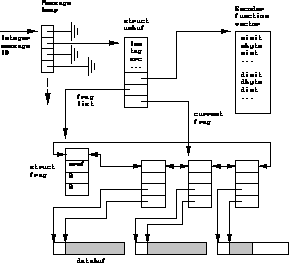
Figure: Message storage in libpvm
By comparison with libpvm,
message packing in the pvmd
is very simple.
Messages are handled using struct mesg
(shown in Figure
).
There are
encoders for signed and unsigned integers and strings,
which use in the libpvm foo format.
Integers occupy four bytes each, with
bytes in network order (bits 31..24 followed by bits 23..16, ...).
Byte strings are packed as an integer length
(including the terminating null for ASCII strings),
followed by the data
and zero to three null bytes to round the total length to a multiple of four.
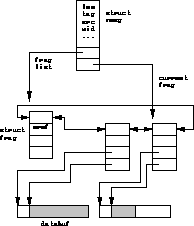
Figure: Message storage in pvmd
Messages for the pvmd are reassembled from packets in loclinpkt() if from a local task, or in netinpkt() if from another pvmd or foreign task. Reassembled messages are passed to one of three entry points:
Function           Messages From
-----------------------------------------------------
loclentry()        Local tasks
netentry()         Remote pvmds
schentry()         Local or remote special tasks
                   (Resource manager, Hoster, Tasker)
-----------------------------------------------------
If the message tag and contents are valid, a new thread of action is started to handle the request. Invalid messages are discarded.
Control messages are sent to a task like regular messages, but have tags in a reserved space (between TC_FIRST and TC_LAST). Normally, when a task downloads a message, it queues it for receipt by the program. Control messages are instead passed to pvmmctl() and then discarded. Like the entry points in the pvmd, pvmmctl() is an entry point in the task, causing it to take some asynchronous action. The main difference is that control messages can't be used to get the task's attention, since it must be in mxfer(), sending or receiving, in order to get them.
The following control message tags are defined.
The first three are used by the direct routing mechanism
(discussed in Section
).
TC_OUTPUT is used to implement
pvm_catchout() (Section
).
User-definable control messages may
be added in the future as a way of implementing
PVM signal handlers
.
Tag            Meaning
----------------------------------------
TC_CONREQ      Connection request
TC_CONACK      Connection ack
TC_TASKEXIT    Task exited/doesn't exist
TC_NOOP        Do nothing
TC_OUTPUT      Claim child stdout data
TC_SETTMASK    Change task trace mask
----------------------------------------
At startup, a pvmd configures itself as a master or slave, depending on its command line arguments. It creates and binds sockets to talk to tasks and other pvmds, and it opens an error log file /tmp/pvml.uid. A master pvmd reads the host file if supplied; otherwise it uses default parameters. A slave pvmd gets its parameters from the master pvmd via the command line and configuration messages.
After configuration, the pvmd enters a loop in function work(). At the core of the work loop is a call to select() that probes all sources of input for the pvmd (local tasks and the network). Packets are received and routed to send queues. Messages to the pvmd are reassembled and passed to the entry points.
A pvmd shuts down when it is deleted from the virtual machine,
killed (signaled),
loses contact with the master pvmd,
or breaks (e.g., with a bus error).
When a pvmd shuts down,
it takes two final actions.
First, it kills any tasks running under it,
with signal SIGTERM.
Second,
it sends a final shutdown message (Section
)
to every other pvmd in its
host table.
The other pvmds would eventually discover the missing one
by timing out trying to communicate with it,
but the shutdown message speeds the process.
A host table describes the configuration of a virtual machine.
It lists
the name,
address
and
communication state
for each host.
Figure
shows how a host table is built from
struct htab and struct hostd structures.
Host tables are issued by the master pvmd
and kept synchronized across the virtual machine.
The delete operation is simple:
On receiving a
DM_HTDEL message from the master,
a pvmd calls
hostfailentry()
for each host listed in the message,
as though the deleted pvmds crashed.
Each pvmd can autonomously delete hosts
from its own table on finding them
unreachable (by timing out during communication).
The add operation is done
with a three-phase commit,
in order to guarantee global availability of new hosts
synchronously with completion of the add-host request.
This is described in
Section
.
Each host descriptor has a refcount so it can be shared by multiple host tables. As the configuration of the machine changes, the host descriptors (except those added and deleted, of course) propagate from one host table to the next. This propagation is necessary because they hold various state information.
Host tables also serve other uses: They allow the pvmd to manipulate host sets, for example, when picking candidate hosts on which to spawn a task. Also, the advisory host file supplied to the master pvmd is parsed and stored in a host table.
If the master pvmd is started with a host file,
it parses the file into a host table, filehosts.
If some hosts in the file are to be started automatically,
the master
sends a
DM_ADD message to itself.
The slave hosts are started
just as though they had been added dynamically
(Section
).
Parallel processing, the method of having many small tasks solve one large problem, has emerged as a key enabling technology in modern computing. The past several years have witnessed an ever-increasing acceptance and adoption of parallel processing, both for high-performance scientific computing and for more ``general-purpose'' applications, was a result of the demand for higher performance, lower cost, and sustained productivity. The acceptance has been facilitated by two major developments: massively parallel processors (MPPs) and the widespread use of distributed computing.
MPPs are now the most powerful computers in the world. These machines combine a few hundred to a few thousand CPUs in a single large cabinet connected to hundreds of gigabytes of memory. MPPs offer enormous computational power and are used to solve computational Grand Challenge problems such as global climate modeling and drug design. As simulations become more realistic, the computational power required to produce them grows rapidly. Thus, researchers on the cutting edge turn to MPPs and parallel processing in order to get the most computational power possible.
The second major development affecting scientific problem solving is distributed computing . Distributed computing is a process whereby a set of computers connected by a network are used collectively to solve a single large problem. As more and more organizations have high-speed local area networks interconnecting many general-purpose workstations, the combined computational resources may exceed the power of a single high-performance computer. In some cases, several MPPs have been combined using distributed computing to produce unequaled computational power.
The most important factor in distributed computing is cost. Large MPPs typically cost more than $10 million. In contrast, users see very little cost in running their problems on a local set of existing computers. It is uncommon for distributed-computing users to realize the raw computational power of a large MPP, but they are able to solve problems several times larger than they could using one of their local computers.
Common between distributed computing and MPP is the notion of message passing . In all parallel processing, data must be exchanged between cooperating tasks. Several paradigms have been tried including shared memory, parallelizing compilers, and message passing. The message-passing model has become the paradigm of choice, from the perspective of the number and variety of multiprocessors that support it, as well as in terms of applications, languages, and software systems that use it.
The Parallel Virtual Machine (PVM) system described in this book uses the message-passing model to allow programmers to exploit distributed computing across a wide variety of computer types, including MPPs. A key concept in PVM is that it makes a collection of computers appear as one large virtual machine , hence its name.
Each pvmd
maintains a list of all tasks under its management
(Figure
).
Every task, regardless of state, is a member of a
threaded list,
sorted by task id.
Most tasks are also in a second list,
sorted by process id.
The head of both lists is
locltasks.
PVM provides a simple debugging system
described in Section
.
More complex debuggers can be built by using
a special type of task called a tasker, introduced in version 3.3.
A tasker starts (execs, and is the parent of)
other tasks.
In general,
a debugger is a process that
controls the execution of other processes - can read and write
their memories and start and stop instruction counters.
On many species of Unix,
a debugger must be the direct parent of any processes it controls.
This is becoming less common with growing availability of the
attachable ptrace interface.
The function of the tasker interface overlaps with the simple debugger starter, but is fundamentally different for two reasons: First, all tasks running under a pvmd (during the life of the tasker) may be children of a single tasker process. With PvmTaskDebug, a new debugger is necessarily started for each task. Second, the tasker cannot be enabled or disabled by spawn flags, so it is always in control, though this is not an important difference.
If a tasker is registered (using pvm_reg_tasker()) with a pvmd when a DM_EXEC message is received to start new tasks, the pvmd sends a SM_STTASK message to the tasker instead of calling execv(). No SM_STTASKACK message is required; closure comes from the task reconnecting to the pvmd as usual. The pvmd doesn't get SIGCHLD signals when a tasker is in use, because it's not the parent process of tasks, so the tasker must send notification of exited tasks to the pvmd in a SM_TASKX message.
The pvmd uses a wait context (waitc) to hold state when a thread of operation must be interrupted. The pvmd is not truly multithreaded but performs operations concurrently. For example, when a pvmd gets a syscall from a task and must interact with another pvmd, it doesn't block while waiting for the other pvmd to respond. It saves state in a waitc and returns immediately to the work() loop. When the reply arrives, the pvmd uses the information stashed in the waitc to complete the syscall and reply to the task. Waitcs are serial numbered, and the number is sent in the message header along with the request and returned with the reply.
For many operations, the TIDs and kind of wait are the only information saved. The struct waitc includes a few extra fields to handle most of the remaining cases, and a pointer, wa_spec, to a block of extra data for special cases-the spawn and host startup operations, which need to save struct waitc_spawn and struct waitc_add.
Sometimes
more than one phase of waiting is necessary-in
series, parallel,
or nested.
In the parallel case, a separate waitc is created for each foreign host.
The waitcs are
peered (linked in a list)
together to indicate they pertain to the same operation.
If a waitc has no peers,
its peer links point to itself.
Usually,
peered waitcs share data,
for example, wa_spec.
All existing parallel operations
are conjunctions;
a peer group is finished when every waitc
in the group is finished.
As replies arrive,
finished waitcs are collapsed out of the list and deleted.
When the
finished waitc is the only one left,
the operation is complete.
Figure
shows single and peered waitcs
stored in
waitlist (the list
of all active waitcs).
When a host fails or a task exits, the pvmd searches waitlist for any blocked on this TID and terminates those operations. Waitcs from the dead host or task blocked on something else are not deleted; instead, their wa_tid fields are zeroed. This approach prevents the wait id's from being recycled while replies are still pending. Once the defunct waitcs are satisfied, they are silently discarded.
Fault detection
originates in the pvmd-pvmd
protocol
(Section
).
When the pvmd times out while communicating with another,
it calls hostfailentry(),
which scans waitlist and terminates any operations waiting
on the down host.
A pvmd can recover from the loss of any foreign pvmd except the master. If a slave loses the master, the slave shuts itself down. This algorithm ensures that the virtual machine doesn't become partitioned and run as two partial machines. It does, however, decrease fault tolerance of the virtual machine because the master must never crash. There is currently no way for the master to hand off its status to another pvmd, so it always remains part of the configuration. (This is an improvement over PVM 2, in which the failure of any pvmd would shut down the entire system.)
The shadow pvmd (pvmd') runs on the master host and is used by the master to start new slave pvmds. Any of several steps in the startup process (for example, starting a shell on the remote machine) can block for seconds or minutes (or hang), and the master pvmd must be able to respond to other messages during this time. It's messy to save all the state involved, so a completely separate process is used.
The pvmd' has host number 0 and communicates with the master through the normal pvmd-pvmd interface, though it never talks to tasks or other pvmds. The normal host failure detection mechanism is used to recover in the event the pvmd' fails. The startup operation has a wait context in the master pvmd. If the pvmd' breaks, the master catches a SIGCHLD from it and calls hostfailentry(), which cleans up.
Getting a slave pvmd started is a messy task with no good solution. The goal is to get a process running on the new host, with enough identity to let it be fully configured and added as a peer.
Ideally, the mechanism used should be widely available, secure, and fast, while leaving the system easy to install. We'd like to avoid having to type passwords all the time, but don't want to put them in a file from where they can be stolen. No one system meets all of these criteria. Using inetd or connecting to an already-running pvmd or pvmd server at a reserved port would allow fast, reliable startup, but would require that a system administrator install PVM on each host. Starting the pvmd via rlogin or telnet with a chat script would allow access even to IP-connected hosts behind firewall machines and would require no special privilege to install; the main drawbacks are speed and the effort needed to get the chat program working reliably.
Two widely available systems are rsh and rexec() ; we use both to cover the cases where a password does and does not need to be typed. A manual startup option allows the user to take the place of a chat program, starting the pvmd by hand and typing in the configuration. rsh is a privileged program that can be used to run commands on another host without a password, provided the destination host can be made to trust the source host. This can be done either by making it equivalent (requires a system administrator) or by creating a .rhosts file on the destination host (this isn't a great idea). The alternative, rexec(), is a function compiled into the pvmd. Unlike rsh, which doesn't take a password, rexec() requires the user to supply one at run time, either by typing it in or by placing it in a .netrc file (this is a really bad idea).
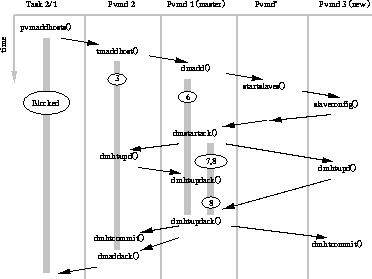
Figure: Timeline of addhost operation
Figure
shows
a host being added to the machine.
A task calls pvm_addhosts()
to
send a request to its pvmd,
which in turn sends a DM_ADD message to the master
(possibly itself).
The master pvmd
creates a new host table entry for each
host
requested,
looks up the IP addresses,
and sets the options
from host file entries
or defaults.
The host descriptors are kept in a waitc_add structure
(attached to a wait context)
and not yet added to the host table.
The master
forks the pvmd'
to do the dirty work,
passing it a list of hosts and commands to execute
(an SM_STHOST message).
The pvmd' uses rsh, rexec() or manual startup
to start each pvmd,
pass it parameters,
and
get a line of configuration data back.
The configuration dialog between pvmd'
and a new slave is as follows:
---------------------------------------------------------------------------
pvmd' --> slave:   (exec) $PVM_ROOT/lib/pvmd -s -d8 -nhonk 1 80 a9ca95:0f5a
                                              4096 3 80a95c43:0000
slave --> pvmd':   ddpro<2312> arch
 ip<80a95c43:0b3f> mtu<4096>
pvmd' --> slave:   EOF
---------------------------------------------------------------------------
The addresses of the master and slave pvmds are passed on the command line. The slave writes its configuration on standard output, then waits for an EOF from the pvmd' and disconnects. It runs in probationary status (runstate = PVMDSTARTUP) until it receives the rest of its configuration from the master pvmd. If it isn't configured within five minutes (parameter DDBAILTIME), it assumes there is some problem with the master and quits. The protocol revision (DDPROTOCOL) of the slave pvmd must match that of the master. This number is incremented whenever a change in the protocol makes it incompatible with the previous version. When several hosts are added at once, startup is done in parallel. The pvmd' sends the data (or errors) in a DM_STARTACK message to the master pvmd, which completes the host descriptors held in the wait context.
If a special task called a hoster is registered with the master pvmd when it receives the DM_ADD message, the pvmd' is not used. Instead, the SM_STHOST message is sent to the hoster, which starts the remote processes as described above using any mechanism it wants, then sends a SM_STHOSTACK message (same format as DM_STARTACK) back to the master pvmd. Thus, the method of starting slave pvmds is dynamically replaceable, but the hoster does not have to understand the configuration protocol. If the hoster task fails during an add operation, the pvmd uses the wait context to recover. It assumes none of the slaves were started and sends a DM_ADDACK message indicating a system error.
After the slaves are started, the master sends each a DM_SLCONF message to set parameters not included in the startup protocol. It then broadcasts a DM_HTUPD message to all new and existing slaves. Upon receiving this message, each slave knows the configuration of the new virtual machine. The master waits for an acknowledging DM_HTUPDACK message from every slave, then broadcasts an HT_COMMIT message, shifting all to the new host table. Two phases are needed so that new hosts are not advertised (e.g., by pvm_config()) until all pvmds know the new configuration. Finally, the master sends a DM_ADDACK reply to the original request, giving the new host id's.
Note: Recent experience suggests it would be cleaner to manage the pvmd' through the task interface instead of the host interface. This approach would allow multiple starters to run at once (parallel startup is implemented explicitly in a single pvmd' process).
A resource manager (RM) is a PVM task responsible for making task and host scheduling (placement) decisions. The resource manager interface was introduced in version 3.3. The simple schedulers embedded in the pvmd handle many common conditions, but require the user to explicitly place program components in order to get the maximum efficiency. Using knowledge not available to the pvmds, such as host load averages, a RM can make more informed decisions automatically. For example, when spawning a task, it could pick the host in order to balance the computing load. Or, when reconfiguring the virtual machine, the RM could interact with an external queuing system to allocate a new host.
The number of RMs registered can vary from one for an entire virtual machine to one per pvmd. The RM running on the master host (where the master pvmd runs) manages any slave pvmds that don't have their own RMs. A task connecting anonymously to a virtual machine is assigned the default RM of the pvmd to which it connects. A task spawned from within the system inherits the RM of its parent task.
If a task has a RM assigned to it, service requests from the task to its pvmd are routed to the RM instead. Messages from the following libpvm functions are intercepted:
------------------------------------------------
Libpvm function    Default Message    RM Message
------------------------------------------------
pvm_addhost()      TM_ADDHOST         SM_ADDHOST
pvm_delhost()      TM_DELHOST         SM_DELHOST
pvm_spawn()        TM_SPAWN           SM_SPAWN
------------------------------------------------
Queries also go to the RM, since it presumably knows more about the state of the virtual machine:
------------------------------------------------
Libpvm function    Default Message    RM Message
------------------------------------------------
pvm_config()       TM_CONFIG          SM_CONFIG
pvm_notify()       TM_NOTIFY          SM_NOTIFY
pvm_task()         TM_TASK            SM_TASK
------------------------------------------------
The call to register a task as a RM (pvm_reg_rm()) is also redirected if RM is already running. In this way the existing RM learns of the new one, and can grant or refuse the request to register.
Using messages SM_EXEC and SM_ADD, the RM can directly command the pvmds to start tasks or reconfigure the virtual machine. On receiving acknowledgement for the commands, it replies to the client task. The RM is free to interpret service request parameters in any way it wishes. For example, the architecture class given to pvm_spawn() could be used to distinguish hosts by memory size or CPU speed.
Libpvm is written in C and directly supports C and C++ applications. The Fortran library, libfpvm3.a (also written in C), is a set of wrapper functions that conform to the Fortran calling conventions. The Fortran/C linking requirements are portably met by preprocessing the C source code for the Fortran library with m4 before compilation.
On the first call to a libpvm function, pvm_beatask() is called to initialize the library state and connect the task to its pvmd. Connecting (for anonymous tasks) is slightly different from reconnecting (for spawned tasks).
The pvmd publishes the address of the socket on which it listens in /tmp/pvmd.uid, where uid is the numeric user id under which the pvmd runs. This file contains a line of the form 7f000001:06f7 or /tmp/aaa014138
This is the IP address and port number (in hexadecimal) of the socket, or the path if a Unix-domain socket. To avoid the need to read the address file, the same information is passed to spawned tasks in environment variable PVMSOCK.
To reconnect, a spawned task also needs its expected process id. When a task is spawned by the pvmd, a task descriptor is created for it during the exec phase. The descriptor must exist so it can stash any messages that arrive for the task before it reconnects and can receive them. During reconnection, the task identifies itself to the pvmd by its PID. If the task is always the child of the pvmd (i.e., the exact process exec'd by it), then it could use the value returned by getpid(). To allow for intervening processes, such as debuggers, the pvmd passes the expected PID in environment variable PVMEPID, and the task uses that value in preference to its real PID. The task also passes its real PID so it can be controlled normally by the pvmd.
pvm_beatask() creates a TCP socket and does a proper connection dance with the pvmd. Each must prove its identity to the other, to prevent a different user from spoofing the system. It does this by creating a file in /tmp writable only by the owner, and challenging the other to write in the file. If successful, the identity of the other is proven. Note that this authentication is only as strong as the filesystem and the authority of root on each machine.
A protocol serial number (TDPROTOCOL) is compared whenever a task connects to a pvmd or another task. This number is incremented whenever a change in the protocol makes it incompatible with the previous version.
Disconnecting is much simpler. It can be done forcibly by a close from either end, for example, by exiting the task process. The function pvm_exit() performs a clean shutdown, such that the process can be connected again later (it would get a different TID).
PVM communication is based on TCP , UDP , and Unix-domain sockets. While more appropriate protocols exist, they aren't as generally available.
VMTP [3] is one example of a protocol built for this purpose. Although intended for RPC-style interaction (request-response), it could support PVM messages. It is packet oriented and efficiently sends short blocks of data (such as most pvmd-pvmd management messages) but also handles streaming (necessary for task-task communication). It supports multicasting and priority data (something PVM doesn't need yet). Connections don't need to be established before use; the first communication initializes the protocol drivers at each end. VMTP was rejected, however. because it is not widely available (using it requires modifying the kernel).
This section explains the PVM protocols. There are three connections to consider: Between pvmds, between pvmd and task, and between tasks.
In an MPP, every processor is exactly like every other in capability, resources, software, and communication speed. Not so on a network. The computers available on a network may be made by different vendors or have different compilers. Indeed, when a programmer wishes to exploit a collection of networked computers, he may have to contend with several different types of heterogeneity :
The set of computers available can include a wide range of architecture types such as 386/486 PC class machines, high-performance workstations, shared-memory multiprocessors, vector supercomputers, and even large MPPs. Each architecture type has its own optimal programming method. In addition, a user can be faced with a hierarchy of programming decisions. The parallel virtual machine may itself be composed of parallel computers. Even when the architectures are only serial workstations, there is still the problem of incompatible binary formats and the need to compile a parallel task on each different machine.
Data formats on different computers are often incompatible. This incompatibility is an important point in distributed computing because data sent from one computer may be unreadable on the receiving computer. Message-passing packages developed for heterogeneous environments must make sure all the computers understand the exchanged data. Unfortunately, the early message-passing systems developed for specific MPPs are not amenable to distributed computing because they do not include enough information in the message to encode or decode it for any other computer.
Even if the set of computers are all workstations with the same data format, there is still heterogeneity due to different computational speeds. As an simple example, consider the problem of running parallel tasks on a virtual machine that is composed of one supercomputer and one workstation. The programmer must be careful that the supercomputer doesn't sit idle waiting for the next data from the workstation before continuing. The problem of computational speeds can be very subtle. The virtual machine can be composed of a set of identical workstations. But since networked computers can have several other users on them running a variety of jobs, the machine load can vary dramatically. The result is that the effective computational power across identical workstations can vary by an order of magnitude.
Like machine load, the time it takes to send a message over the network can vary depending on the network load imposed by all the other network users, who may not even be using any of the computers in the virtual machine. This sending time becomes important when a task is sitting idle waiting for a message, and it is even more important when the parallel algorithm is sensitive to message arrival time. Thus, in distributed computing, heterogeneity can appear dynamically in even simple setups.
Despite these numerous difficulties caused by heterogeneity, distributed computing offers many advantages:
The pvmd and libpvm use the same message header,
shown in Figure
.
Code
contains an integer tag (message type).
Libpvm uses
Encoding
to pass the encoding
style of the message, as it can pack in different
formats.
The pvmd always sets Encoding (and requires that it be set)
to 1 (foo),
Pvmds use
the
Wait Context
field
to pass the wait id's (if any, zero if none)
of the waitc
associated with the message.
Certain tasks (resource manager, tasker, hoster)
also use wait id's.
The
Checksum
field is reserved for future use.
Messages are sent in one or more fragments,
each with its own fragment header (described below).
The message header is at the beginning of the first fragment.
PVM daemons communicate with one another through UDP sockets. UDP is an unreliable delivery service which can lose, duplicate or reorder packets, so an acknowledgment and retry mechanism is used. UDP also limits packet length, so PVM fragments long messages.
We considered TCP, but three factors make it inappropriate. First is scalability . In a virtual machine of N hosts, each pvmd must have connections to the other N - 1. Each open TCP connection consumes a file descriptor in the pvmd, and some operating systems limit the number of open files to as few as 32, whereas a single UDP socket can communicate with any number of remote UDP sockets. Second is overhead . N pvmds need N(N - 1)/2 TCP connections, which would be expensive to set up. The PVM/UDP protocol is initialized with no communication. Third is fault tolerance . The communication system detects when foreign pvmds have crashed or the network has gone down, so we need to set timeouts in the protocol layer. The TCP keepalive option might work, but it's not always possible to get adequate control over the parameters.
The packet header
is shown in Figure
.
Multibyte values are sent in (Internet) network byte order
(most significant byte first).
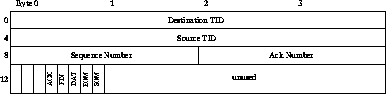
Figure: Pvmd-pvmd packet header
The source and destination fields hold the TIDs of the true source and final destination of the packet, regardless of the route it takes. Sequence and acknowledgment numbers start at 1 and increment to 65535, then wrap to zero.
SOM (EOM) - Set for the first (last) fragment of a message. Intervening fragments have both bits cleared. They are used by tasks and pvmds to delimit message boundaries.
DAT - If set, data is contained in the packet, and the sequence number is valid. The packet, even if zero length, must be delivered.
ACK - If set, the acknowledgment number field is valid.
This bit may be combined with the DAT bit to piggyback an acknowledgment
on a data packet.

FIN - The pvmd is closing down the connection. A packet with FIN bit set (and DAT cleared) begins an orderly shutdown. When an acknowledgement arrives (ACK bit set and ack number matching the sequence number from the FIN packet), a final packet is sent with both FIN and ACK set. If the pvmd panics, (for example on a trapped segment violation) it tries to send a packet with FIN and ACK set to every peer before it exits.
The state of a connection to another pvmd is kept in its host table entry. The protocol driver uses the following fields of struct hostd:
Field           Meaning
-----------------------------------------------------
hd_hostpart    TID of pvmd
hd_mtu         Max UDP packet length to host
hd_sad         IP address and UDP port number
hd_rxseq       Expected next packet number from host
hd_txseq       Next packet number to send to host
hd_txq         Queue of packets to send
hd_opq         Queue of packets sent, awaiting ack
hd_nop         Number of packets in hd_opq
hd_rxq         List of out-of-order received packets
hd_rxm         Buffer for message reassembly
hd_rtt         Estimated smoothed round-trip time
-----------------------------------------------------
Figure
shows
the host send and outstanding-packet queues.
Packets waiting to be sent to a host are queued in FIFO
hd_txq.
Packets
are appended to this queue by the routing code,
described in
Section
.
No receive queues are used;
incoming packets are passed immediately through
to other send queues or reassembled into messages (or discarded).
Incoming messages are delivered to a pvmd
entry point as described in
Section
.

Figure: Host descriptors with send queues
The protocol allows multiple outstanding packets to improve performance over high-latency networks, so two more queues are required. hd_opq holds a per-host list of unacknowledged packets, and global opq lists all unacknowledged packets, ordered by time to retransmit. hd_rxq holds packets received out of sequence until they can be accepted.
The difference in time between sending a packet
and getting the acknowledgement is
used to estimate the round-trip time to the foreign host.
Each update is filtered into the estimate according to the formula
 .
.
When the acknowledgment for a packet arrives, the packet is removed from hd_opq and opq and discarded. Each packet has a retry timer and count, and each is resent until acknowledged by the foreign pvmd. The timer starts at 3 * hd_rtt, and doubles for each retry up to 18 seconds. hd_rtt is limited to nine seconds, and backoff is bounded in order to allow at least 10 packets to be sent to a host before giving up. After three minutes of resending with no acknowledgment, a packet expires.
If a packet expires as a result of timeout, the foreign pvmd is assumed to be down or unreachable, and the local pvmd gives up on it, calling hostfailentry()
A task talks to its pvmd and other tasks through TCP sockets. TCP is used because it delivers data reliably. UDP can lose packets even within a host. Unreliable delivery requires retry (with timers) at both ends: since tasks can't be interrupted while computing to perform I/O, we can't use UDP.
Implementing a
packet service over TCP is
simple
because of its reliable delivery.
The packet header is shown in
Figure
.
No sequence numbers are needed,
and only flags SOM and EOM
(these have the same meaning as in Section
).
Since TCP
provides no record marks to
distinguish back-to-back packets from one another,
the length is sent in the header.
Each side maintains a
FIFO of packets to send,
and switches between reading
the socket when data is available
and writing when there is space.
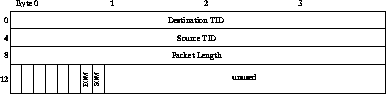
Figure: Pvmd-task packet header
The main drawback to TCP (as opposed to UDP) is that more system calls are needed to transfer each packet. With UDP, a single sendto() and single recvfrom() are required. With TCP, a packet can be sent by a single write() call, but must be received by two read() calls, the first to get the header and the second to get the data.
When traffic on the connection is heavy,
a simple optimization reduces the average number of reads back
to about one per packet.
If,
when reading the packet body,
the requested length is increased by the size of a
packet header,
the read may succeed in getting both the packet body
and header of the next packet at once.
We have the header for the next packet for free
and can repeat this process.
Version 3.3 introduced the use of Unix-domain stream sockets as an alternative to TCP for local communication, to improve latency and transfer rate (typically by a factor of two). If enabled (the system is built without the NOUNIXDOM option), stream sockets are used between the pvmd and tasks as well as between tasks on the same host.
Packet descriptors (struct pkt)
track message fragments
through
the pvmd.
Fields
pk_buf, pk_max, pk_dat and pk_len
are used in the same ways as
similarly named fields of a frag,
described in
Section
.
Besides data,
pkts contain state to operate
the pvmd-pvmd protocol.
Messages are sent by calling sendmessage(), which routes by destination address. Messages for other pvmds or tasks are linked to packet descriptors and attached to a send queue. If the pvmd addresses a message to itself, sendmessage() passes the whole message descriptor to netentry(), avoiding the packet layer entirely. This loopback interface is used often by the pvmd. During a complex operation, netentry() may be reentered several times as the pvmd sends itself messages.
Messages to the pvmd are reassembled from packets
in message reassembly buffers,
one for each local task and remote pvmd.
Completed messages are passed to entry points (Section
).
A graph of packet and message routing inside the pvmd is shown in
Figure
.
Packets are received from the network
by
netinput()
directly into buffers
long enough to hold the largest packet
the pvmd will receive (its MTU in the host table).
Packets from local tasks
are read by loclinput(),
which creates a buffer large enough for each packet
after it reads the header.
To route a packet,
the pvmd chains it onto
the queue for its destination.
If a packet is multicast
(see Section
),
the descriptor is replicated,
counting extra
references on the underlying databuf.
One copy is placed in each send queue.
After the last copy of the packet is sent,
the databuf is freed.
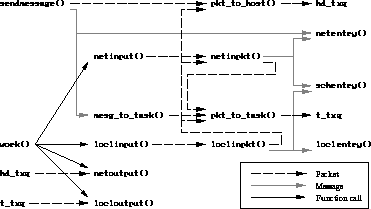
Figure: Packet and message routing in pvmd
Messages are generally built with fragment length equal to the MTU of the host's pvmd, allowing them to be forwarded without refragmentation. In some cases, the pvmd can receive a packet (from a task) too long to be sent to another pvmd. The pvmd refragments the packet by replicating its descriptor as many times as necessary. A single databuf is shared between the descriptors. The pk_dat and pk_len fields of the descriptors cover successive chunks of the original packet, each chunk small enough to send. The SOM and EOM flags are adjusted (if the original packet is the start or end of a message). At send time, netoutput() saves the data under where it writes the packet header, sends the packet, and then restores the data.


MIT Press
Scientific and Engineering ComputationJanusz Kowalik, Editor
 1994 Massachusetts Institute of Technology
All rights reserved. No part of this book may be reproduced in any form by any electronic or mechanical means (including photocopying, recording, or information storage and retrieval) without permission in writing from the publisher.
This book was set in  by the authors and was
printed and bound in the United States of America.
by the authors and was
printed and bound in the United States of America.
Library of Congress Cataloging-in-Publication Data
This book is also available in postscript and html forms over the Internet.
To retrieve the postscript file you can use one of the following methods:
netlib@netlib.org and in the message type: send pvm-book.ps from pvm3/book
To view the html file use the URL:
http://www.netlib.org/pvm3/book/pvm-book.html
In our next example we program a matrix-multiply algorithm described by Fox
et al. in
[5]. The mmult program can be found at the end of this
section.
The mmult program will calculate  , where
 ,
, and
are all square matrices. For simplicity we
assume that
,
, and
are all square matrices. For simplicity we
assume that  tasks will be used to calculate the solution.
Each task will calculate a subblock of the resulting matrix
. The
block size and the value of
tasks will be used to calculate the solution.
Each task will calculate a subblock of the resulting matrix
. The
block size and the value of  is given as a command line argument to
the program. The matrices
and
are also stored as blocks distributed
over the
tasks. Before delving into the details of the program,
let us first describe the algorithm at a high level.
is given as a command line argument to
the program. The matrices
and
are also stored as blocks distributed
over the
tasks. Before delving into the details of the program,
let us first describe the algorithm at a high level.
Assume we have a grid of
tasks. Each task (
where
 ) initially contains blocks
,
, and
. In the first step of the algorithm the tasks on the diagonal
(
where
) initially contains blocks
,
, and
. In the first step of the algorithm the tasks on the diagonal
(
where  ) send their block
to all the other tasks
in row
) send their block
to all the other tasks
in row  . After the transmission of
, all tasks calculate
and add the result into
. In the next
step, the column blocks of
are rotated. That is,
sends
its block of
to
. (Task
sends its
block
to
.) The tasks now return to the first step;
is multicast to all other tasks in row
, and the
algorithm continues. After
iterations the
matrix contains
. After the transmission of
, all tasks calculate
and add the result into
. In the next
step, the column blocks of
are rotated. That is,
sends
its block of
to
. (Task
sends its
block
to
.) The tasks now return to the first step;
is multicast to all other tasks in row
, and the
algorithm continues. After
iterations the
matrix contains  , and the
matrix has been rotated back into place.
, and the
matrix has been rotated back into place.
Let's now go over the matrix multiply as it is programmed in PVM. In
PVM there is no restriction on which tasks may communicate with which
other tasks. However, for this program we would like to think of the
tasks as a two-dimensional conceptual torus. In order to enumerate the
tasks, each task joins the group mmult. Group ids are used to
map tasks to our torus. The first task to join a group is given the
group id of zero. In the mmult program, the task with group id zero
spawns the other tasks and sends the parameters for the matrix multiply
to those tasks. The parameters are
and  : the square root of
the number of blocks and the size of a block, respectively. After all the
tasks have been spawned and the parameters transmitted,
: the square root of
the number of blocks and the size of a block, respectively. After all the
tasks have been spawned and the parameters transmitted,
pvm_barrier() is called to make sure all the tasks have joined
the group. If the barrier is not performed, later
calls to pvm_gettid() might fail since a task may not have yet
joined the group.
After the barrier, we store the task ids for the other tasks in our
``row'' in the array myrow. This is done by calculating the
group ids for all the tasks in the row and asking PVM for the task
id for the corresponding group id. Next we allocate the blocks for the
matrices using malloc(). In an actual application program we would
expect that the matrices would already be allocated. Next the program
calculates the row and column of the block of
it will be computing.
This is based on the value of the group id. The group ids range from
 to
to  inclusive. Thus the integer division of
  will
give the task's row and
will
give the task's row and  will give the column, if we assume
a row major mapping of group ids to tasks. Using a similar mapping, we
calculate the group id of the task directly above and below
in the torus and store their task ids in up and down,
respectively.
will give the column, if we assume
a row major mapping of group ids to tasks. Using a similar mapping, we
calculate the group id of the task directly above and below
in the torus and store their task ids in up and down,
respectively.
Next the blocks are initialized by calling InitBlock(). This function
simply initializes
to random values,
to the identity matrix, and
to zeros. This will allow us to verify the computation at the end of the
program by checking that  .
.
Finally we enter the main loop to calculate the matrix multiply. First
the tasks on the diagonal multicast their block of A to the other tasks
in their row. Note that the array myrow actually contains the
task id of the task doing the multicast. Recall that pvm_mcast() will
send to all the tasks in the tasks array except the calling task. This
procedure works well in the case of mmult since we don't want to have to needlessly
handle the extra message coming into the multicasting task with an extra
pvm_recv(). Both the multicasting task and the tasks receiving the block
calculate the  for the diagonal block and the block of
residing in
the task.
for the diagonal block and the block of
residing in
the task.
After the subblocks have been multiplied and added into the
block, we
now shift the
blocks vertically. Specifically, we pack the block
of
into a message, send it to the up task id, and then
receive a new
block from the down task id.
Note that we use different message tags for sending the
blocks and the
blocks as well as for different iterations of the loop. We also fully
specify the task ids when doing a pvm_recv(). It's tempting to use
wildcards for the fields of pvm_recv(); however, such a practice can be dangerous. For instance,
had we incorrectly calculated the value for up and used a wildcard
for the pvm_recv() instead of down,
we might have sent
messages to the wrong tasks without knowing it. In this example we fully
specify messages, thereby reducing the possibility of mistakes by receiving
a message from the wrong task or the wrong phase of the algorithm.
Once the computation is complete, we check to see that
, just to verify
that the matrix multiply correctly calculated the values of
. This check would
not be done in a matrix multiply library routine, for example.
It is not necessary to call pvm_lvgroup(), since PVM will
realize the task has exited and will remove it from the group. It is good
form, however, to leave the group before calling pvm_exit(). The
reset command from the PVM console will reset all the PVM groups. The
pvm_gstat command will print the status of any groups that
currently exist.
Pvmds usually don't communicate with foreign tasks (those on other hosts). The pvmd has message reassembly buffers for each foreign pvmd and each task it manages. What it doesn't want is to have reassembly buffers for foreign tasks. To free up the reassembly buffer for a foreign task (if the task dies), the pvmd would have to request notification from the task's pvmd, causing extra communication.
For the sake of simplicity the pvmd local to the sending task serves as a message repeater. The message is reassembled by the task's local pvmd as if it were the receiver, then forwarded all at once to the destination pvmd, which reassembles the message again. The source address is preserved, so the sender can be identified.
Libpvm maintains dynamic reassembly buffers, so messages from pvmd to task do not cause a problem.
Control messages are sent to a task like regular messages, but have tags in a reserved space (between TC_FIRST and TC_LAST). Normally, when a task downloads a message, it queues it for receipt by the program. Control messages are instead passed to pvmmctl() and then discarded. Like the entry points in the pvmd, pvmmctl() is an entry point in the task, causing it to take some asynchronous action. The main difference is that control messages can't be used to get the task's attention, since it must be in mxfer(), sending or receiving, in order to get them.
The following control message tags are defined.
The first three are used by the direct routing mechanism
(discussed in Section
).
TC_OUTPUT is used to implement
pvm_catchout() (Section
).
User-definable control messages may
be added in the future as a way of implementing
PVM signal handlers
.
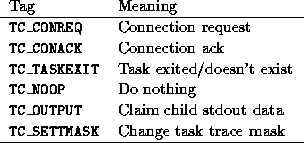
Messages for the pvmd are reassembled from packets in loclinpkt() if from a local task, or in netinpkt() if from another pvmd or foreign task. Reassembled messages are passed to one of three entry points:

If the message tag and contents are valid, a new thread of action is started to handle the request. Invalid messages are discarded.
A resource manager (RM) is a PVM task responsible for making task and host scheduling (placement) decisions. The resource manager interface was introduced in version 3.3. The simple schedulers embedded in the pvmd handle many common conditions, but require the user to explicitly place program components in order to get the maximum efficiency. Using knowledge not available to the pvmds, such as host load averages, a RM can make more informed decisions automatically. For example, when spawning a task, it could pick the host in order to balance the computing load. Or, when reconfiguring the virtual machine, the RM could interact with an external queuing system to allocate a new host.
The number of RMs registered can vary from one for an entire virtual machine to one per pvmd. The RM running on the master host (where the master pvmd runs) manages any slave pvmds that don't have their own RMs. A task connecting anonymously to a virtual machine is assigned the default RM of the pvmd to which it connects. A task spawned from within the system inherits the RM of its parent task.
If a task has a RM assigned to it, service requests from the task to its pvmd are routed to the RM instead. Messages from the following libpvm functions are intercepted:
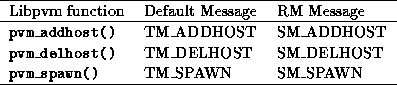
Queries also go to the RM, since it presumably knows more about the state of the virtual machine:
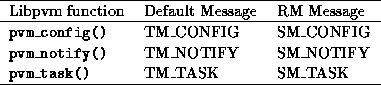
The call to register a task as a RM (pvm_reg_rm()) is also redirected if RM is already running. In this way the existing RM learns of the new one, and can grant or refuse the request to register.
Using messages SM_EXEC and SM_ADD, the RM can directly command the pvmds to start tasks or reconfigure the virtual machine. On receiving acknowledgement for the commands, it replies to the client task. The RM is free to interpret service request parameters in any way it wishes. For example, the architecture class given to pvm_spawn() could be used to distinguish hosts by memory size or CPU speed.
Experience seems to indicate that inherited environment (Unix environ) is useful to an application. For example, environment variables can be used to distinguish a group of related tasks or to set debugging variables.
PVM makes increasing use of environment, and may eventually support it even on machines where the concept is not native. For now, it allows a task to export any part of environ to tasks spawned by it. Setting variable PVM_EXPORT to the names of other variables causes them to be exported through spawn. For example, setting
PVM_EXPORT=DISPLAY:SHELLexports the variables DISPLAY and SHELL to children tasks (and PVM_EXPORT too).
The following environment variables are used by PVM. The user may set these:

The following variables are set by PVM and should not be modified:

Experience seems to indicate that inherited environment (Unix environ) is useful to an application. For example, environment variables can be used to distinguish a group of related tasks or to set debugging variables.
PVM makes increasing use of environment, and may eventually support it even on machines where the concept is not native. For now, it allows a task to export any part of environ to tasks spawned by it. Setting variable PVM_EXPORT to the names of other variables causes them to be exported through spawn. For example, setting
PVM_EXPORT=DISPLAY:SHELLexports the variables DISPLAY and SHELL to children tasks (and PVM_EXPORT too).
The following environment variables are used by PVM. The user may set these:
The following variables are set by PVM and should not be modified:
Each task spawned through PVM has /dev/null opened for stdin. From its parent, it inherits a stdout sink, which is a (TID, code) pair. Output on stdout or stderr is read by the pvmd through a pipe, packed into PVM messages and sent to the TID, with message tag equal to the code. If the output TID is set to zero (the default for a task with no parent), the messages go to the master pvmd, where they are written on its error log.
Children spawned by a task inherit its stdout sink. Before the spawn, the parent can use pvm_setopt() to alter the output TID or code. This doesn't affect where the output of the parent task itself goes. A task may set output TID to one of three settings: the value inherited from its parent, its own TID, or zero. It can set output code only if output TID is set to its own TID. This means that output can't be assigned to an arbitrary task.
Four types of messages are sent to an stdout sink. The message body formats for each type are as follows:
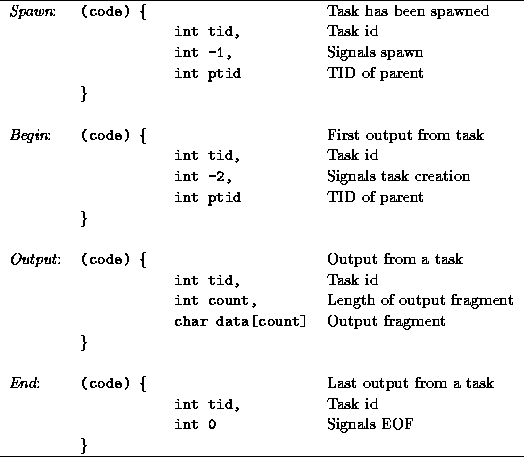
The first two items in the message body are always the task id and output count, which allow the receiver to distinguish between different tasks and the four message types. For each task, one message each of types Spawn, Begin, and End is sent, along with zero or more messages of class Output, (count > 0). Classes Begin, Output and End will be received in order, as they originate from the same source (the pvmd of the target task). Class Spawn originates at the (possibly different) pvmd of the parent task, so it can be received in any order relative to the others. The output sink is expected to understand the different types of messages and use them to know when to stop listening for output from a task (EOF) or group of tasks (global EOF).
The messages are designed so as to prevent race conditions
when a task spawns another task,
then immediately exits.
The
output sink might
get the End
message from the parent task
and decide the group is finished,
only to receive more output later from the child task.
According to these rules, the Spawn
message for the second task
must
arrive before
the End message from the first task.
The Begin message itself is necessary because the Spawn
message for a task may arrive after the End message
for the same task.
The state transitions of a task as observed by the receiver of
the output messages
are shown in
Figure
.
Figure: Output states of a task
The libpvm function pvm_catchout() uses this output collection feature to put the output from children of a task into a file (for example, its own stdout). It sets output TID to its own task id, and the output code to control message TC_OUTPUT. Output from children and grandchildren tasks is collected by the pvmds and sent to the task, where it is received by pvmmctl() and printed by pvmclaimo().